Developer technologies | Transact-SQL
A Microsoft extension to the ANSI SQL language that includes procedural programming, local variables, and various support functions.
This browser is no longer supported.
Upgrade to Microsoft Edge to take advantage of the latest features, security updates, and technical support.
' cx='32' cy='32' r='32' /%3E%3Ctext x='50%25' y='55%25' dominant-baseline='middle' text-anchor='middle' fill='%23FFF' %3EKM%3C/text%3E%3C/svg%3E)
Hi,
I have a table with datetime column like below
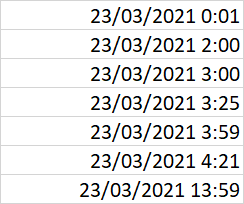
if time is between 1 to 2 then the next column value should be 2.
if time is between 2 to 4 then the next column value should be 4. etc., like below
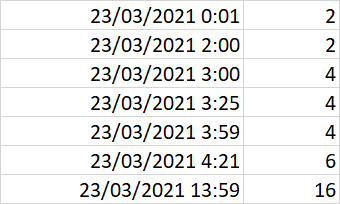
how to achieve this in query
Thanks In Advance
A Microsoft extension to the ANSI SQL language that includes procedural programming, local variables, and various support functions.
Additional SQL Server features and topics not covered by specific categories
Answer accepted by question author

Check this query:
select MyColumn,
    ((datediff(minute, cast(MyColumn as date), MyColumn) - 1) / (2*60) + 1) * 2 as NextColumn
from @MyTable
And maybe clarify the rules.
' cx='32' cy='32' r='32' /%3E%3Ctext x='50%25' y='55%25' dominant-baseline='middle' text-anchor='middle' fill='%23FFF' %3EEM%3C/text%3E%3C/svg%3E)
Hi @kasim mohamed ,
declare @yourtable table(datetimediff char(25))
insert into @yourtable values('23/03/2021 0:01'),('23/03/2021 2:00')
                            ,('23/03/2021 3:00'),('23/03/2021 13:59')

select datetimediff,
case when cast(substring(datetimediff,charindex(':',datetimediff)-2,2) as int)%2<>0 then
cast(substring(datetimediff,charindex(':',datetimediff)-2,2) as int)+1 else
cast(substring(datetimediff,charindex(':',datetimediff)-2,2) as int)+2 end newcolumn
from @yourtable
Regards
Echo
If the answer is helpful, please click "Accept Answer" and upvote it.
Note: Please follow the steps in our [documentation][1] to enable e-mail notifications if you want to receive the related email notification for this thread.