Microsoft 365 and Office | Excel | For business | Windows
A family of Microsoft spreadsheet software with tools for analyzing, charting, and communicating data

This browser is no longer supported.
Upgrade to Microsoft Edge to take advantage of the latest features, security updates, and technical support.
' cx='32' cy='32' r='32' /%3E%3Ctext x='50%25' y='55%25' dominant-baseline='middle' text-anchor='middle' fill='%23FFF' %3EA%3C/text%3E%3C/svg%3E)
Why parts of the data indication are wrong and parts ![81132-data-indication.png][1]are right when we move the mouse to certain point. (As the picture attached) [1]: /api/attachments/81132-data-indication.png?platform=QnA

Hi @家倩 羅 ,
Just checking in to see if the information was helpful. Please let us know if you would like further assistance.
Hi @家倩 羅 ,
Did you create the PivotChart?
I suggest you go to Pivot Table and check the Value number format, make sure the Decimal places is 2:
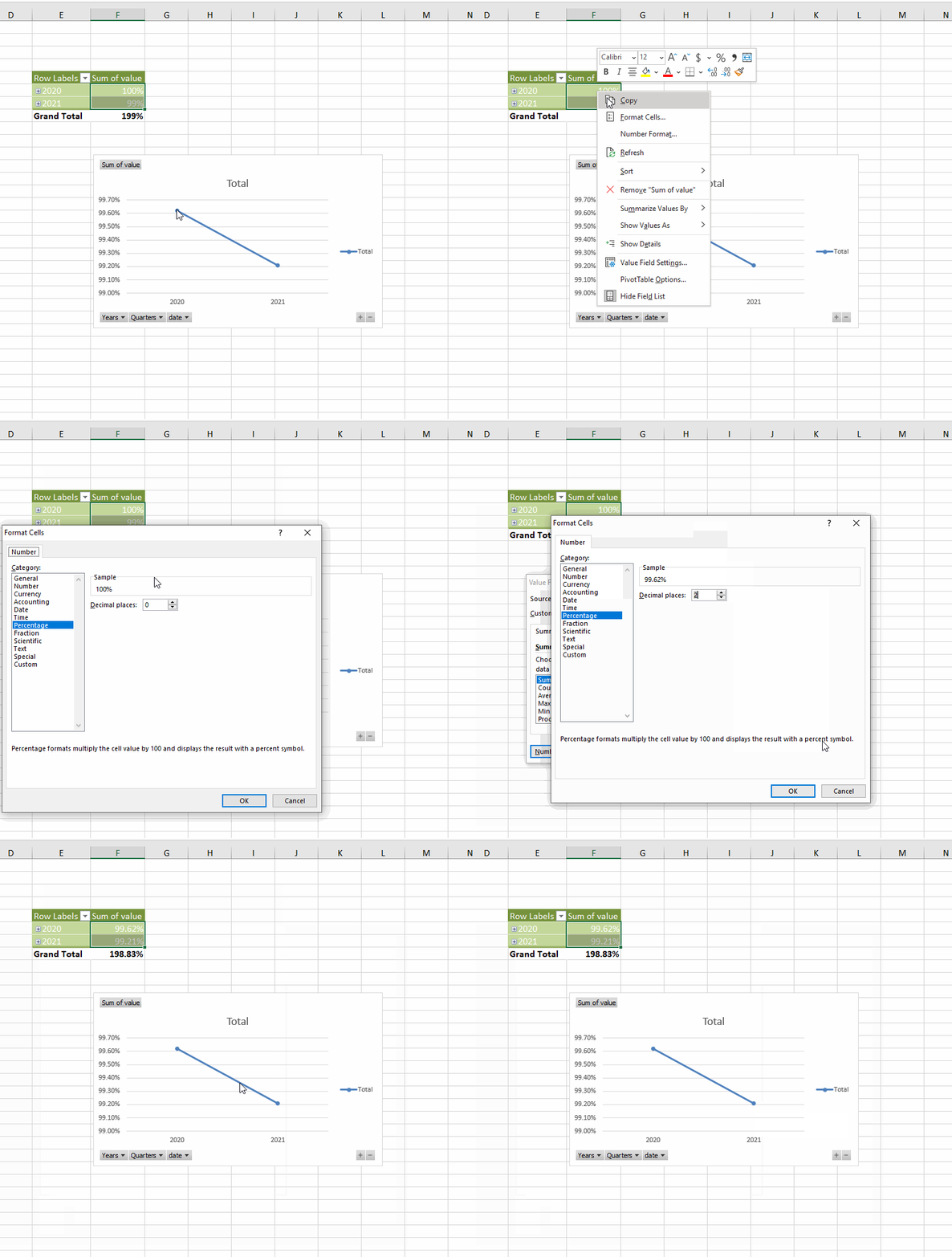
If my understanding is incorrect, please provide more information and I'm glad to help you.
If the response is helpful, please click "Accept Answer" and upvote it.
Note: Please follow the steps in our documentation to enable e-mail notifications if you want to receive the related email notification for this thread.