Microsoft Security | Intune | Enrollment
Registering devices with Intune for management and policy enforcement

This browser is no longer supported.
Upgrade to Microsoft Edge to take advantage of the latest features, security updates, and technical support.
' cx='32' cy='32' r='32' /%3E%3Ctext x='50%25' y='55%25' dominant-baseline='middle' text-anchor='middle' fill='%23FFF' %3EKP%3C/text%3E%3C/svg%3E)
Hi,
I am trying to enroll a internet/intranet connected device to Intune, I tried manually by getting in to settings - access work or school - Connect. Getting the below error
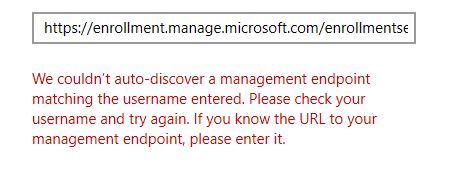
Is this error related to network port communication. Please share your expertise
' cx='32' cy='32' r='32' /%3E%3Ctext x='50%25' y='55%25' dominant-baseline='middle' text-anchor='middle' fill='%23FFF' %3EN%3C/text%3E%3C/svg%3E)
Do you have Azure AD Premium licenses? It is recommended that you set up Automatic enrollment so you don't need to specify a URL. See https://learn.microsoft.com/en-us/mem/intune/enrollment/windows-enroll#enable-windows-10-automatic-enrollment
' cx='32' cy='32' r='32' /%3E%3Ctext x='50%25' y='55%25' dominant-baseline='middle' text-anchor='middle' fill='%23FFF' %3ECM%3C/text%3E%3C/svg%3E)
@karthik palani , From your description, I know we are failed to do Intune enroll manually. If there's any misunderstanding, please let me know.
Firstly, we can cancel the enroll and try to copy the MDM discovery URL from MDM user scope, enter again to see if it is working.
Meanwhile, please check if some DNS related configuration are set in our environment:
https://learn.microsoft.com/en-us/mem/intune/enrollment/windows-enroll#simplify-windows-enrollment-without-azure-ad-premium
In addition, we can also consider windows 10 automatic enrollment which Nick mentioned . It is more convenient.
Hope it can help.
If the response is helpful, please click "Accept Answer" and upvote it.
Note: Please follow the steps in our documentation to enable e-mail notifications if you want to receive the related email notification for this thread.
It was proxy which was blocking the endpoint URL, after opening all the Intune endpoint.
It started working
@karthik palani , Thanks for sharing the solution here. I appreciate it. if there's anything we can discuss together, feel free to post in our Q&A. Thanks and have a nice day!