Microsoft 365 and Office | Excel | For business | Windows
A family of Microsoft spreadsheet software with tools for analyzing, charting, and communicating data

This browser is no longer supported.
Upgrade to Microsoft Edge to take advantage of the latest features, security updates, and technical support.
' cx='32' cy='32' r='32' /%3E%3Ctext x='50%25' y='55%25' dominant-baseline='middle' text-anchor='middle' fill='%23FFF' %3EBL%3C/text%3E%3C/svg%3E)
Where is the "SAVE" icon button in the toolbar? Can't find it... I just want to be ablw to quickly save documents on which I'm working. Thanks!

@Benoit Labonte
Does the "toolbar" you mentioned is the Quick Access Toolbar like following image shown?

I suggest you go to File > Options > Quick Access Toolbar, add ”Save“ to Quick Access Toolbar.
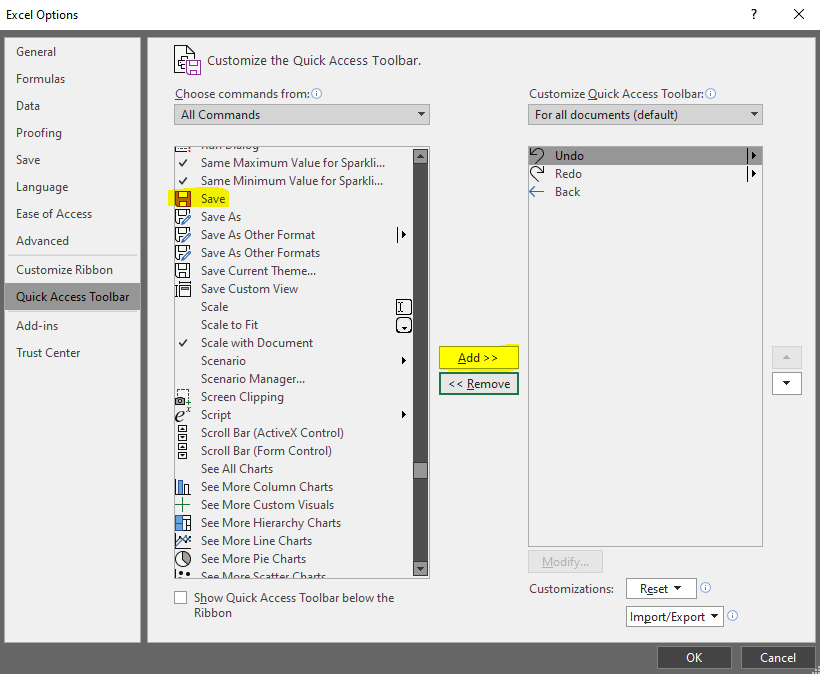
If you are using Microsoft 365 apps on Mac, please refer to "Customize the Ribbon and toolbars in Office for Mac".
Any misunderstanding, please let me know.
If an Answer is helpful, please click "Accept Answer" and upvote it.
Note: Please follow the steps in our documentation to enable e-mail notifications if you want to receive the related email notification for this thread.
@Benoit Labonte
I am checking this thread, is there any update?
If yes, welcom to come back and share with us.
Thank you very much! Was able to fix my problem.