Please let us try to downlead/update the latest version of Microsoft Visual C++ 2019 X64 o your computer
The latest supported Visual C++ downloads
https://support.microsoft.com/en-us/help/297700...
Best regards,
Anthony De Jesus
Independent Advisor
Hello Anthony
I have same issue with a different software (different editor).
Before I do, I delete all folders in "C:\ProgramData\Package Cache".
When I execute VC_redist.x64.exe from
the link you provide
it looks after C:\ProgramData\Package Cache{F1B0FB3A-E0EA-47A6-9383-3650655403B0}v14.16.27024\packages\vcRuntimeMinimum_amd64\
but that path does not exist.
It creates
C:\Users\atreide>dir /s "C:\ProgramData\Package Cache"
16/09/2020 21:42 <DIR> {40d3fee2-b257-46c2-bdc0-cb1088d97327}
16/09/2020 21:42 <DIR> {E493B8F4-E300-43EC-95D0-BDF3711297EA}v14.27.29016
16/09/2020 21:42 <DIR> {F07B1E25-5670-4556-9C7F-5A1966C83269}v14.27.29016
0 fichier(s) 0 octets
Répertoire de C:\ProgramData\Package Cache{40d3fee2-b257-46c2-bdc0-cb1088d97327}
16/09/2020 21:42 884 state.rsm
16/09/2020 21:42 647 704 VC_redist.x64.exe
Répertoire de C:\ProgramData\Package Cache{E493B8F4-E300-43EC-95D0-BDF3711297EA}v14.27.29016\packages\vcRuntimeMinimum_amd64
16/06/2020 10:47 1 534 706 cab1.cab
16/06/2020 10:50 192 512 vc_runtimeMinimum_x64.msi
Répertoire de C:\ProgramData\Package Cache{F07B1E25-5670-4556-9C7F-5A1966C83269}v14.27.29016\packages\vcRuntimeAdditional_amd64
16/06/2020 10:52 5 633 182 cab1.cab
16/06/2020 10:54 184 320 vc_runtimeAdditional_x64.msi
As you see folder "{F1B0FB3A-E0EA-47A6-9383-3650655403B0}v14.16.27024" is not created by VC_redist.x64.exe
When I manually select "C:\ProgramData\Package Cache{E493B8F4-E300-43EC-95D0-BDF3711297EA}v14.27.29016\packages\vcRuntimeMinimum_amd64\vc_runtimeMinimum_x64.msi"
it fails to execute.
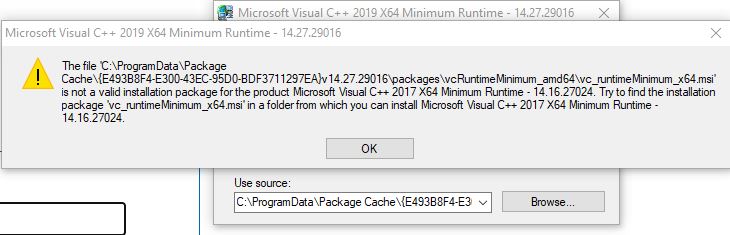
Did anyone successfully installed that redist ?
' cx='32' cy='32' r='32' /%3E%3Ctext x='50%25' y='55%25' dominant-baseline='middle' text-anchor='middle' fill='%23FFF' %3EA%3C/text%3E%3C/svg%3E)
