Azure Databricks
An Apache Spark-based analytics platform optimized for Azure.
This browser is no longer supported.
Upgrade to Microsoft Edge to take advantage of the latest features, security updates, and technical support.
' cx='32' cy='32' r='32' /%3E%3Ctext x='50%25' y='55%25' dominant-baseline='middle' text-anchor='middle' fill='%23FFF' %3ES%3C/text%3E%3C/svg%3E)
Currently the notebook need to use spark.conf.set to set storage account password .
like
spark.conf.set("fs.azure.account.auth.type.**************************dfs.core.windows.net", "OAuth")
spark.conf.set("fs.azure.account.oauth.provider.type..**************************.dfs.core.windows.net", "org.apache.hadoop.fs.azurebfs.oauth2.ClientCredsTokenProvider")
spark.conf.set("fs.azure.account.oauth2.client.id..**************************.dfs.core.windows.net", ".**************************")
spark.conf.set("fs.azure.account.oauth2.client.secret..**************************.dfs.core.windows.net", dbutils.secrets.get(scope=".**************************",key=".**************************"))
spark.conf.set("fs.azure.account.oauth2.client.endpoint..**************************.dfs.core.windows.net", "https://login.microsoftonline.com/.**************************/oauth2/token")j
how to include in during spark cluster startup as a global config ?
' cx='32' cy='32' r='32' /%3E%3Ctext x='50%25' y='55%25' dominant-baseline='middle' text-anchor='middle' fill='%23FFF' %3ESS%3C/text%3E%3C/svg%3E)
@sakuraime Thanks for using Microsoft Q&A !!
I do not think you can use spark.conf.set in global config files. Can you please clarify more what exactly you to achieve with by setting this at cluster level ? If my understanding is correct and if you want your storage account to be available for all users in the databricks workspace then you can plan to create a storage mount point to a specific container path. Please refer to the Mount ADLS Gen2 storage documentation for detailed steps. Thanks.
@sakuraime Did you get a chance to look into my previous response.
@sakuraime I have not heard back from you. Did my answer solve your issue? If not, please let me know how I may better assist.
can't include it in any init script upon the cluster startup ?

Here are the steps to access secrets in databricks initscript:
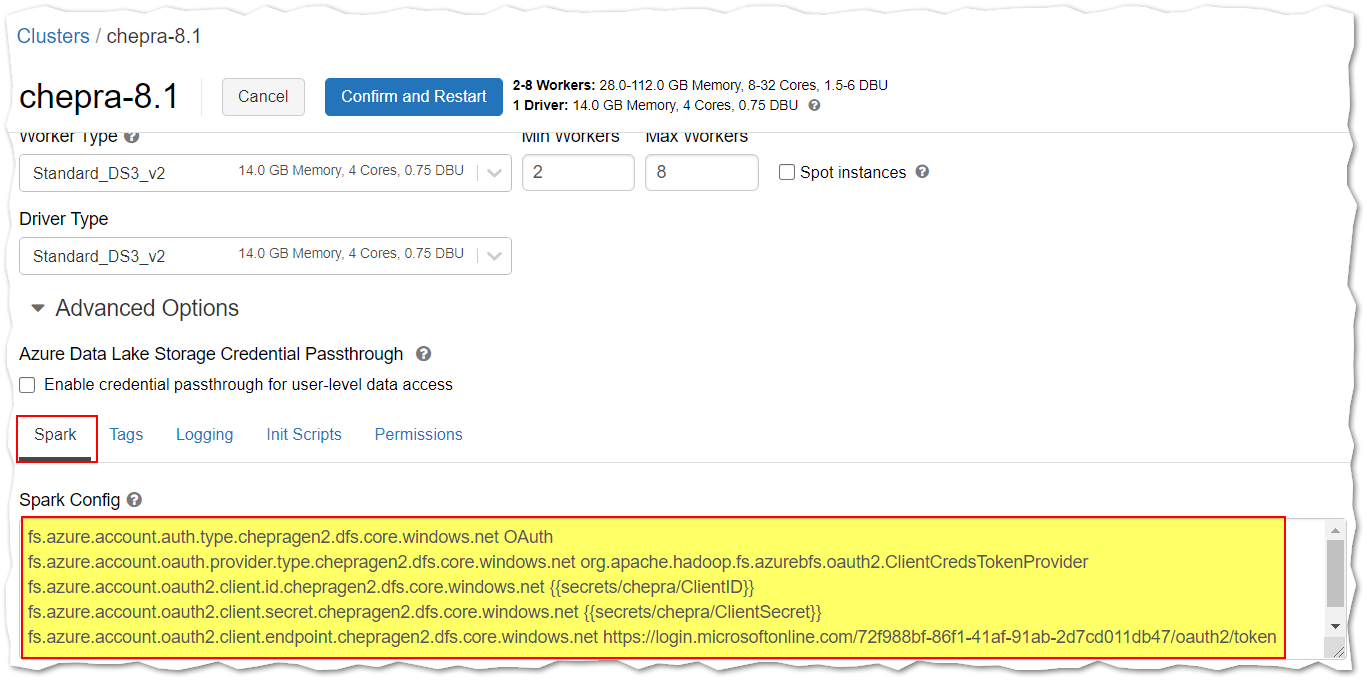
Sample ini code:
fs.azure.account.auth.type.chepragen2.dfs.core.windows.net OAuth
fs.azure.account.oauth.provider.type.chepragen2.dfs.core.windows.net org.apache.hadoop.fs.azurebfs.oauth2.ClientCredsTokenProvider
fs.azure.account.oauth2.client.id.chepragen2.dfs.core.windows.net {{secrets/chepra/ClientID}}
fs.azure.account.oauth2.client.secret.chepragen2.dfs.core.windows.net {{secrets/chepra/ClientSecret}}
fs.azure.account.oauth2.client.endpoint.chepragen2.dfs.core.windows.net https://login.microsoftonline.com/72f988bf-86f1-41af-91ab-2d7cd011db47/oauth2/token
For more details, refer Azure Databricks - configure the cluster to read secrets from the secret scope.
Hope this helps. Do let us know if you any further queries.
------------
Please don’t forget to Accept Answer and Up-Vote wherever the information provided helps you, this can be beneficial to other community members.
cool... let me have a try
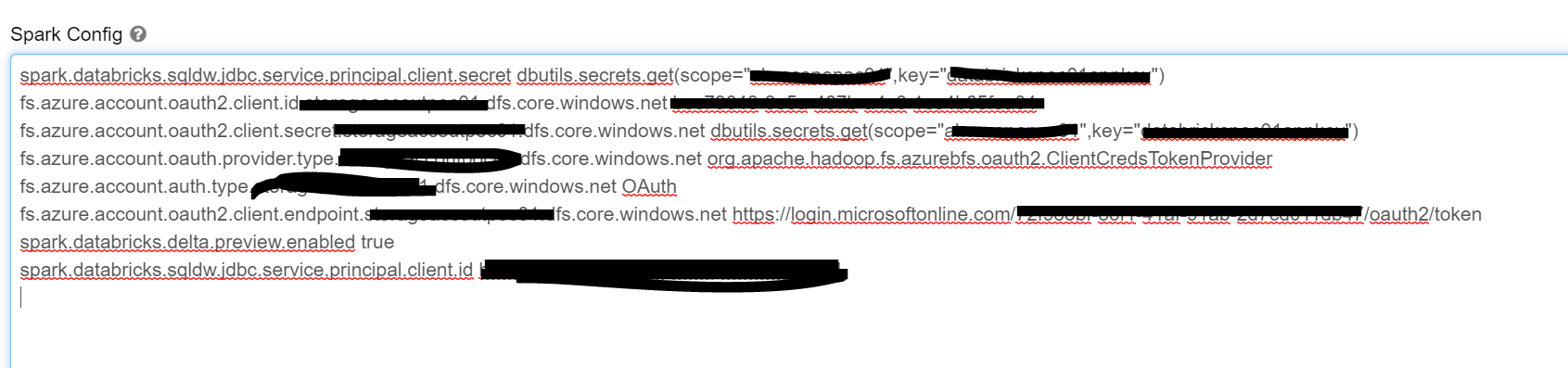
actually my secret are in keyvault , and I have link databricks to that keyvault. , and I am getting the get dbutils.secrets.get........
however ..
it says

Hi @sakuraime ,
Yes, the above instructions uses secrets are in Azure keyvault.
Sample ini code:
fs.azure.account.auth.type.chepragen2.dfs.core.windows.net OAuth
fs.azure.account.oauth.provider.type.chepragen2.dfs.core.windows.net org.apache.hadoop.fs.azurebfs.oauth2.ClientCredsTokenProvider
fs.azure.account.oauth2.client.id.chepragen2.dfs.core.windows.net {<!-- -->{secrets/KeyVaultName/ClientID}}
fs.azure.account.oauth2.client.secret.chepragen2.dfs.core.windows.net {<!-- -->{secrets/KeyVaultName/ClientSecret}}
fs.azure.account.oauth2.client.endpoint.chepragen2.dfs.core.windows.net https://login.microsoftonline.com/<Directory_ID>/oauth2/token
Hope this helps. Do let us know if you any further queries.
Hi @sakuraime ,
Just checking in to see if the above answer helped. If this answers your query, do click Accept Answer and Up-Vote for the same. And, if you have any further query do let us know.
Hi @sakuraime ,
Following up to see if the above suggestion was helpful. And, if you have any further query do let us know.
Take care & stay safe!
' cx='32' cy='32' r='32' /%3E%3Ctext x='50%25' y='55%25' dominant-baseline='middle' text-anchor='middle' fill='%23FFF' %3EAK%3C/text%3E%3C/svg%3E)
Hi @PRADEEPCHEEKATLA , I have used the same configuration as mentioned above and getting the following error. Could you please help.
The configuration is working fine when I give the application id and secret value directly (not from key vault)
key-vault : it is the secret scope created in the workspace.
