Developer technologies | Transact-SQL
A Microsoft extension to the ANSI SQL language that includes procedural programming, local variables, and various support functions.
This browser is no longer supported.
Upgrade to Microsoft Edge to take advantage of the latest features, security updates, and technical support.
' cx='32' cy='32' r='32' /%3E%3Ctext x='50%25' y='55%25' dominant-baseline='middle' text-anchor='middle' fill='%23FFF' %3EMJ%3C/text%3E%3C/svg%3E)
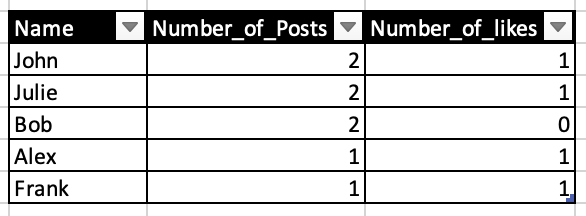
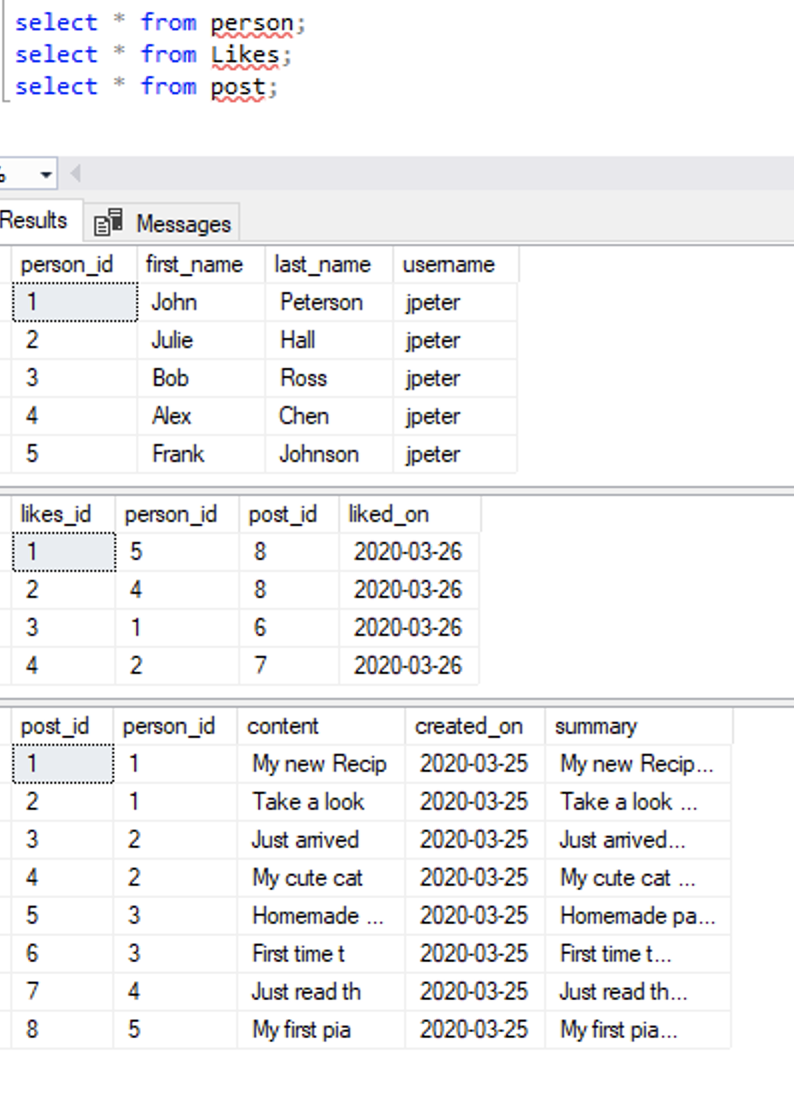
Hi, Looking for your help on the SQL JOIN, basically we want to List down the first_names with total number of posts and total number of likes in a single table of below tables in the screenshot? I've tried couple of joins and methods but unable to come to a single table with accurate number of count, especially because post#8 were liked by Alex and Frank both and when i use GROUP by, it always show the wrong count.

So I replace Number_of_posts with Number_of_likes in the second subquery (which technically is known as a derived table), I seem to get the expected result:
SELECT pn.First_name, isnull(ps.Number_of_posts, 0) AS Number_of_posts,
           isnull(l.Number_of_likes, 0) AS Number_of_likes
    FROM   person pn
    LEFT   JOIN   (SELECT person_id, COUNT(*) AS Number_of_posts
                   FROM   posts
                   GROUP  BY person_id) AS ps ON ps.person_id = pn.person_id
    LEFT    JOIN   (SELECT person_id, COUNT(*) AS Number_of_posts
                    FROM   likes
                    GROUP  BY person_id) AS l ON l.person_id = pn.person_id

Hi @MOHIT JAIN ,
Welcome to Microsoft Q&A!
You could refer Erland's query which you could get expected output.
Please also refer below which replace the 'count(...) group by...' with 'count(...) over (partition by ...)':
SELECT distinct a.first_name
,isnull(b.Number_of_posts,0) Number_of_posts
,isnull(c.Number_of_likes,0) Number_of_likes
FROM person a
left join
(SELECT  person_id, COUNT(post_id) over (partition by person_id) AS Number_of_posts
FROM   Post) b on a.person_id=b.person_id
left join
(SELECT person_id, COUNT(likes_id) over (partition by person_id) AS Number_of_likes
FROM   likes) c on a.person_id=c.person_id
Output:
first_name	Number_of_posts	Number_of_likes
Alex	1	1
Bob	2	0
Frank	1	1
John	2	1
Julie	2	1
Best regards
Melissa
If the answer is helpful, please click "Accept Answer" and upvote it.
Note: Please follow the steps in our documentation to enable e-mail notifications if you want to receive the related email notification for this thread.
SELECT pn.First_name, isnull(ps.Number_of_posts, 0) AS Number_of_posts,
       isnull(l.Number_of_likes, 0) AS Number_of_likes
FROM   person pn
LEFT   JOIN   (SELECT person_id, COUNT(*) AS Number_of_posts
               FROM   posts
               GROUP  BY person_id) AS ps ON ps.person_id = pn.person_id
LEFT    JOIN   (SELECT person_id, COUNT(*) AS Number_of_posts
                FROM   likes
                GROUP  BY person_id) AS l ON l.person_id = pn.person_id
Note: this is untested solution. Had you posted your data as CREATE TABLE + INSERT statements, I would have tested the solution.
"This pile has been deleted".
It would be simpler to just include the statements in the post.
Then again, did you try my query?
Hi, thanks for your response!
It exceeded 1000 character limit, hence posted the cmds elsewhere.
And yes i tried executing the query but it gives column doesn't exists!

Seems like there is a fairly trivial error in the second left join. I mean, it can't hurt if you try to figure that out on your own. You may even learn more that way.
Thanks, i've tried everything but it just gives me more rows and wrong count. I'll be really appreciate if you can provide the working query! Thanks!
A working query out of thin air?
Again: CREATE TABLE + INSERT for the sample data.
My bad, apologies, here it is:
or