Microsoft 365 and Office | Access | Development
The creation and customization of database applications using Microsoft Access

This browser is no longer supported.
Upgrade to Microsoft Edge to take advantage of the latest features, security updates, and technical support.
' cx='32' cy='32' r='32' /%3E%3Ctext x='50%25' y='55%25' dominant-baseline='middle' text-anchor='middle' fill='%23FFF' %3EJ%3C/text%3E%3C/svg%3E)
I have the following code snippet:
Sub Sort_Those_Subcategories()
Set db = CurrentDb
Set frmX = New Form_Categories
Set rx = db.OpenRecordset("Precategorized", dbOpenDynaset)
Dim Ctx As Long
Ctx = 1
Do Until rx.EOF
    If frmX.Category.Value = rx.Fields(0).Value Then
        rx.MoveNext
        frmX.chdSubCat.Controls![Sub Category Number] = Ctx
        frmX.chdSubCat.Controls![Sub Category] = rx.Fields(0).Value
        frmX.chdSubCat.Controls![Category Number] = frmX.Category_Number.Value
        Ctx = Ctx + 1
    End If
    rx.MoveNext
Loop

frmX.Refresh
frmX.Requery
rx.Close


End Sub
..and here is the screenshot:
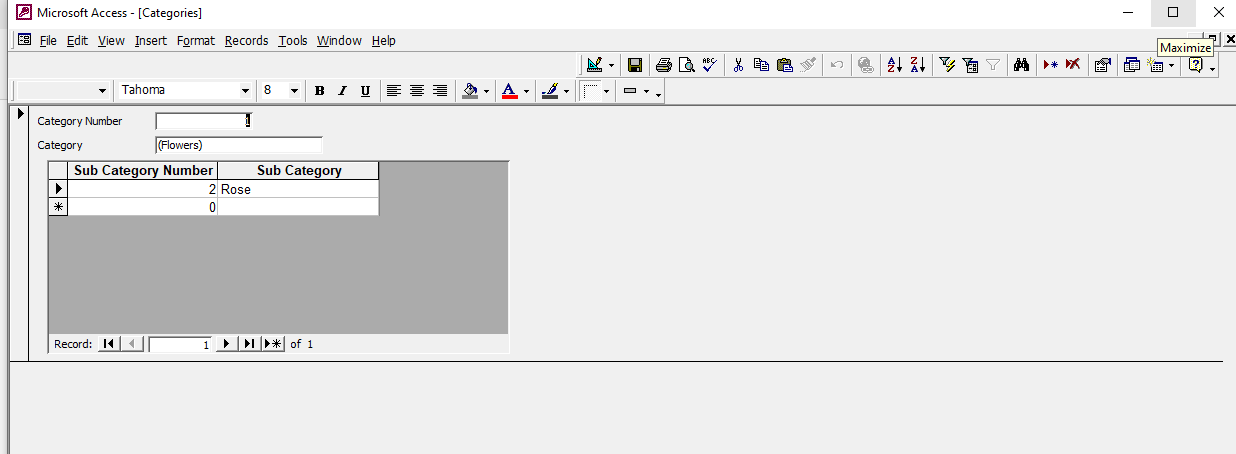
I want to improve or fix this source code snippet above, but I just don't know how.
Should I use the Seek or Find method of the DoCmd object, and add it to my code snippet?
Regards,
JohnCTX