Developer technologies | .NET | Xamarin
A Microsoft framework for building cross-platform mobile apps using .NET and C# with native performance and user interfaces.
This browser is no longer supported.
Upgrade to Microsoft Edge to take advantage of the latest features, security updates, and technical support.
' cx='32' cy='32' r='32' /%3E%3Ctext x='50%25' y='55%25' dominant-baseline='middle' text-anchor='middle' fill='%23FFF' %3EMP%3C/text%3E%3C/svg%3E)
I had to set the target framework to Android 10 and Visual Studio made me install the Xamarin.AndroidX.AppCompat.AppCompatResources package.
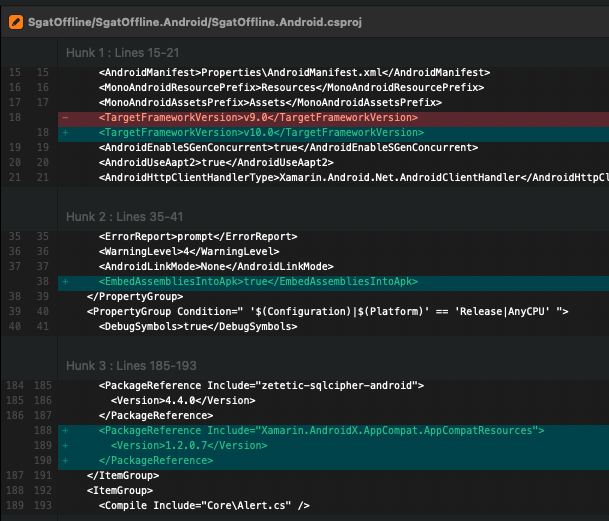
Now the application does not start anymore and I am given this error directly from Visual Studio.

I am using XF version 4.8.0.1560 and cannot update it at the moment.
Prior to add this package all works fine.
How do I fix this?
Thanks.
EDIT:
Here the full Android app.
' cx='32' cy='32' r='32' /%3E%3Ctext x='50%25' y='55%25' dominant-baseline='middle' text-anchor='middle' fill='%23FFF' %3EM%3C/text%3E%3C/svg%3E)
Do you have MainLauncher=true on an activity class?
Have you cleaned and rebuilt? Or deleted bin/obj and built again?
Did you "Migrate to AndroidX"?

Hello,
Welcome to our Microsoft Q&A platform!
You can recheck if you have set the MainLauncher property for your activity ( MainLauncher=true), for example:
    [Activity (Label="Awesome Demo App", MainLauncher=true)]
    public class MainActivity : Activity
   {
   }
I had to set the target framework to Android 10 and Visual Studio made me install the Xamarin.AndroidX.AppCompat.AppCompatResources package.
Android projects built with Xamarin.Forms 5.0 require that you've installed the AndroidX (Android 10.0) platform to your development environment.
This can be accomplished with the Android SDK manager. For more information about AndroidX, see AndroidX migration in Xamarin.Forms.
Android projects will then require several updates to build correctly.
1.Minimum TargetFrameworkVersion
Xamarin.Forms 5.0 requires a minimum target framework version of 10.0 (AndroidX) for Android projects. The target framework version can be set in Visual Studio, or in the Android .csproj file:
<TargetFrameworkVersion>v10.0</TargetFrameworkVersion>
2.Minimum TargetSDKVersion
AndroidX requires that your Android manifest sets the targetSdkVersion to 29+:
<uses-sdk android:minSdkVersion="21" android:targetSdkVersion="29" />
For more details, you can check: https://learn.microsoft.com/en-us/xamarin/xamarin-forms/troubleshooting/questions/forms5-migration
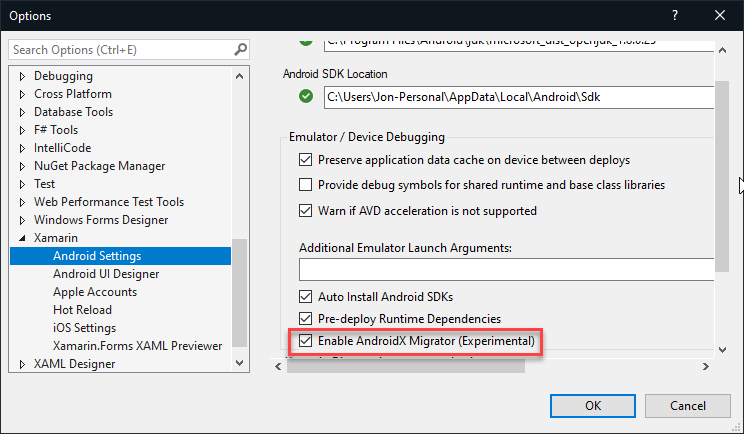
You can use the Migration Tooling to achieve this.
You can enable the AndroidX Migrator via Tools > Options > Xamarin > Android Settings inside Visual Studio 2019 (you can skip this step on Visual Studio for Mac).
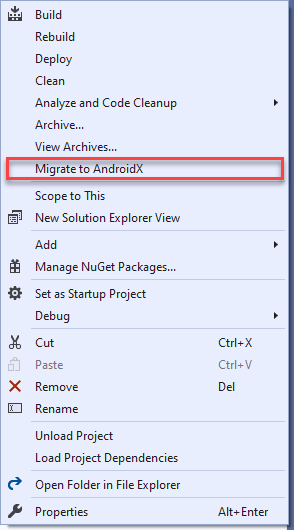
Right-click your project and Migrate to AndroidX.
For more details, please check: https://learn.microsoft.com/en-us/xamarin/android/platform/androidx#migration-tooling
Update:
I have redone the entire procedure and this new error is appeared.
For the new problem, you can try the following steps:
1.update packages to latest with legacy Android.Support (28.0.0.3) + build
2.add Xamarin.AndroidX.Migration + rebuild
You can refer to this issue: https://github.com/xamarin/AndroidX/issues/4
Best Regards,
Jessie Zhang
If the response is helpful, please click "Accept Answer" and upvote it.
Note: Please follow the steps in our documentation to enable e-mail notifications if you want to receive the related email notification for this thread.
Hi all and thank you for the replies!
Do you have MainLauncher=true on an activity class?
Yes, I have two activity classes, one for splashscreen one for the main activity and the MainLauncher=true is set only on the splashscreen's one.
Have you cleaned and rebuilt? Or deleted bin/obj and built again?
Yes, but nothing is changed
Did you "Migrate to AndroidX"?
No, I have not done this operation, but as suggested also by @JessieZhang-MSFT I'll try this way.
Waitting for your good news!
I've done the upgrade but now the compiler give me this error
/Library/Frameworks/Mono.framework/External/xbuild/Xamarin/Android/Xamarin.Android.Aapt2.targets(3,3): Error APT2260: resource style/Theme.MaterialComponents.DayNight.DarkActionBar (aka <AppName>]:style/Theme.MaterialComponents.DayNight.DarkActionBar) not found. (APT2260)
Are you referencing that resource somewhere in your project? Search for "DarkActionBar" in VS to see where you might be calling/referencing that. If you are referencing that style, and not defining it, you will get that error.
In particular, do you have that defined in your styles.xml?
When we migrate to androidx, something usually goes wrong, and we need to fix some code manually. For this problem , you can try to check if you have defined the DarkActionBar in your code.
Hi,
thank you all!
Here my style.xml file.
EDIT: I have redone the entire procedure and this new error is appeared :(

I have updated the answer, you can check the updated part at the bottom of my answer.
Thank you but the "No launchable activity found" issue still persist.
I had to update all the Android. packages and the popup with the message "No launchable activity found" is still present.

Could you please post a basic demo to github or onedriver so that we can test on our side?
I have added to the main post the full Android application.
Thank you.
Hi @Matteo Pozzato , is the demo you posted the latest?When I tested on our side ,there are some other problems not the problem you mentioned.
Hi @JessieZhang-MSFT , yes it is the latest version.
The problem is the one written in the main post, the message from Visual studio "No launchable activity found". Is that problem that I need to solve :(
Video with the problem --> https://we.tl/t-i12jWJm0uz
I created a new simple demo, and created page SplashActivity and MainActivity based on your demo, but it works properly. You can try to create a new app and copy your code to the new one step by step. Creating new apps is also a common way to solve problems.
Hi, thank you.
I have created a new application that target Android 11 and now the initial issue seems gone, but now I can't copy the DB inside the working directory.
The DB is in the download folder and this is the error message:
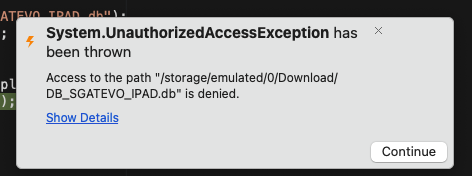
I'm using this code to copy it
var pathDownload = Android.OS.Environment.GetExternalStoragePublicDirectory(Android.OS.Environment.DirectoryDownloads).AbsolutePath;
   pathDownload = Path.Combine(pathDownload, "myDB.db");
   var esiste = System.IO.File.Exists(pathDownload);
   if (esiste)
   {
       var pathFolder = MainActivity.AppInstance.ApplicationContext.GetExternalFilesDir("").AbsolutePath;
       System.IO.File.Copy(pathDownload, pathFolder);
   }
And I have granted this permissions:
READ_EXTERNAL_STORAGE
WRITE_EXTERNAL_STORAGE
MANAGE_EXTERNAL_STORAGE
Also the GetExternalStoragePublicDirectory is deprecated..
Hi @Matteo Pozzato ,one problem, one thread. You can create a new thread for the new problem. We are all willing to help you.
' cx='32' cy='32' r='32' /%3E%3Ctext x='50%25' y='55%25' dominant-baseline='middle' text-anchor='middle' fill='%23FFF' %3ET%3C/text%3E%3C/svg%3E)
Creating new apps is also a common way to solve problems?? If I had to do that for every obscure issue I run into with the Microsoft dev stack I would never be able to deploy.
Looking at the AndoidManifest.xml there is 2 application nodes that is most likely the cause of the issue, there can only be 1.