Developer technologies | VB
An object-oriented programming language developed by Microsoft that can be used in .NET.
This browser is no longer supported.
Upgrade to Microsoft Edge to take advantage of the latest features, security updates, and technical support.
' cx='32' cy='32' r='32' /%3E%3Ctext x='50%25' y='55%25' dominant-baseline='middle' text-anchor='middle' fill='%23FFF' %3ESG%3C/text%3E%3C/svg%3E)
Hi,
I am trying to Create a Windows Forms application from the command line and for that I am following the steps outlined in the MSDN documentation: how-to-create-a-windows-forms-application-from-the-command-line
The steps I did as per the documentation are as follows:
However for some reason my VB code editor is not giving me the option to import the Windows.Forms namespace. See pic below.
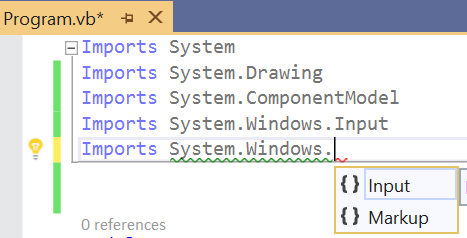
Also when I forcefully type it out I get the following warning message with a green squiggly line (see the second pic below). Can anyone pls tell me where I am going wrong?

The MSDN link as the next steps ask me to write the following piece of code: Public Class Form1: Inherits Form . Unless I include the Windows.Forms namespace the above code piece is giving me an error. So could anyone pls point out where I am going wrong?
Also, I do understand that there are easier methods to create a WinForms APP using VB. But for the sake of comprehensive understanding, I want to know why I am not getting the desired output even when I follow the steps outlined in the documentation? So any help would be much appreciated.
' cx='32' cy='32' r='32' /%3E%3Ctext x='50%25' y='55%25' dominant-baseline='middle' text-anchor='middle' fill='%23FFF' %3EMT%3C/text%3E%3C/svg%3E)
If you're going to use Visual Studio to write your code then there is no reason to follow the step for doing it from the command line. VS already handles all this. The steps are for those folks who don't want to use, or cannot use, the IDE.
The problem you are running into is that the IDE provides intellisense and background compilation to guide you down the path of success. But that requires that you are actually using the IDE for what it was designed for. In your specific case it appears that you simply opened the VB file in the editor. Because you aren't providing any of the contextual information the IDE needs to help you along it is going to flag everything with warnings and errors. Since you aren't using any of the editor features of the IDE you can ignore all of them. Some may be valid and some may not but the IDE won't be able to tell the difference. However you might as well just use Notepad++ or similar text editor instead since you're wasting your time loading up the IDE just to edit a text file.
After you've typed in all the code (again completely ignoring all the warnings and errors the IDE is giving you) then you can compile the code from the command line to see what is actually wrong. Since the IDE has no context it isn't going to be able to sync up to this. You'll then have to switch back to the IDE and fix the errors one by one, returning to the command line and recompiling after each change to get the updated list of issues. The IDE will unlikely never get to the point where it doesn't flag your code with errors/warnings because it doesn't have the context it needs.
The recommended approach is to create the project in VS. You'll then have the full power of the IDE to help you. This includes the background compilation that will tell you quickly when things are wrong, quick actions to fix your code and resolve common errors like unresolved identifiers, ability to auto-import references and namespaces (which you have to do by hand otherwise), etc. There really is no reason not to use the IDE if you have it installed.
To migrate over to using the IDE you will want to open VS and then create a new project (Windows Forms App (.NET Framework) and ensure the selected language is VB. It'll auto generate all the code that was listed in the instructions you were following. After that you'll notice all the errors will be resolved in the IDE. At that point you can compile from the IDE (or command line) and it should be fine. As you continue adding code the IDE will properly reflect compiler errors/warnings and offer to help you fix errors as you go along.
Thank you for the detailed answer.

- Created a Console App (.net core) new VB project
Use a .NET Framework Console project instead
then
add a Reference to
System.Windows.Forms.dll
Hello,
Thanks. It works.
' cx='32' cy='32' r='32' /%3E%3Ctext x='50%25' y='55%25' dominant-baseline='middle' text-anchor='middle' fill='%23FFF' %3EXZ%3C/text%3E%3C/svg%3E)
Hi @Sougata Ghosh ,
If you want to use winform in .net core, you need to install the latest version of Visual Studio 2019.
Here's a reference you can refer to.
Windows Forms Designer for .NET Core Released
Hope it could be helpful.
Best Regards,
Xingyu Zhao
*
If the answer is helpful, please click "Accept Answer" and upvote it.
Note: Please follow the steps in our documentation to enable e-mail notifications if you want to receive the related email notification for this thread.