Powershell Get-Printer

Francesco S. Tremamunno 41 Reputation points
2021-04-02T09:03:20.637+00:00

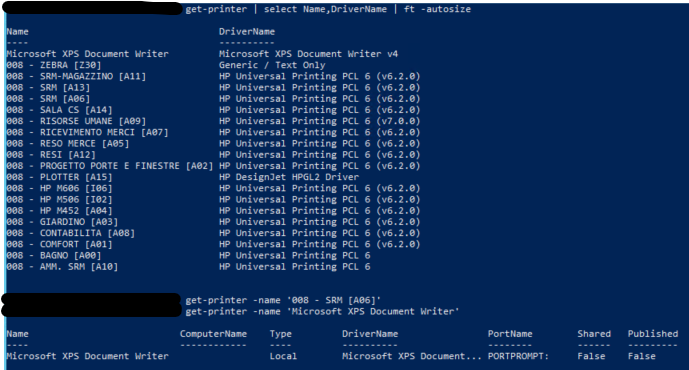
I'm wondering why, if I use in powershell the command Get-Printer I get all the printers installed on server, but if I use Get-Printer -name '008 - SRM [A06]', I get nothing.
But if I use the same command on 'Microsoft XPS Document Writer' all the details appear.
84004-image.png

Therefore I suppose that this error is preventing me from updating massivily the printer drivers.

Windows for business | Windows Server | User experience | PowerShell
{count} votes

Answer accepted by question author
  1. Anonymous
    2021-04-02T09:57:38.76+00:00

    Hi,

    You have to prepend the escape character to the square brackets.

    Get-Printer -name '008 - SRM `[A06`]'  
    

    Best Regards,
    Ian Xue

    ============================================

    If the Answer is helpful, please click "Accept Answer" and upvote it.
    Note: Please follow the steps in our documentation to enable e-mail notifications if you want to receive the related email notification for this thread.

    1 person found this answer helpful.
    0 comments No comments

1 additional answer

Sort by: Most helpful
  1. Francesco S. Tremamunno 41 Reputation points
    2021-04-07T06:24:44.72+00:00

    Sorry for the late reply, I've been off for some days.
    It's working.
    I can get all the information I need and update drivers as well.

    0 comments No comments

Your answer

Answers can be marked as 'Accepted' by the question author and 'Recommended' by moderators, which helps users know the answer solved the author's problem.