Microsoft 365 and Office | Excel | For business | Windows
A family of Microsoft spreadsheet software with tools for analyzing, charting, and communicating data

This browser is no longer supported.
Upgrade to Microsoft Edge to take advantage of the latest features, security updates, and technical support.
' cx='32' cy='32' r='32' /%3E%3Ctext x='50%25' y='55%25' dominant-baseline='middle' text-anchor='middle' fill='%23FFF' %3EMD%3C/text%3E%3C/svg%3E)
Container exited unexpectedly with code 0xFFFFFFFF. PID: 27244. Used features: (none)

Based on your description, this issue is related with Excel. I helped you change the tag to the correct one.

Are you using Power Query?
It's recommended to go to Data tab > Query Options > Data Load > Clear Cache, after this step please check issue again.
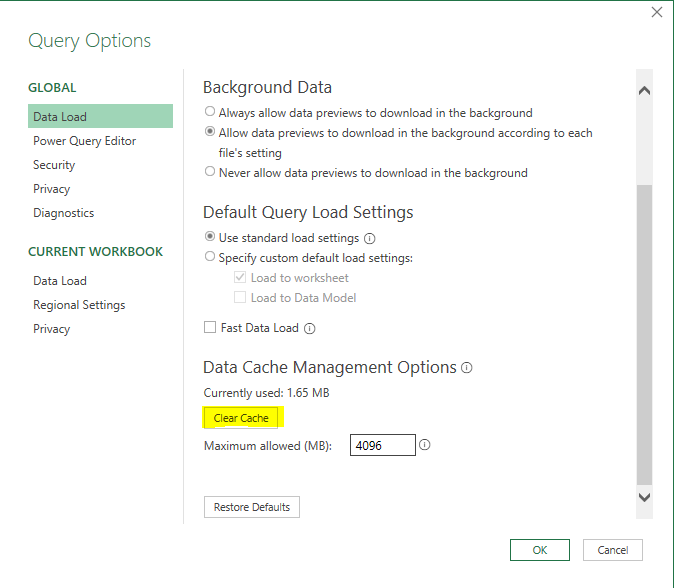
Which type of data do you import into Excel?
Such as file, database.
Please check whether this issue occurs with all data source or just specific data source.
Please go to Excel > File > Account > Product Information, check the version number and product name for Office, and share the information with us.
If an Answer is helpful, please click "Accept Answer" and upvote it.
Note: Please follow the steps in our documentation to enable e-mail notifications if you want to receive the related email notification for this thread.
@MAYANK DUGAR
If you have a chance, please check whether my reply is helpful.
Any updates you may post back.