Developer technologies | Windows Presentation Foundation
A part of the .NET Framework that provides a unified programming model for building line-of-business desktop applications on Windows.
This browser is no longer supported.
Upgrade to Microsoft Edge to take advantage of the latest features, security updates, and technical support.
' cx='32' cy='32' r='32' /%3E%3Ctext x='50%25' y='55%25' dominant-baseline='middle' text-anchor='middle' fill='%23FFF' %3ES%3C/text%3E%3C/svg%3E)
Hello there, I'm trying to adapt this script:
https://blog.ctglobalservices.com/powershell/kaj/powershell-wpf-treeview-example/
to something that browses the ADUC and pick an OU DN. Everywhere on the Internet has been done with Winforms but I don't want to use that. I've reached a point where I see content in the TreeView but it is shown all at once on one line rather than in hierarchical form and if I expand an item it collapses by showing the same content again as duplicated. The expected result is that it should display the OUs in hierarchical tree order. Any hint or any knowledge I should look up to? C# is not an option on this project, only PS and WPF. Many thanks!
here below the code and:
 $query = Get-ADOrganizationalUnit -LDAPFilter '(name=*)' -SearchBase $domainDN -SearchScope 2

 foreach($item in $query){
     Add-OUItem -Name $Item.Name -Parent $TreeItem -Tag $domainPath
  }
       if($_.OriginalSource -is [System.Windows.Controls.TreeViewItem]){
         $TreeItem = $_.OriginalSource
         $TreeItem.items.clear()
         Get-DomainOU -domainPath $TreeItem.Tag -TreeItem $TreeItem
         Write-Host $TreeView
       }
  }
        $Tree.AddHandler([System.Windows.Controls.TreeViewItem]::ExpandedEvent,$Event)
 })
A part of the .NET Framework that provides a unified programming model for building line-of-business desktop applications on Windows.

Hi,
at first you must assign $Tree.
Thanks! It's being used here:
# Operations
foreach($item in (Get-ADOrganizationalUnit -LDAPFilter '(name=*)' -SearchBase $globalAD -SearchScope 2)){
    Add-OUItem -Name $item.Name -Parent $Tree -Tag "Root"
}
or maybe I didn't catch what your suggestion is...
Answer accepted by question author
Hi,
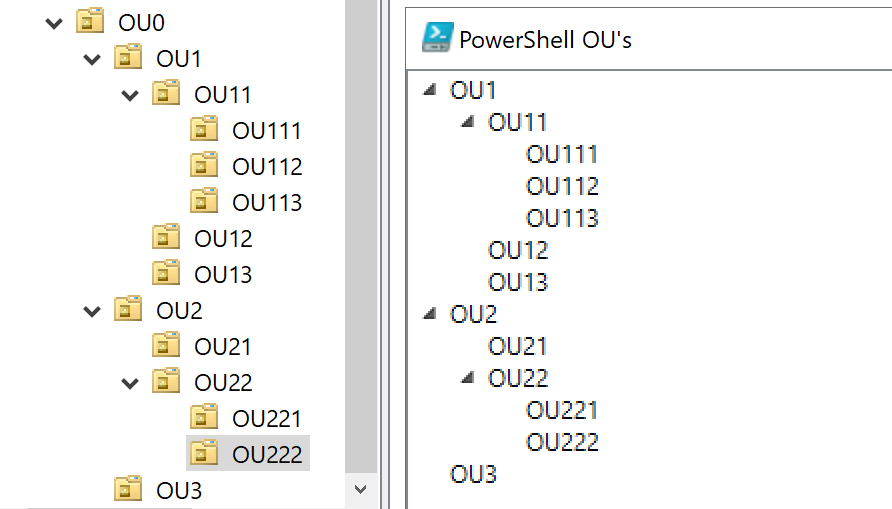
if you want see only OU try following demo:
 # Load the Assemblies for the GUI and modules
 Add-Type -AssemblyName PresentationFramework
 Import-Module ActiveDirectory

[XML]$xamlWindow = @'
<Window
        xmlns="http://schemas.microsoft.com/winfx/2006/xaml/presentation"
        xmlns:x="http://schemas.microsoft.com/winfx/2006/xaml"
        Title="PowerShell OU's" Height="400" Width="400">
    <Grid>
        <TreeView Name="Tree"/>
    </Grid>
</Window>
'@

 $xamlReader  = (New-Object System.Xml.XmlNodeReader $xamlWindow)
 try{
     $MainForm=[Windows.Markup.XamlReader]::Load( $xamlReader )
 }catch{
 Write-Host "Unable to load Windows.Markup.XamlReader. Some problem is there. Please check the XAML code entered."
 exit
 }

 $Tree = $MainForm.FindName('Tree')

 $domainDN = 'OU=OU0,DC=lg,DC=loc'

 # Functions
 Function Add-OUItem ($Name, $Parent, $Tag) {
     #Add new TreeViewItem
     $ChildItem = New-Object System.Windows.Controls.TreeViewItem
     $ChildItem.Header = $Name
     $ChildItem.Name = ""
     $ChildItem.Tag = "OU=$Name," + $Tag
     [Void]$ChildItem.Items.Add("*")
     [Void]$Parent.Items.Add($ChildItem)
 }

 Function Get-DomainOU ($domainPath, $TreeItem){

     $sb = $domainPath + $domainDN

     $query = Get-ADOrganizationalUnit -SearchBase $sb -LDAPFilter '(name=*)' -SearchScope 1
     foreach($item in $query)
     {
         if($TreeItem.Header -ne $Item.Name)
         {
            if($Item.ObjectClass -eq 'organizationalUnit')
            {Add-OUItem -Name $Item.Name -Parent $TreeItem -Tag $domainPath}
         }
     }
 }

 # Operations
  foreach($item in (Get-ADOrganizationalUnit -LDAPFilter '(name=*)' -SearchBase $domainDN -SearchScope 1)){
     Add-OUItem -Name $item.Name -Parent $Tree -Tag ""
 }

 $MainForm.Add_SourceInitialized({
         [System.Windows.RoutedEventHandler]$Event = {

           if($_.OriginalSource -is [System.Windows.Controls.TreeViewItem]){
             $TreeItem = $_.OriginalSource
             $TreeItem.items.clear()
             Get-DomainOU -domainPath $TreeItem.Tag -TreeItem $TreeItem
             Write-Host $TreeView
           }
      }
            $Tree.AddHandler([System.Windows.Controls.TreeViewItem]::ExpandedEvent,$Event)
     })
 $MainForm.ShowDialog() | Out-Null
Result:
' cx='32' cy='32' r='32' /%3E%3Ctext x='50%25' y='55%25' dominant-baseline='middle' text-anchor='middle' fill='%23FFF' %3EC%3C/text%3E%3C/svg%3E)
use Get-ADOrganisationUnit CmdLet
Many thanks Peter! Really thanks!!
Hi,
try this demo:
 # Load the Assemblies for the GUI and modules
 Add-Type -AssemblyName PresentationFramework
 Import-Module ActiveDirectory

[XML]$xamlWindow = @'
<Window
        xmlns="http://schemas.microsoft.com/winfx/2006/xaml/presentation"
        xmlns:x="http://schemas.microsoft.com/winfx/2006/xaml"
        Title="PowerShell OU's" Height="400" Width="400">
    <Grid>
        <TreeView Name="Tree"/>
    </Grid>
</Window>
'@

 $xamlReader  = (New-Object System.Xml.XmlNodeReader $xamlWindow)
 try{
     $MainForm=[Windows.Markup.XamlReader]::Load( $xamlReader )
 }catch{
 Write-Host "Unable to load Windows.Markup.XamlReader. Some problem is there. Please check the XAML code entered."
 exit
 }

 $Tree = $MainForm.FindName('Tree')

 $domainDN = 'DC=lg,DC=loc'

 # Functions
 Function Add-OUItem ($Name, $Parent, $Tag) {
     #Add new TreeViewItem
     $ChildItem = New-Object System.Windows.Controls.TreeViewItem
     $ChildItem.Header = $Name
     $ChildItem.Name = ""
     $ChildItem.Tag = "OU=$Name," + $Tag
     [Void]$ChildItem.Items.Add("*")
     [Void]$Parent.Items.Add($ChildItem)
 }

  Function Add-Object ($Name, $Parent) {
     #Add new TreeViewItem
     $ChildItem = New-Object System.Windows.Controls.TreeViewItem
     $ChildItem.Header = $Name
     $ChildItem.Name = ""
     [Void]$Parent.Items.Add($ChildItem)
 }

 Function Get-DomainOU ($domainPath, $TreeItem){

     $sb = $domainPath + $domainDN

     $query = Get-ADObject -SearchBase $sb -LDAPFilter '(name=*)'
     foreach($item in $query)
     {
         if($TreeItem.Header -ne $Item.Name)
         {
            if($Item.ObjectClass -eq 'organizationalUnit')
            {Add-OUItem -Name $Item.Name -Parent $TreeItem -Tag $domainPath}
            else
            {Add-Object -Name $Item.Name -Parent $TreeItem}
         }
     }
 }

 # Operations
  foreach($item in (Get-ADOrganizationalUnit -LDAPFilter '(name=*)' -SearchBase $domainDN -SearchScope 1)){
     Add-OUItem -Name $item.Name -Parent $Tree -Tag ""
 }

 $MainForm.Add_SourceInitialized({
         [System.Windows.RoutedEventHandler]$Event = {

           if($_.OriginalSource -is [System.Windows.Controls.TreeViewItem]){
             $TreeItem = $_.OriginalSource
             $TreeItem.items.clear()
             Get-DomainOU -domainPath $TreeItem.Tag -TreeItem $TreeItem
             Write-Host $TreeView
           }
      }
            $Tree.AddHandler([System.Windows.Controls.TreeViewItem]::ExpandedEvent,$Event)
     })
 $MainForm.ShowDialog() | Out-Null
