Developer technologies | C#
An object-oriented and type-safe programming language that has its roots in the C family of languages and includes support for component-oriented programming.
This browser is no longer supported.
Upgrade to Microsoft Edge to take advantage of the latest features, security updates, and technical support.
' cx='32' cy='32' r='32' /%3E%3Ctext x='50%25' y='55%25' dominant-baseline='middle' text-anchor='middle' fill='%23FFF' %3ENP%3C/text%3E%3C/svg%3E)
I recently converted a Windows Forms solution/project to .NET 5 using the try-convert application. The application builds and runs just fine. However, I tried adding a unit test project to the solution. In Solution Explorer, when I go into the unit test project Dependencies node and try to add a reference to the project I wish to test, it doesn't seem to work. The referenced project shows up with a yellow warning symbol and if I try to rebuild the solution, there are errors that show up in the unit test project saying the project I am referencing is not compatible with the unit test project. Has unit testing in Visual Studio 2019 not yet caught up to being compatible with .NET 5 Windows Forms projects? Any ideas about this problem?
Disregard above question. I found out that I had to modify the unit test project from <TargetProject>.net5.0>/TargetProject> to <TargetProject>.net5.0-windows</TargetProject>
' cx='32' cy='32' r='32' /%3E%3Ctext x='50%25' y='55%25' dominant-baseline='middle' text-anchor='middle' fill='%23FFF' %3EC%3C/text%3E%3C/svg%3E)
Good advice ! Thanks.
This works also for .Net6.0.
Use : <TargetFramework>net6.0-windows</TargetFramework>

A decent alternative to what you are doing now but make a project template. Templates can be test project, class projects etc.
The following is one of my .NET 5/C# templates (works no different for a test project)
Type in the name of the template e.g. my template for a class project for .NET 5 is PayneClassProject
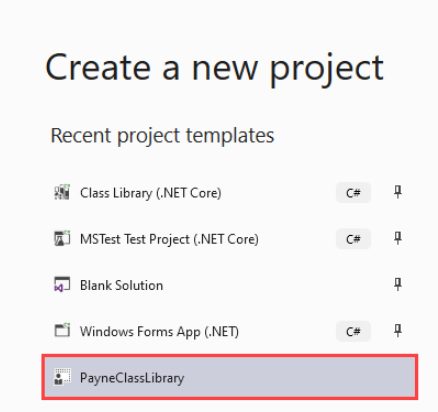
Give a name for the project, done,
Thanks for the info! That's a great idea!
Sadly not many are aware of this, sure beats hand coding for repetitive operations.
@Nicholas Piazza If interested check out the template I created for something complexly different than this question. It has an included cheat sheet too.
Thanks for the extra help and info.