Microsoft 365 and Office | SharePoint | For business | Windows
A group of Microsoft Products and technologies used for sharing and managing content, knowledge, and applications.

This browser is no longer supported.
Upgrade to Microsoft Edge to take advantage of the latest features, security updates, and technical support.
' cx='32' cy='32' r='32' /%3E%3Ctext x='50%25' y='55%25' dominant-baseline='middle' text-anchor='middle' fill='%23FFF' %3EJL%3C/text%3E%3C/svg%3E)
Hi All,
We have a calendar with entries which have recurring events sometimes monthly sometimes yearly.
When we add the list as a webpart it displays the information in the calendar but incorrectly
Eg: if we set it to show (This month only) or this week only it will show stuff from last month or all events and not filter it.
Looking online it seems that its got to do with the option of recurring events, once i untick this option on these events the list displays properly as a webpart.
Is there any fix to this? or suggestions on how to go forward with this other than not using recurring and entering everything in manually?

Hi @Jason Levy ,
Per my test, I am not able to add the calendar list directly as a web part on a modern page. Are you using an event web part or a group web part? Screenshots may be helpful.
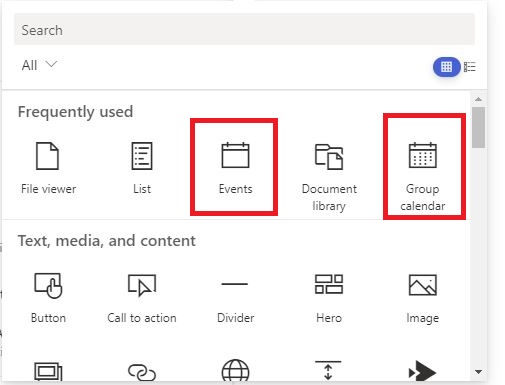
Apologies,
Steps involved where on a modern page
Add an app
Calendar
Put entries in
Back to page, add webpart Events
Hi @Jason Levy ,
I did some tests and it works well. You could try to use See All to filter events.

In addition, recurring events are temporarily out of Microsoft’s plan, you can also submit your suggestions to the official:
New Event Web Part should support recurring events
If the answer is helpful, please click "Accept Answer" and upvote it.
Note: Please follow the steps in our documentation to enable e-mail notifications if you want to receive the related email notification for this thread.
' cx='32' cy='32' r='32' /%3E%3Ctext x='50%25' y='55%25' dominant-baseline='middle' text-anchor='middle' fill='%23FFF' %3ERM%3C/text%3E%3C/svg%3E)
I am also having this same issue with a recurring event. it shows past occurrences. I selected the option to display upcoming events. it does this for a single event. but not a recurring event. When I change it to this week or this month it still shows the event that past.
' cx='32' cy='32' r='32' /%3E%3Ctext x='50%25' y='55%25' dominant-baseline='middle' text-anchor='middle' fill='%23FFF' %3EKM%3C/text%3E%3C/svg%3E)
I'm having the same issue : we have birthdays setup as recurring events, these are shown with the webpart Events.
The past birthdays however remain displayed.
When changing the event to single they dissapear
Any ideas ?