Microsoft 365 and Office | Access | Development
The creation and customization of database applications using Microsoft Access

This browser is no longer supported.
Upgrade to Microsoft Edge to take advantage of the latest features, security updates, and technical support.
' cx='32' cy='32' r='32' /%3E%3Ctext x='50%25' y='55%25' dominant-baseline='middle' text-anchor='middle' fill='%23FFF' %3EKV%3C/text%3E%3C/svg%3E)
Sometimes I design a form in Access and carefully arrange the controls in correct position when I change the view to form view, some controls locations change and overlap each other. I don't know why?

' cx='32' cy='32' r='32' /%3E%3Ctext x='50%25' y='55%25' dominant-baseline='middle' text-anchor='middle' fill='%23FFF' %3EAK%3C/text%3E%3C/svg%3E)
One other thing to check?
It is what we call control anchoring.
This feature can be put to good use. So if you anchoring controls say right bottom, then a form can re-size and MOVE the buttons based on form size:
eg:
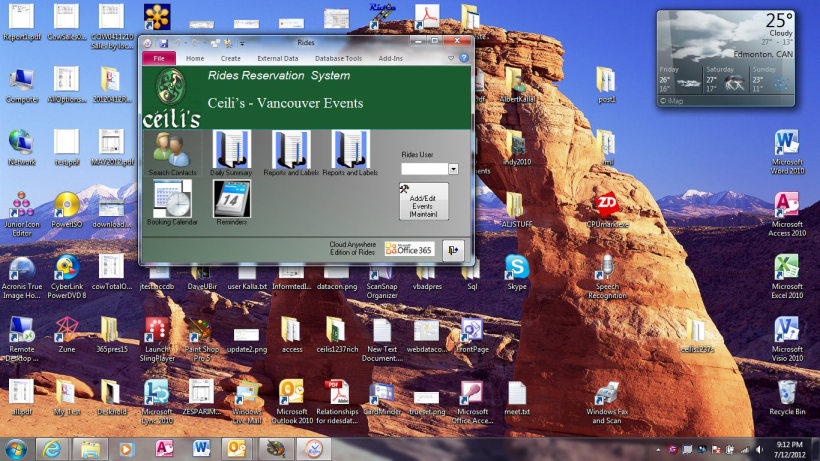
Now, make the form larger, and we get this:
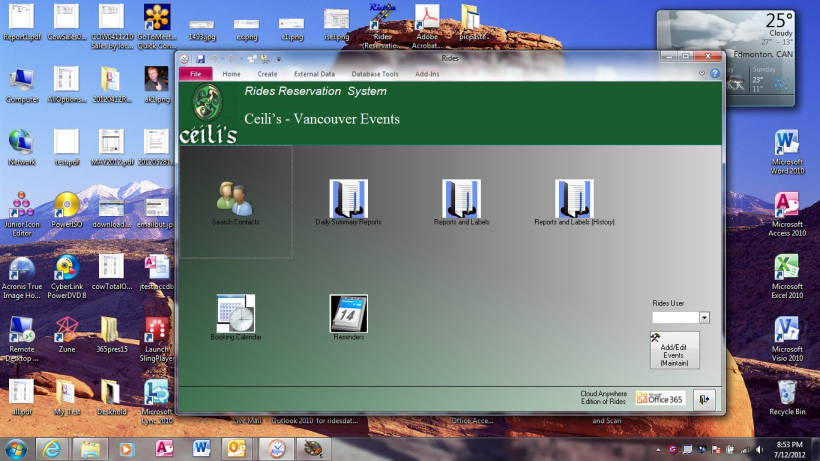
I did not change the "resolution", but notice how the controls shifted and moved?
You do this with control anchoring. This option on the ribbon:
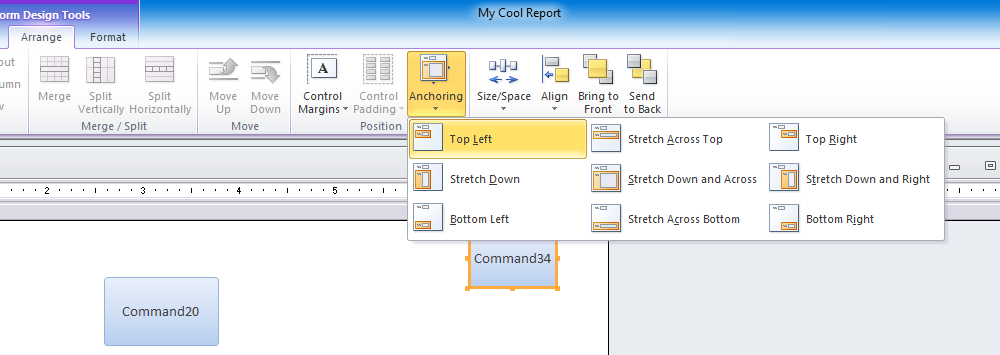
so check the control anchoring. If you used anything but top left, then the control can and will shift when you view the form in "view" mode. As noted, often we WANT this to occur, but of course many a time we do not. So check the control anchoring - that could be the issue here.
Regards,
Albert D. Kallal (Access MVP 2003-2017)
Edmonton, Alberta Canada
' cx='32' cy='32' r='32' /%3E%3Ctext x='50%25' y='55%25' dominant-baseline='middle' text-anchor='middle' fill='%23FFF' %3ETV%3C/text%3E%3C/svg%3E)
Could be several reasons. Maybe you have a Layout Grid around your controls - see Arrange tab.
I set my gridlines WAY smaller (24 * 24) and remove any Layout Grid that might be there; then I size to grid and align to grid, and that keeps it very stable.
Dear Mr.Kallal,
Thanks a lot for your detailed and complete reply. I checked it and it was exactly the reason.
Best Regards