Developer technologies | Windows Presentation Foundation
A part of the .NET Framework that provides a unified programming model for building line-of-business desktop applications on Windows.
This browser is no longer supported.
Upgrade to Microsoft Edge to take advantage of the latest features, security updates, and technical support.
' cx='32' cy='32' r='32' /%3E%3Ctext x='50%25' y='55%25' dominant-baseline='middle' text-anchor='middle' fill='%23FFF' %3EEH%3C/text%3E%3C/svg%3E)
I've this in my window:
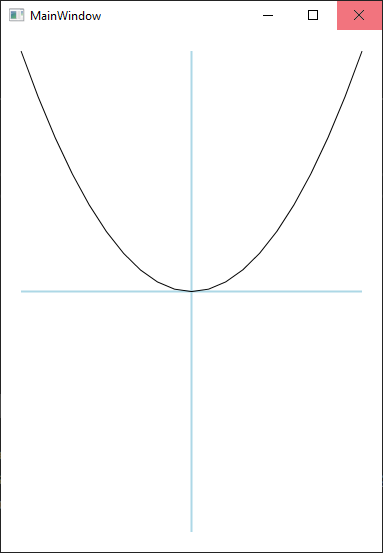
I want that curve to rise up from horizontal line, x axis. So the initial position of each point will be (x,0) and will go up to (x,y). How to do that?
Here's the code for this plot:
class Plot : FrameworkElement
{
    VisualCollection children;
    Canvas plotArea;
    Polyline poly;
    Line xAxis, yAxis;
    public Plot() {
        children = new VisualCollection(this);
        initAxis();
        initPlotArea();
    }
    void initAxis() {
        xAxis = new Line() { Stroke = Brushes.LightBlue, StrokeThickness = 2 };
        yAxis = new Line() { Stroke = Brushes.LightBlue, StrokeThickness = 2 };
        children.Add(xAxis);
        children.Add(yAxis);
    }
    void initPlotArea() {
        plotArea = new Canvas() {
            LayoutTransform = new ScaleTransform() { ScaleY = - 1 },
            RenderTransform = new TransformGroup() {
                Children = {
                    new ScaleTransform(),
                    new TranslateTransform()
                }
            }
        };
        children.Add(plotArea);
        poly = new Polyline() { Stroke = Brushes.Black, StrokeThickness = 1 };
        plotArea.Children.Add(poly);
    }
    void rearrangeAxis(Size size) {
        xAxis.X2 = size.Width;
        xAxis.Y1 = xAxis.Y2 = size.Height / 2;
        yAxis.X1 = yAxis.X2 = size.Width / 2;
        yAxis.Y2 = size.Height;
        xAxis.Measure(size);
        xAxis.Arrange(new Rect(xAxis.DesiredSize));
        yAxis.Measure(size);
        yAxis.Arrange(new Rect(yAxis.DesiredSize));
    }
    void rearrangePlotArea(Size size) {
        plotArea.Width = size.Width;
        plotArea.Height = size.Height;
        var translate = (TranslateTransform)((TransformGroup)plotArea.RenderTransform).Children[1];
        translate.X = size.Width / 2;
        translate.Y = -size.Height / 2;
        plotArea.Measure(size);
        plotArea.Arrange(new Rect(plotArea.DesiredSize));
        var points = new PointCollection();
        var step = 0.5;
        double xMin, xMax, yMax;
        xMin = -5; xMax = 5; yMax = 25;
        var seg = (xMax - xMin) / step;
        double x = -5;
        var xPos = -((TranslateTransform)((TransformGroup)plotArea.RenderTransform).Children[1]).X;
        var xStep = plotArea.Width / seg;
        for (int i = 0; i < seg+1; i++) {
            var y = x * x;
            var tY = (plotArea.Height / 2 / yMax) * y;
            var point = new Point(xPos, tY);
            points.Add(point);
            xPos += xStep;
            x += step;
        }
        poly.Points = points;
    }
    protected override Size ArrangeOverride(Size finalSize) {
        rearrangeAxis(finalSize);
        rearrangePlotArea(finalSize);
        return finalSize;
    }
    protected override Visual GetVisualChild(int index) => children[index];
    protected override int VisualChildrenCount => children.Count;
}
and in MainWindow.xaml I've used Plot like this:
<Grid Margin="20">
    <cc:Plot />
</Grid>

@Emon Haque
Animating a Point within a PointCollection seems impossible, animation object cannot be used to animate property 'Points' because it is of incompatible type System.Windows.Media.PointCollection. PointCollectionAnimation may be what you want, WPF doesn't provide it, but you can refer to Extending the WPF Animation Classes which shows you how to go about it.
@DaisyTian-MSFT, that's complicated!

Hi,
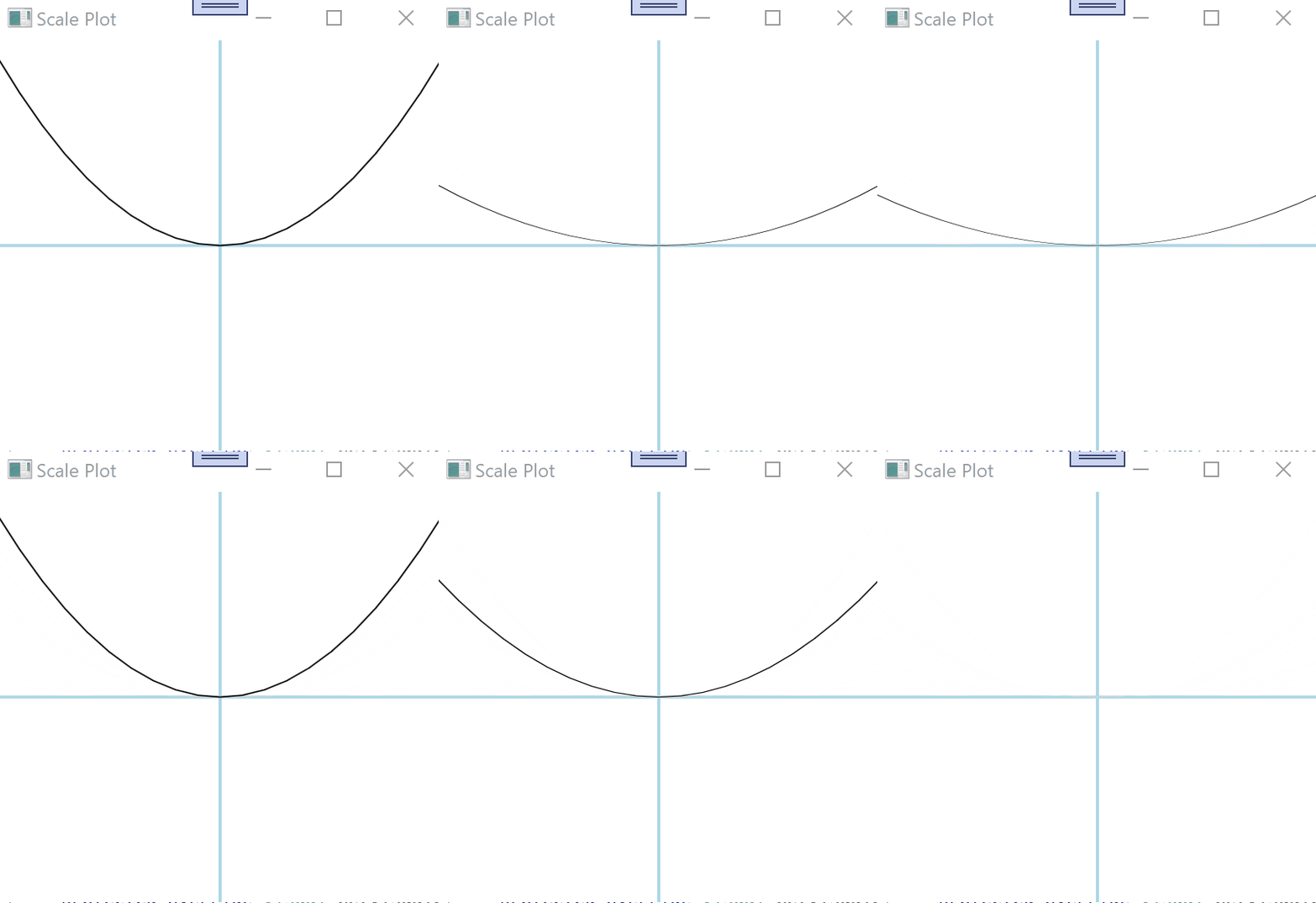
you can use StoryBoard to animate PolyLine like in following demo (with your code):
using System;
using System.Windows;
using System.Windows.Controls;
using System.Windows.Media;
using System.Windows.Media.Animation;
using System.Windows.Shapes;

namespace CC
{

  class Plot : FrameworkElement
  {
    VisualCollection children;
    Canvas plotArea;
    Polyline poly;
    Line xAxis, yAxis;
    public Plot()
    {
      children = new VisualCollection(this);
      initAxis();
      initPlotArea();
      this.Loaded += Plot_Loaded; // start Storyboard after loading
    }

    void initAxis()
    {
      xAxis = new Line() { Stroke = Brushes.LightBlue, StrokeThickness = 2 };
      yAxis = new Line() { Stroke = Brushes.LightBlue, StrokeThickness = 2 };
      children.Add(xAxis);
      children.Add(yAxis);
    }
    void initPlotArea()
    {
      plotArea = new Canvas()
      {
        LayoutTransform = new ScaleTransform() { ScaleY = -1 },
        RenderTransform = new TransformGroup()
        {
          Children = {
                     new ScaleTransform(),
                     new TranslateTransform()
                 }
        }
      };
      children.Add(plotArea);
      poly = new Polyline() { Stroke = Brushes.Black, StrokeThickness = 1 };
      plotArea.Children.Add(poly);
    }
    void rearrangeAxis(Size size)
    {
      xAxis.X2 = size.Width;
      xAxis.Y1 = xAxis.Y2 = size.Height / 2;
      yAxis.X1 = yAxis.X2 = size.Width / 2;
      yAxis.Y2 = size.Height;
      xAxis.Measure(size);
      xAxis.Arrange(new Rect(xAxis.DesiredSize));
      yAxis.Measure(size);
      yAxis.Arrange(new Rect(yAxis.DesiredSize));
    }
    void rearrangePlotArea(Size size)
    {
      plotArea.Width = size.Width;
      plotArea.Height = size.Height;
      var translate = (TranslateTransform)((TransformGroup)plotArea.RenderTransform).Children[1];
      translate.X = size.Width / 2;
      translate.Y = -size.Height / 2;
      plotArea.Measure(size);
      plotArea.Arrange(new Rect(plotArea.DesiredSize));
      var points = new PointCollection();
      var step = 0.5;
      double xMin, xMax, yMax;
      xMin = -5; xMax = 5; yMax = 25;
      var seg = (xMax - xMin) / step;
      double x = -5;
      var xPos = -((TranslateTransform)((TransformGroup)plotArea.RenderTransform).Children[1]).X;
      var xStep = plotArea.Width / seg;
      for (int i = 0; i < seg + 1; i++)
      {
        var y = x * x;
        var tY = (plotArea.Height / 2 / yMax) * y;
        var point = new Point(xPos, tY);
        points.Add(point);
        xPos += xStep;
        x += step;
      }
      poly.Points = points;
    }
    protected override Size ArrangeOverride(Size finalSize)
    {
      rearrangeAxis(finalSize);
      rearrangePlotArea(finalSize);
      return finalSize;
    }
    protected override Visual GetVisualChild(int index) => children[index];
    protected override int VisualChildrenCount => children.Count;

    // animate Polyline

    public DoubleAnimation da;
    private Storyboard sb = new Storyboard();
    ScaleTransform trans = new ScaleTransform() { ScaleY = 1 };
    public void Plot_Loaded(object sender, RoutedEventArgs e)
    {
      if (da == null)
      {
        NameScope.SetNameScope(this, new NameScope());
        this.RegisterName("scaleTransform", trans);
        poly.LayoutTransform = trans;
        da = new DoubleAnimation()
        {
          From = 0,
          To = 1,
          Duration = new Duration(TimeSpan.FromSeconds(1.0)),
          RepeatBehavior = new RepeatBehavior(2),
          AutoReverse = true
        };
        sb.Children.Clear();
        sb.Children.Add(da);
        Storyboard.SetTargetName(da, "scaleTransform");
        Storyboard.SetTargetProperty(da, new PropertyPath(ScaleTransform.ScaleYProperty));
        sb.Begin(this);
      }
    }
  }
}
Result:
That's a nice trick, thanks.
One more thing, I don't understand the point of Storyboard. I've done quite a bit of 2D animations in code behind (with FrameworkElement and Panel) over the past few weeks and to me it's much easier to call BeginAnimation on the object directly or use an AnimationClock instead of creating and using a Storyboard. Ofcourse, I can use Storyboard in code behind as well BUT was that introduced for xaml or it's something more that AnimationClock and BeginAnimation don't have?
Hi,
there are three ways to animate a dependency property:
Storyboard objects and the BeginAnimation method enable you to animate properties without directly creating and distributing clocks; clocks are created and distributed for you automatically.
I love the first way. Use a Storyboard I can define and apply animations in VB, C# or XAML, interactively control animations after they start, create a complex tree of animations, or animate in a Style, ControlTemplate or DataTemplate.