
Hello @MBE ,
We haven’t heard from you in a couple of days.
Is there any update from your side?
This browser is no longer supported.
Upgrade to Microsoft Edge to take advantage of the latest features, security updates, and technical support.
' cx='32' cy='32' r='32' /%3E%3Ctext x='50%25' y='55%25' dominant-baseline='middle' text-anchor='middle' fill='%23FFF' %3EM%3C/text%3E%3C/svg%3E)
Hi there,
have similar question to the guy over here
https://learn.microsoft.com/en-us/answers/questions/80184/remoteapp-file-types-association.html
We want to configure file type association to application which are not installed - therefor we have in the rds configuration no option to select an associated file type. But how do we get this ability to select one?
While reading the link
https://techcommunity.microsoft.com/t5/microsoft-security-and/windows-server-2012-remoteapp-and-desktop-connections-default/ba-p/247680
"We calculate this list based upon the file types that the app is associated with on the collection endpoints (Remote Desktop Session Host servers in a session collection, or virtual desktops in a virtual desktop collection)."
So how to do this?
We have couple of applications which are not installed (some of them are started form unc path) but need filetype associations. While there is no install procedure there is no default file type association and therefor we have no filetype to select.
When i just set filetypeassociation on the session hosts, nothing changes for me. Redeploy the app and nothing to select.
So where does the app creation process looks for file type associations? We have the same problem as the guy in the other thread with his autocad (which is unanswered)
' cx='32' cy='32' r='32' /%3E%3Ctext x='50%25' y='55%25' dominant-baseline='middle' text-anchor='middle' fill='%23FFF' %3ELK%3C/text%3E%3C/svg%3E)
Hello @MBE ,
We haven’t heard from you in a couple of days.
Is there any update from your side?
Hello @MBE ,
How are things going there on this issue?
Please let me know if you would like further assistance.
Hello @MBE ,
Is there any progress on your side? You may also open a ticket to Microsoft for further professional help:
https://support.microsoft.com/en-us/help/4341255/support-for-busines
Hi Leila,
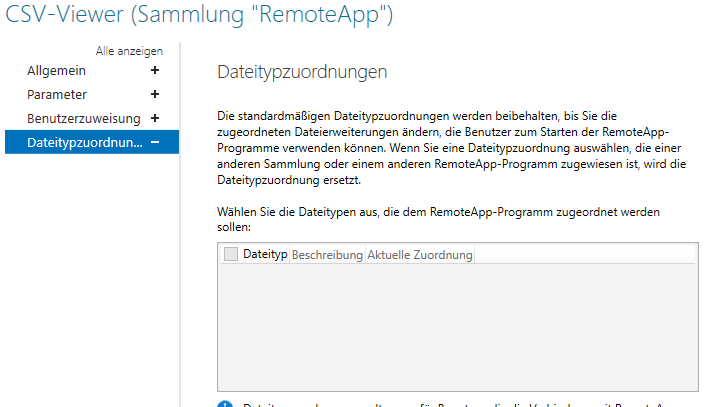
Set-RDFiletypeassociation cant create an file type association, just "activate" it. When we try we get

Thank you, we're doing some research.
Hello @MBE ,
1.Did you connect by RD Web Access or RDP files, which may not be working for file type associations.

2.Did you set default app associations on domain controller?
3.Did you check the below video of "RDS file type associations"?
https://www.youtube.com/watch?v=AtFtB1atOCI
4.Did you contact AutoCAD for troubleshooting?
https://knowledge.autodesk.com/support/autocad/learn-explore/caas/sfdcarticles/sfdcarticles/DWG-file-type-associativity-in-Windows.html
Other links:
https://learn.microsoft.com/en-us/powershell/module/remotedesktop/get-rdfiletypeassociation?view=winserver2012r2-ps
https://learn.microsoft.com/en-us/powershell/module/remotedesktop/set-rdfiletypeassociation?view=winserver2012r2-ps
Best regards,
Leila
If the Answer is helpful, please click "Accept Answer" and upvote it.
Note: Please follow the steps in our documentation to enable e-mail notifications if you want to receive the related email notification for this thread.