Azure Data Factory
An Azure service for ingesting, preparing, and transforming data at scale.
This browser is no longer supported.
Upgrade to Microsoft Edge to take advantage of the latest features, security updates, and technical support.
' cx='32' cy='32' r='32' /%3E%3Ctext x='50%25' y='55%25' dominant-baseline='middle' text-anchor='middle' fill='%23FFF' %3ERS%3C/text%3E%3C/svg%3E)
I'am retrieving data from an API endpoint.
The response JSON contains some date time strings formatted as "2019-08-15T16:56:30Z" which is valid ISO 8601.
When I use a copy pipeline in ADF it fails with the following error.
Operation on target *********** failed: ErrorCode=SqlOperationFailed,'Type=Microsoft.DataTransfer.Common.Shared.HybridDeliveryException,Message=A database operation failed. Please search error to get more details.,Source=Microsoft.DataTransfer.ClientLibrary,''Type=System.InvalidOperationException,Message=The given value of type String from the data source cannot be converted to type datetime2 of the specified target column.,Source=System.Data,''Type=System.FormatException,Message=Failed to convert parameter value from a String to a DateTime.,Source=System.Data,''Type=System.FormatException,Message=String was not recognized as a valid DateTime.,Source=mscorlib,'
Could this be related to the fact that some datetime strings are empty? I did validate that when there is a datetime string that they all have the same formatting.
What would be a solution or workaround for this issue?
Hi @Saurabh Sharma Thanks for your feedback. I've tried the mentioned logging and indeed the empty strings are not parseable as DateTime fields.
With this issue now confirmed I can see how to follow up with a workaround/solution.
' cx='32' cy='32' r='32' /%3E%3Ctext x='50%25' y='55%25' dominant-baseline='middle' text-anchor='middle' fill='%23FFF' %3ESS%3C/text%3E%3C/svg%3E)
@Robin Smits Thanks for the confirmation and good to hear that you are able to identify the root cause.
' cx='32' cy='32' r='32' /%3E%3Ctext x='50%25' y='55%25' dominant-baseline='middle' text-anchor='middle' fill='%23FFF' %3EPS%3C/text%3E%3C/svg%3E)
Any workaround or solution yet?
Update: This problem magically went away a few hours after my comment, so I guess the issue has been fixed in Azure Data Factory side. Seems that empty values in CSV now map to NULL in Azure SQL Server as expected. My data is quoted, in DelimitedText dataset quote character is defined as double quote, and "Null value" setting is empty.
The problem has reappeared.
Message=Column 'Prop_4' contains an invalid value ''. Cannot convert '' to type 'DateTime' with format 'dd.MM.yyyy'
Settings still same, Quote character as double quote, "Null value" setting is empty.
Hi @Robin Smits ,
Thanks for using Microsoft Q&A !!
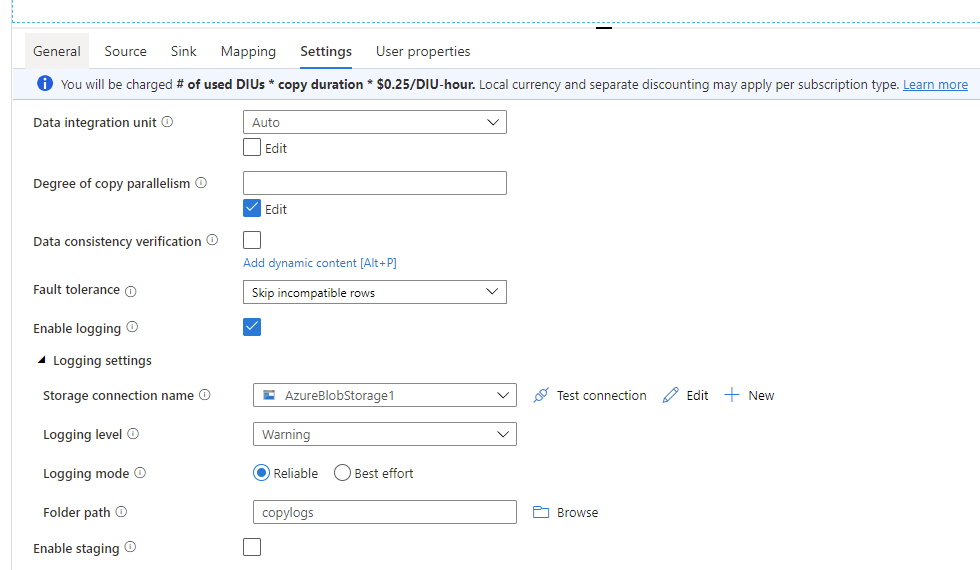
Yes, I believe it is happening for empty datetime strings? Are you using a copy data activity ? Can you please try to use the fault tolerance setting to skip incompatible rows (See screenshot below) and add logging settings(storage account, folder path etc.) so that the excluded records gets locked at the configured folder path. You can then validate the dates against which the conversion is failing -
' cx='32' cy='32' r='32' /%3E%3Ctext x='50%25' y='55%25' dominant-baseline='middle' text-anchor='middle' fill='%23FFF' %3EFH%3C/text%3E%3C/svg%3E)
Hi,
I have found the same problem. @Saurabh Sharma , I have tried what you said and indeed ADF is logging that it cannot convert an empty string to datetime:
Timestamp,Level,OperationName,OperationItem,Message
2022-01-05 17:40:56.1757927,Warning,TabularRowSkip,""""","""",""BF"",""Balance Brought Forward"",""0"",""0"",""1000"",","Exception occurred when converting value '' for column name 'Posting Date' from type 'String' (precision:, scale:) to type 'DateTime' (precision:255, scale:255). Additional info: String was not recognized as a valid DateTime."
2022-01-05 17:40:56.1907944,Warning,TabularRowSkip,""""","""",""CF"",""Balance as at 26 Nov 2021"",""0"",""0"",""10000"",","Exception occurred when converting value '' for column name 'Posting Date' from type 'String' (precision:, scale:) to type 'DateTime' (precision:255, scale:255). Additional info: String was not recognized as a valid DateTime."
The expected resoult would be a NULL, as defined in the DataSet.
I don't really know how to log this as a bug. Please, could any of you do it?
Thanks,
' cx='32' cy='32' r='32' /%3E%3Ctext x='50%25' y='55%25' dominant-baseline='middle' text-anchor='middle' fill='%23FFF' %3ESM%3C/text%3E%3C/svg%3E)
Was there any reply from Microsoft? I am facing the similar issue now.
@Saurabh Sharma - I think this is bug and it should be fixed by Microsoft. Can you please let us know if there is any plan address this issue?