Share via

Invoke-Sqlcmd -ServerInstance parameter not accepting variable

Charlie Rix 21 Reputation points
2021-04-07T14:22:47.88+00:00

Hello

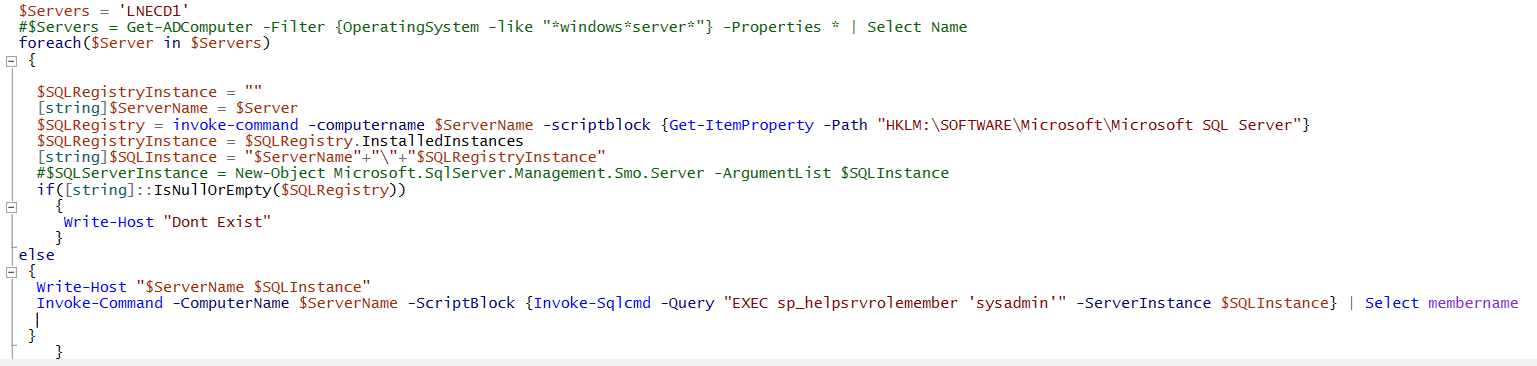
Seem to be having a issue where the -ServerInstance parameter of the Invoke-Sqlcmd command does not like a variable I am passing it e.g. Invoke-Sqlcmd -ServerInstance $SQLInstance -Query "EXEC sp_helpsrvrolemember 'sysadmin'" however if I manually type the server instance e.g. SERVER\INSTANCE it works. When I print the variable out, it prints out exactly the same when I type it in manually e.g. SERVER\INSTANCE. I have tried making the variable a string variable, a PSObject etc but no luck. Anyone have any ideas?

Cheers

Charlie

Windows for business | Windows Server | User experience | PowerShell
0 comments No comments

Answer accepted by question author
  1. Anonymous
    2021-04-08T15:54:08.583+00:00

    Hi,

    As $SQLInstance is defined outside of the scriptblock, you have to use the "using:" scope modifier to access the variable.

    Invoke-Command -ComputerName $ServerName -ScriptBlock {Invoke-Sqlcmd -ServerInstance $using:SQLInstance -Query "EXEC sp_helpsrvrolemember 'sysadmin'"}  
    

    Or you can simply run Invoke-Sqlcmd without Invoke-Command

    Invoke-Sqlcmd -ServerInstance $SQLInstance -Query "EXEC sp_helpsrvrolemember 'sysadmin'"  
    

    Best Regards,
    Ian Xue

    ============================================

    If the Answer is helpful, please click "Accept Answer" and upvote it.
    Note: Please follow the steps in our documentation to enable e-mail notifications if you want to receive the related email notification for this thread.


2 additional answers

Sort by: Most helpful
  1. Charlie Rix 21 Reputation points
    2021-04-08T09:03:54.167+00:00

    Hello Ian

    Thanks for replying. The full error message I am getting is below:

    85725-image.png

    See output below of the $SQLInstance.GetType() command which is a string type variable:

    85726-image.png

    Thanks

    Charlie


  2. Anonymous
    2021-04-08T05:35:49.75+00:00

    Hi,

    I tried Invoke-Sqlcmd -ServerInstance $SQLInstance and it worked well for me. Can you post the full error message? What does $SQLInstance.GetType() return?

    Best Regards,
    Ian Xue

    ============================================

    If the Answer is helpful, please click "Accept Answer" and upvote it.
    Note: Please follow the steps in our documentation to enable e-mail notifications if you want to receive the related email notification for this thread.

    0 comments No comments

Your answer

Answers can be marked as 'Accepted' by the question author and 'Recommended' by moderators, which helps users know the answer solved the author's problem.
