' cx='32' cy='32' r='32' /%3E%3Ctext x='50%25' y='55%25' dominant-baseline='middle' text-anchor='middle' fill='%23FFF' %3EA%3C/text%3E%3C/svg%3E)

Hi @Avyayah ,
> Do I increase the size of the logfile if so how since this is production?
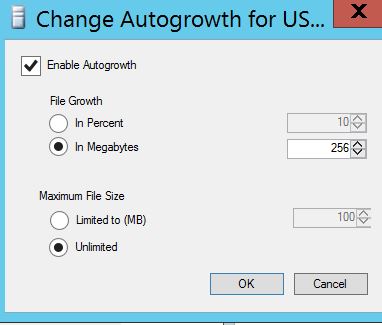
No, since you enabled auto growth for log file, the SQL server log file will automatic increase 256MB when the log file has no empty space for transaction log. If the log file have sufficient free space, it will not cause any auto growth.
> don't see any DBCC checkDB running in the server. Is it safe to delete the MSSQL_DBCC files?
Yes, you can delete these files after you confirm that there is no DBCC CHECKDB command currently being executed.
These files are the snapshot files created by DBCC CHECKDB command. SQL Server normally deletes the snapshot files when the DBCC completes. If the operating system encounters an unexpected shutdown while the DBCC CHECKDB command is in progress, then these files will not be cleaned up. They will accumulate space, and potentially will prevent future DBCC CHECKDB executions from completing correctly. In that case, you can delete these new files after you confirm that there is no DBCC CHECKDB command currently being executed.
Refer to this thread What is .mdf_MSSQL_DBCC15 file.
> One of the database in simple recovery mode has 259GB datafile and 1 MB logfile.
Suggest you setting the database to Full recovery mode, since you can not backup the log file when the database in simple recovery mode, and your database is in product environment . If the database is corrupt, how did you recovery it?
If the response is helpful, please click "Accept Answer" and upvote it, thank you.