Developer technologies | VB
An object-oriented programming language developed by Microsoft that can be used in .NET.
This browser is no longer supported.
Upgrade to Microsoft Edge to take advantage of the latest features, security updates, and technical support.
' cx='32' cy='32' r='32' /%3E%3Ctext x='50%25' y='55%25' dominant-baseline='middle' text-anchor='middle' fill='%23FFF' %3EHH%3C/text%3E%3C/svg%3E)
With VB and WPF I build a Usercontrol "ToggleSwitch". Want to bind it's IsChecked-Property to another signal as I did with Checkbox.
How to get Dependency-Object and Dependency-Property for that in VB and WPF?
Thanks

Hi,
you can register static (shared) property like in following demo:
XAML UserControl:
<UserControl x:Class="Window088ToggleSwitch"
             xmlns="http://schemas.microsoft.com/winfx/2006/xaml/presentation"
             xmlns:x="http://schemas.microsoft.com/winfx/2006/xaml"
             xmlns:mc="http://schemas.openxmlformats.org/markup-compatibility/2006"
             xmlns:d="http://schemas.microsoft.com/expression/blend/2008"
             xmlns:local="clr-namespace:WpfControlLibrary1"
             mc:Ignorable="d"
             d:DesignHeight="450" d:DesignWidth="800">
  <StackPanel x:Name="stp">
    <CheckBox Content="Binded IsChecked" IsChecked="{Binding IsChecked}" IsEnabled="False"/>
  </StackPanel>
</UserControl>
CodeBehind UserControl:
Public Class Window088ToggleSwitch

  Public Sub New()

    ' This call is required by the designer.
    InitializeComponent()

    ' Add any initialization after the InitializeComponent() call.
    stp.DataContext = Me
  End Sub

  Public Shared ReadOnly IsCheckedProperty As DependencyProperty =
          DependencyProperty.RegisterAttached("IsChecked", GetType(Boolean),
            GetType(Window088ToggleSwitch), New PropertyMetadata(Nothing))

  Public Shared Function GetIsChecked(obj As DependencyObject) As Boolean
    Return CType(obj.GetValue(IsCheckedProperty), Boolean)
  End Function

  Public Shared Sub SetIsChecked(obj As DependencyObject, value As Boolean)
    obj.SetValue(IsCheckedProperty, value)
  End Sub

End Class
XAML MainWindow:
<Window x:Class="Window088"
        xmlns="http://schemas.microsoft.com/winfx/2006/xaml/presentation"
        xmlns:x="http://schemas.microsoft.com/winfx/2006/xaml"
        xmlns:d="http://schemas.microsoft.com/expression/blend/2008"
        xmlns:mc="http://schemas.openxmlformats.org/markup-compatibility/2006"
        xmlns:local="clr-namespace:WpfApp1"
        xmlns:controls="clr-namespace:WpfControlLibrary1;assembly=WpfControlLibrary1"
        mc:Ignorable="d"
        Title="MainWindow" Height="450" Width="800">
  <StackPanel>
    <CheckBox x:Name="cb" Content="Main CheckBox"/>
    <controls:Window088ToggleSwitch IsChecked="{Binding ElementName=cb, Path=IsChecked}" />
  </StackPanel>
</Window>
Result:
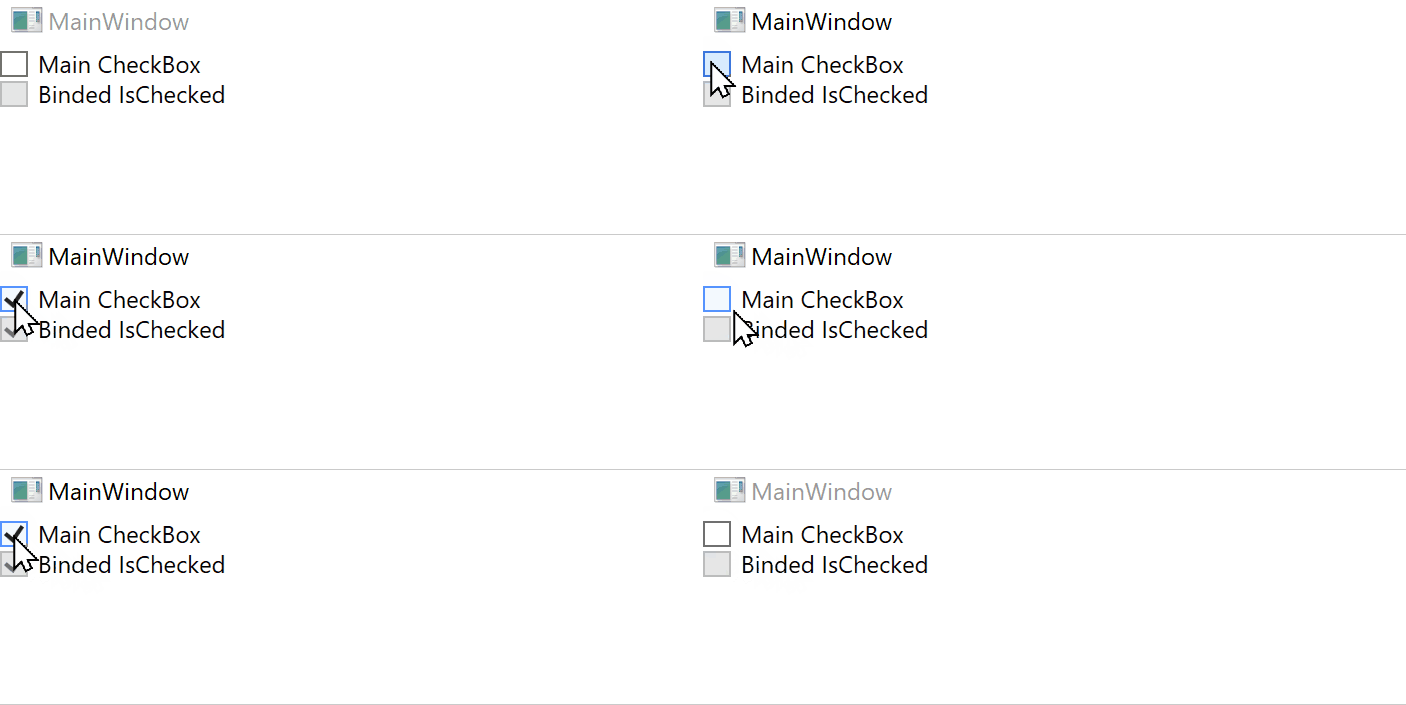
Peter Fleischer thank you for the Demo. Got it run on my PC.
Thanks a lot!