Connecting to Network share

Reccoppa, Michael 1 Reputation point
2021-04-09T18:18:51.147+00:00

Hello,

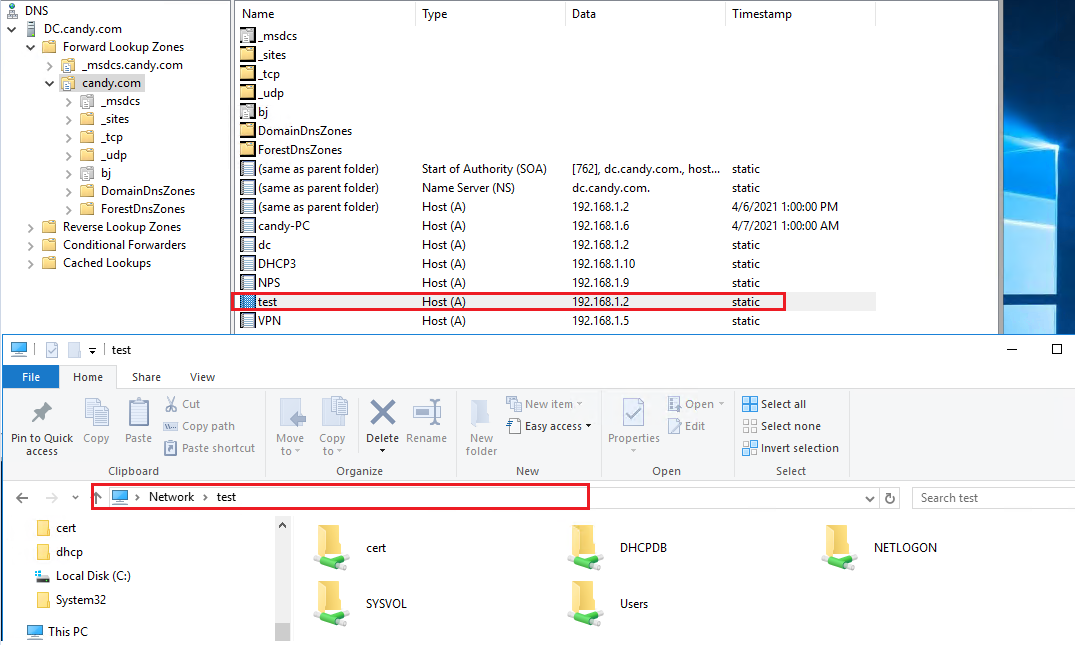
I'm sure I'm missing something very simple with this, but I was hoping to get pointed in the right direction. I recently had to rebuild my SCCM (Endpoing Config Manager) server and the build itself went as planned. I created a DNS alias in DNS for my SCCM server so when I create packages, it's easier to type out the alias than the whole server name network share. When I'm logged into my server and I try to connect to the network share using the alias, (\alias), I get prompted for network credentials to the domain, which even when I put in, comes up incorrect credentials. However I can connect using the full network path, (\servername). I had other people on their computers try and they can all connect to the alias, so it just happens from the server itself. And I can also connect to other servers DNS alias from my SCCM server with no issue...so I'm not really sure why the server can't connect to it's own DNS alias. On my old SCCM server, it worked fine and I don't think I did anything different. I'm running Windows Server 2016.

Any help anyone can give would be great!!!

Thanks

Windows for business | Windows Client for IT Pros | Networking | Network connectivity and file sharing
Windows for business | Windows Server | User experience | Other
{count} votes

1 answer

Sort by: Most helpful
  1. Anonymous
    2021-04-12T03:47:45.723+00:00

    Hi,

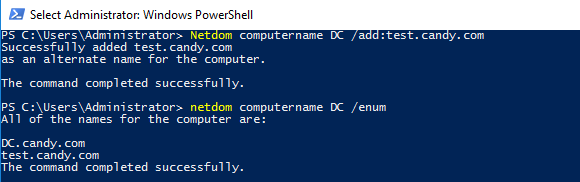
    This phenomenon is related with SPN. Note: SMB Access requests using CNAMEs will not use Kerberos and are totally unsafe. This has evolved over the last operating system releases and CNAMEs are not to be used or trusted anymore. So, the recommendation is that Do not use CNAMEs anymore. If you want to still give 'alternate names' to servers, you can do so with the command NETDOM COMPUTERNAME /ADD , which will automatically register SPNs for the alternate names.

    As picture below:
    86656-image.png

    86697-image.png

    For more details, you can refer to the following article:

    Using Computer Name Aliases in place of DNS CNAME Records

    SMB file server share access is unsuccessful through DNS CNAME alias

    Please try to mark the replies which help you. It will encourage the person who help you.
    Appreciate your understanding. :)

    Best Regards,
    Candy

    --------------------------------------------------------------

    If the Answer is helpful, please click "Accept Answer" and upvote it.

    Note: Please follow the steps in our documentation to enable e-mail notifications if you want to receive the related email notification for this thread.

    1 person found this answer helpful.
    0 comments No comments

Your answer

Answers can be marked as 'Accepted' by the question author and 'Recommended' by moderators, which helps users know the answer solved the author's problem.