Azure Data Factory
An Azure service for ingesting, preparing, and transforming data at scale.
This browser is no longer supported.
Upgrade to Microsoft Edge to take advantage of the latest features, security updates, and technical support.
' cx='32' cy='32' r='32' /%3E%3Ctext x='50%25' y='55%25' dominant-baseline='middle' text-anchor='middle' fill='%23FFF' %3EC%3C/text%3E%3C/svg%3E)
Hello,
We are trying to migrate from Informatica to Data Factory. I'm attempting to do a simple pipeline copy activity to replace a process that works fine in Informatica and am getting the following error message. Any help would be greatly appreciated. This copy activity is from a SQL database to an Oracle table.
Error code: 2200
Failure type: User configuration issue
Details: Failure happened on 'Sink' side. ErrorCode=UserErrorOdbcOperationFailed,'Type=Microsoft.DataTransfer.Common.Shared.HybridDeliveryException,Message=ERROR [HY000] [Microsoft][ODBC Oracle Wire Protocol driver]Error tolerance exceeded. Bulk load operation terminated. Error in parameter 7. ERROR [22001] [Microsoft][ODBC Oracle Wire Protocol driver]String data, right truncated. Error in row 1. Error in parameter 7.,Source=Microsoft.DataTransfer.ClientLibrary.Odbc.OdbcConnector,''Type=Microsoft.DataTransfer.ClientLibrary.Odbc.Exceptions.OdbcException,Message=ERROR [HY000] [Microsoft][ODBC Oracle Wire Protocol driver]Error tolerance exceeded. Bulk load operation terminated. Error in parameter 7. ERROR [22001] [Microsoft][ODBC Oracle Wire Protocol driver]String data, right truncated. Error in row 1. Error in parameter 7.,Source=msora28.dll,'
' cx='32' cy='32' r='32' /%3E%3Ctext x='50%25' y='55%25' dominant-baseline='middle' text-anchor='middle' fill='%23FFF' %3ESS%3C/text%3E%3C/svg%3E)
Hi @CTrudgeon ,
Thanks for using Microsoft Q&A !!
Can you please try “Skip incompatible rows” in copy settings so that you could record the problematic records which may be causing the problem.
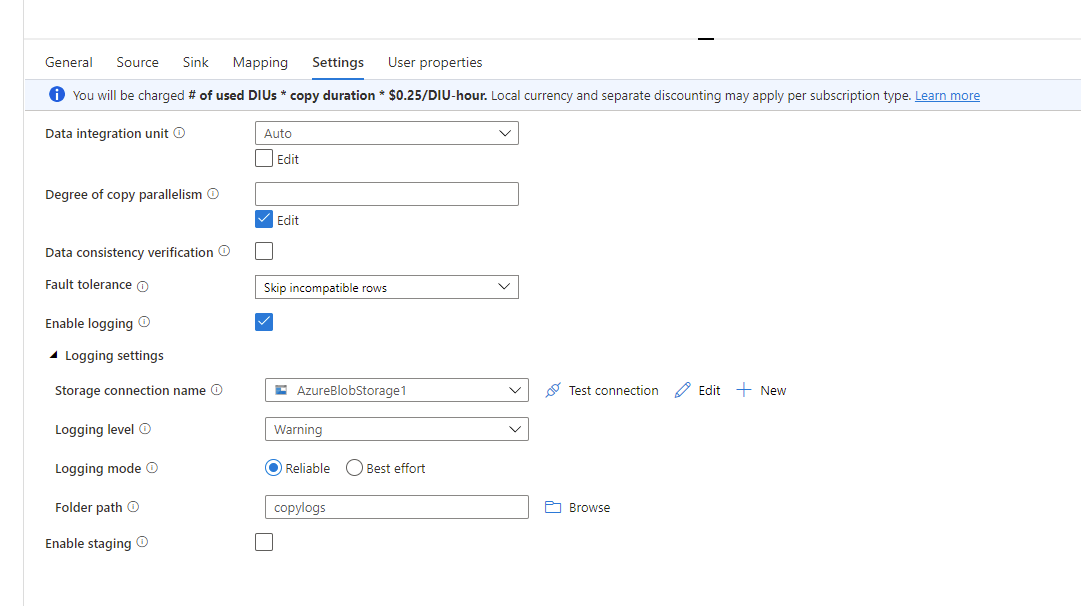
Thanks
Saurabh
Hello @Saurabh Sharma ,
Thank you for your reply. Unfortunately, “Skip incompatible rows” did not work. I received the same error message as before and no data was transferred.
Best regards,
Chad
@CTrudgeon ok. How many rows ADF is trying to write to Oracle instance ?
@Saurabh Sharma It's a very small job. Approximately 6500 rows.
@Saurabh Sharma It's a straight copy job with no data transformation or manipulation. Is it possibly a versioning issue?
@CTrudgeon Have you imported mappings on Copy Data activity from "Mappings" Tab. Can you please provide a screenshot.
@Saurabh Sharma Yes, I've imported the mapping schemas. Here is the screenshot.
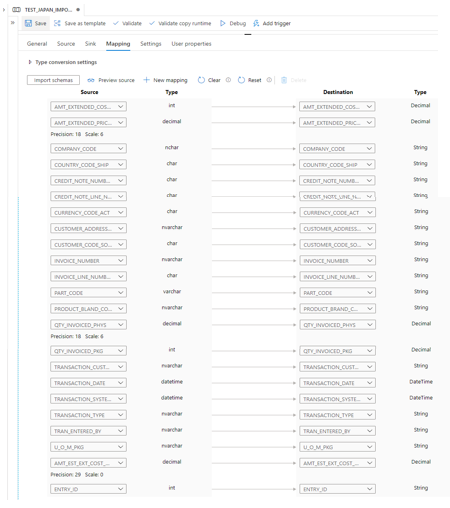
@CTrudgeon Thanks. Also, can you share pipeline run id and activity run id so that I can try checking in backend.
@Saurabh Sharma Thanks so much for looking into this. Here are the IDs.
Pipeline Run ID: ba27920b-95a9-4681-a961-cdbe22fad2ef
Activity Run ID: a75378e3-ad50-4fdd-b853-e30f98f74b94
@CTrudgeon Thanks for sharing. I am checking internally on this one and get back to you.
@CTrudgeon Can you also share the DDL of the oracle table please.
@Saurabh Sharma I've attached the DDL.
@CTrudgeon thanks for sharing. Looking into it.
@Saurabh Sharma Have you had a chance to look into this? Thanks.
The failure message says "Error in parameter 7". This is a straight copy job in which I set no parameters. Does anyone know how I can find "parameter 7"?
' cx='32' cy='32' r='32' /%3E%3Ctext x='50%25' y='55%25' dominant-baseline='middle' text-anchor='middle' fill='%23FFF' %3ESK%3C/text%3E%3C/svg%3E)
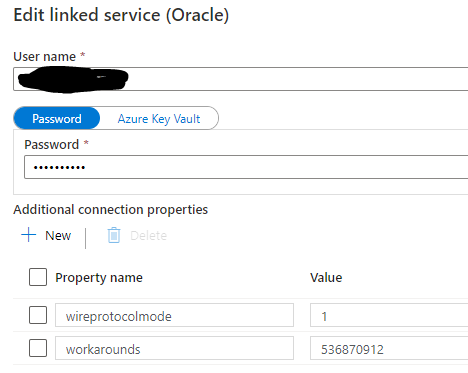
Go to the Linked Service and Add Additional Parameter With Value shown in the diagram .
I found the solution. I needed to set EnableBulkLoad=0 in the ODBC DSN or connection string.
' cx='32' cy='32' r='32' /%3E%3Ctext x='50%25' y='55%25' dominant-baseline='middle' text-anchor='middle' fill='%23FFF' %3EH%3C/text%3E%3C/svg%3E)
Hello @CTrudgeon ,
It was great to know that you were able to get to a resolution . We expect you to keep using this forum and also motivate others to do that same . You can always help other community members by answering to their queries .
Thanks
Himanshu
' cx='32' cy='32' r='32' /%3E%3Ctext x='50%25' y='55%25' dominant-baseline='middle' text-anchor='middle' fill='%23FFF' %3EB%3C/text%3E%3C/svg%3E)
Hi, I have the same problem, i tried connect to th Database and it didn´t conect , it shows this message "ERROR [HY000] [Microsoft][ODBC Oracle Wire Protocol driver][Oracle]ORA-12650: No common encryption or data integrity algorithm ERROR [HY000] [Microsoft][ODBC Oracle Wire Protocol driver][Oracle]ORA-12650: No common encryption or data integrity algorithm"
Previously the pipeline was executed successfully, but in the last four days pipeline was not executed, I checked the user and password, i checket if the user was locked but all good
' cx='32' cy='32' r='32' /%3E%3Ctext x='50%25' y='55%25' dominant-baseline='middle' text-anchor='middle' fill='%23FFF' %3EM%3C/text%3E%3C/svg%3E)
Could you please try using WireProtocolMode=1 and set WorkArounds =<<value>> in connection properties.