Developer technologies | Windows Presentation Foundation
A part of the .NET Framework that provides a unified programming model for building line-of-business desktop applications on Windows.
This browser is no longer supported.
Upgrade to Microsoft Edge to take advantage of the latest features, security updates, and technical support.

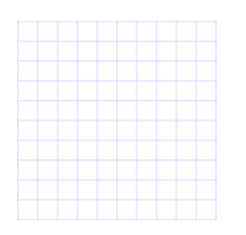
Does anybody have a link to a WPF example application that creates a document page with grid lines? Please see below:


Is there any update for your problem? I had added another way to draw grid line for you.
You can use DrawingVisual and DrawingContext to draw the grid , something like:
   DrawingVisual gridLinesVisual = new DrawingVisual();
   DrawingContext dct = gridLinesVisual.RenderOpen();
Then use Pen and DrawingContext.DrawLine to draw the lines like below:
 Pen lightPen = new Pen(_color1, 0.5), darkPen = new Pen(_color2, 1);
            int yOffset = yoffSet,
                xOffset = xoffSet,
                rows = (int)(SystemParameters.PrimaryScreenHeight),
                columns = (int)(SystemParameters.PrimaryScreenWidth),
                alternate = yOffset == 5 ? yOffset : 1,
                j = 0;

            //Draw the horizontal lines
            Point x = new Point(0, 0.5);
            Point y = new Point(SystemParameters.PrimaryScreenWidth, 0.5);

            for (int i = 0; i <= rows; i++, j++)
            {
                dct.DrawLine(j % alternate == 0 ? lightPen : darkPen, x, y);
                x.Offset(0, yOffset);
                y.Offset(0, yOffset);
            }
            j = 0;
Finally use Image and RenderTargetBitmap to save the line for the Grid:
You can also use DrawingBrush to draw the grid lines in the xaml like this:
 <Window.Resources>
        <DrawingBrush x:Key="MyGridBrushResource" Viewport="0,0,10,10" ViewportUnits="Absolute" TileMode="Tile">
            <DrawingBrush.Drawing>
                <DrawingGroup>
                    <DrawingGroup.Children>
                        <GeometryDrawing Brush="#99FFFFFF">
                            <GeometryDrawing.Geometry>
                                <RectangleGeometry Rect="0,0,1,1" />
                            </GeometryDrawing.Geometry>
                        </GeometryDrawing>
                        <GeometryDrawing Geometry="M0,0 L1,0 1,0.1, 0,0.1Z" Brush="#66CCCCFF" />
                        <GeometryDrawing Geometry="M0,0 L0,1 0.1,1, 0.1,0Z" Brush="#66CCCCFF" />
                    </DrawingGroup.Children>
                </DrawingGroup>
            </DrawingBrush.Drawing>
        </DrawingBrush>
    </Window.Resources>
    <Grid>
        <Image Width="200" Height="200">
            <Image.Source>
                <DrawingImage>
                    <DrawingImage.Drawing>
                        <DrawingGroup>
                            <DrawingGroup.Children>
                                <GeometryDrawing Brush="{StaticResource MyGridBrushResource}">
                                    <GeometryDrawing.Geometry>
                                        <RectangleGeometry Rect="0,0,101,101" />
                                    </GeometryDrawing.Geometry>
                                </GeometryDrawing>
                            </DrawingGroup.Children>
                        </DrawingGroup>
                    </DrawingImage.Drawing>
                </DrawingImage>
            </Image.Source>
        </Image>
    </Grid>
</Window>
Here is the result picture: