Microsoft Security | Intune | Configuration Manager | Other
Other Configuration Manager-related features and issues

This browser is no longer supported.
Upgrade to Microsoft Edge to take advantage of the latest features, security updates, and technical support.
' cx='32' cy='32' r='32' /%3E%3Ctext x='50%25' y='55%25' dominant-baseline='middle' text-anchor='middle' fill='%23FFF' %3ERA%3C/text%3E%3C/svg%3E)
Hello Team.
I am installing the client on some computers via client push but this give as error code "67".
Searching the net I found that this error is due to DNS problems.
What tests can I do to find out if the computer is indeed having DNS problems?
I do a ping -a to the computer name and get its IP.
I do a ping -a to the ip and I get the ip.
I don't know if these tests are correct?
Can you help me?
Thanks.
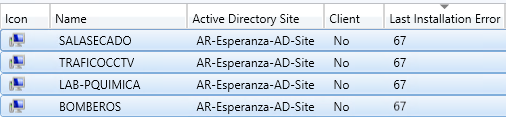
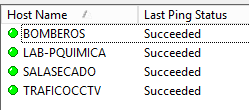

By DNS problems, it might be that a client respons on ping but actually it is another host/client there. RDP will reveal that, if you try to connect to the desired machine, it asks you creds and then tells it is wrong host. If you manage to connect via RDP, the DNS should be fine. Also try to open \hostname\c$ from the site server, can you do that? And from site server, the ccm.log will tell you what is happening with client push on a server side.
Hello.
Thanks for replying, I'm trying to log in via shared resources and I can't. I'm not able to \hostname\admin$
Any other test to check?

Kindly run nslookup for both IP and hostname and check if they are having proper hostname
If the IP having different DNS name kindly perform DNS-Scaveging and delete outdated record from DNS.
I do a nslookup hostname and it returns the hostname and its ip.
I do an nslookup ip-address and it says: can't find ip-host non-existent domain.
Can we conclude that this computer has a DNS problem?
Best regards.
Its DNS issue, kindly ask concern team to fix the issue