Azure Backup
An Azure backup service that provides built-in management at scale.
This browser is no longer supported.
Upgrade to Microsoft Edge to take advantage of the latest features, security updates, and technical support.
' cx='32' cy='32' r='32' /%3E%3Ctext x='50%25' y='55%25' dominant-baseline='middle' text-anchor='middle' fill='%23FFF' %3EA%3C/text%3E%3C/svg%3E)
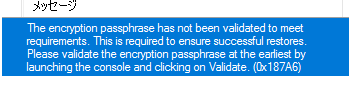
Please tell me the solution.

@徐 勇 Thank you for reaching out to us and I apologize for the delayed response!
Per error message, it seems you need to validate passphrase.
Launch Microsoft Azure backup console, and click on validate. You will command line screen to enter passphrase. Once the passphrase is entered you will be able to access Microsoft Azure backup console and continue backup operations.

If you are unable to find validate option in Microsoft Azure backup console, try updating the MARS agent. You can download the latest version of the agent from the vault, or download it directly.
After updating the MARS agent if you still don't find validate option, you can start the validation tool manually from the location below:
C:\Program Files\Microsoft Azure Recovery Services Agent\bin\PassphraseValidator.exe
Hope this helps!
----------------------------------------------------------------------------------------------------------------------
If the response helped, do "Accept Answer" and up-vote it