Clearing Date and Time Picker?

a_unique_name 401 Reputation points
2021-04-13T00:19:32.507+00:00

Hi Folks:

Developing on Windows 10 Pro, all C++, current VS, WIN32 not MFC.

I'm running into a problem I'm surprised I haven't seen before.

I have a dialog that's using date and time pickers.

Until I set a time, I'd like the pickers to return an indication that no time has been set. I'm not particularly picky, just something I can detect.

Apparently, whenever I send the picker a DTM_GETSYSTEMTIME message, either the time set in the picker is returned or the current time is returned.

This not what I need. I need to receive an invalid time, or something to tell me if the picker hasn't been set by the user.

I've tried sending a DTM_SETSYSTEMTIME with an invalid system time, all zeros, and both GDT_NONE and GDT_VALID.

I keep getting valid times.

I guess I haven't seen this before because I usually service the WM_NOTIFY, DTN_DATETIMECHANGE message in order to set a date and time. Now I'd like to query the control for the date directly.

Is there a method to do this?

[Edit]

The value returned by the DTM_GETSYSTEMTIME message is always GDT_VALID.
[/Edit]

Thanks
Larry

Windows development | Windows API - Win32
Developer technologies | C++
A high-level, general-purpose programming language, created as an extension of the C programming language, that has object-oriented, generic, and functional features in addition to facilities for low-level memory manipulation.
0 comments No comments
{count} votes

Answer accepted by question author
  1. Petrus 【KIM】 546 Reputation points
    2021-04-13T01:32:25.497+00:00

    You can initialize the control "1900-01-01 00:00:00" AS "MinDate".
    In .NET Framework, Datatime use "0000-00-00 00:00:00" is MinDate
    <.NET>
    A date and time expressed in the number of 100-nanosecond intervals that have
    elapsed since January 1, 0001 at 00:00:00.000 in the Gregorian calendar.
    <WIN32>
    SYSTEMTIME
    wYear : The year. The valid values for this member are 1601 through 30827.
    But, in my case I cannot set the year under 1752.

    So, You can define MinDate then check the value.

            SYSTEMTIME oSysTime;
            HWND hWndDtp = NULL;
            RtlZeroMemory(&oSysTime, sizeof(SYSTEMTIME));
            oSysTime.wYear = 1900;
            oSysTime.wMonth = 1;
            oSysTime.wDay = 1;
    
            hWndDtp = GetDlgItem(hDlg, IDC_DATETIMEPICKER1);
            DateTime_SetSystemtime(hWndDtp, GDT_VALID, &oSysTime);

    
    0 comments No comments

3 additional answers

Sort by: Most helpful
  1. SM 416 Reputation points
    2021-04-13T01:28:28.433+00:00

    Did yo try setting DTS_SHOWNONE style?

    As per MSDN
    Return value
    Returns GDT_VALID if the time information was successfully placed in lParam. Returns GDT_NONE if the control was set to the DTS_SHOWNONE style and the control check box was not selected. Returns GDT_ERROR if an error occurs.

    -Seetharam

    0 comments No comments

  2. Song Zhu - MSFT 906 Reputation points
    2021-04-13T03:40:09.567+00:00

    According to the MSDN:

    GDT_NONE

    Set the DTP control to "no date" and clear its check box. When this flag is specified, lpSysTime is ignored. This flag applies only to DTP controls that are set to the DTS_SHOWNONE style.

    So when you set GDT_NONE, you need to add the DTS_SHOWNONE style when creating the control.

    This way you can set the time at the beginning as:

    DateTime_SetSystemtime(hWndDtp, GDT_NONE, NULL);  
    

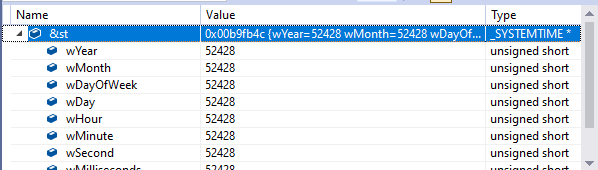
    Then when you use DateTime_GetSystemtime, the function will return:

    ![87225-image.png

    You can think of it as an unset time. Then when you set the time, you can also get the set time normally.

    0 comments No comments

  3. a_unique_name 401 Reputation points
    2021-04-14T18:27:53.607+00:00

    Thank You SM, PetrusKIM and SongZhu:

    I tried to comment on each response, but I apparently don't understand how that works.

    I selected the answer provided by PetrusKIM.

    I had attempted his method, but I was setting the year to zero, and later to the 1601 as mentioned in the documentation. The control returned the current date and time when queried, when initialized to either of these values.

    PetrusKIM's suggestion of using 1752 was the key. I probed around and found midnight on the morning of October 1, 1752 as the earliest date that worked, at least for me. Querying the control for the SYSTEMTIME would return that date if the user hadn't selected their own date on the control.

    It might be good to bring this to the attention of the people writing the documentation for topics related to SYSTEMTIME. Or modify the code behind the control to comply with the documentation.

    I appreciate everybody's suggestion. however, setting the control's style to DTS_SHOWNONE caused the control to go invisible, with no checkbox or anything to suggest a control is occupying that area of the dialog. The control needs to be visible, waiting for the use's input.

    Thanks again.

    Larry

    0 comments No comments

Your answer

Answers can be marked as 'Accepted' by the question author and 'Recommended' by moderators, which helps users know the answer solved the author's problem.