I still have this problem when I move meetings and it has nothing to do with it happening after I cancel a reminder.
Outllok meeting reminders are always removed when rescheduling a meeting
When rescheduling a meeting (whether it has started or not) the moved meetings loses any reminder set. Surely if a meeting had a reminder enabled, the same reminder should be carried over tot eh newly scheduled instance? Why is it reset as default beahviour?
Outlook | Windows | Classic Outlook for Windows | For business
-
Hill, Simon (Group) • 291 Reputation points
2021-04-28T12:44:55.563+00:00 I think you are missing my point. The current functionality assumes the user knows to check the reminder status when moving a meeting, however they actually move it (open and reschedule or click and drag). Most users will assume that the reminder they originally set would get set on the new instance OR they would get prompted to re-apply it OR they would be prompted to edit and check the whole appointment. The truth is, if you click and drag, it takes a second and the appointment just moves, with no prompts etc. It puts the onus on the scheduler to check everything about the appointment, which in this instance makes the click and drag functionality pointless; you have to open and edit the appointment anyway to reset the reminder. And believe me, I've been invited to many appointments which have been moved and this resulted in the reminder being removed without the host being aware.
It's not intuitive and not user friendly because the app assumes that regardless of how you set up the appointment originally, the current state is exactly what you want to copy to the new time slot. People don't work/think that way.
-
Jade Liang-MSFT • 9,986 Reputation points • Microsoft Employee
2021-05-04T10:16:13.547+00:00 Thanks for your update,
The truth is, if you click and drag, it takes a second and the appointment just moves, with no prompts etc
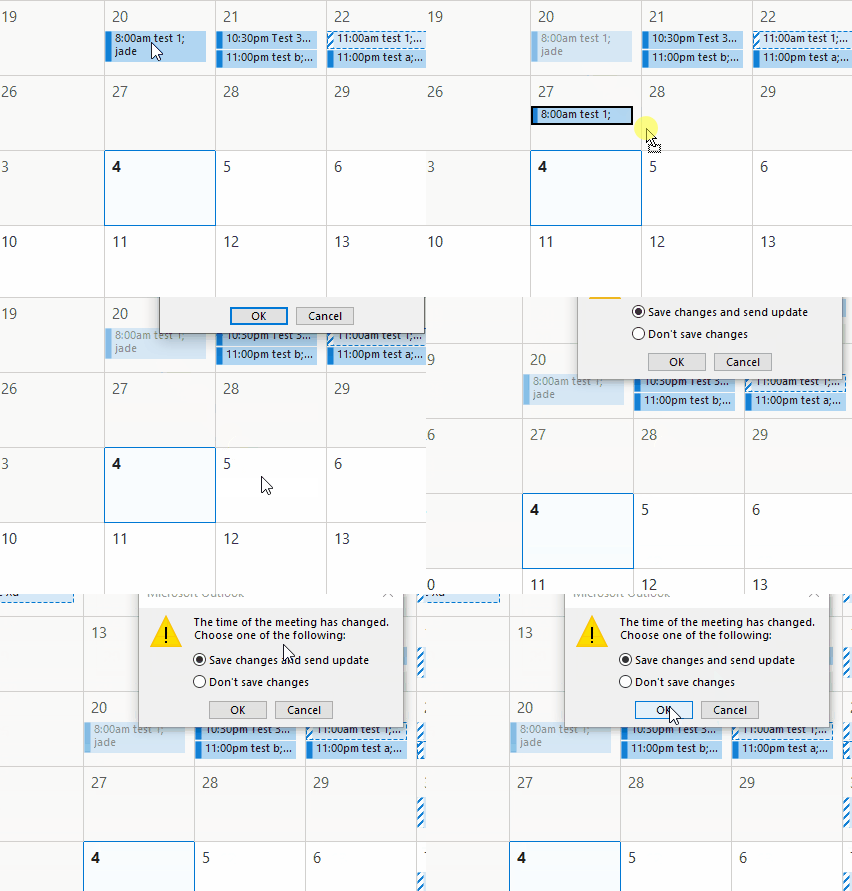
Actually, if you are the meeting organizer, it would display a prompt and we could reschdule the meeting after click "OK" as I mentioned on April 19, in order to make it clearer, I added the .gif like below
If you are not the meeting organizer or you are rescheduling an appointment instead of a meeting, it wouldn't prompt display to reschedule it. If that's your case, in general, due to the reminder would be lost(changed to None) once we dissmiss it, and there's no option/location to store and restore the original reminder information, so it's necessary to re-check and configure the reminder.
Hope that would be helfpul to you.
-
Jade Liang-MSFT • 9,986 Reputation points • Microsoft Employee
2021-05-07T09:06:15.29+00:00 Hi,
I post it to check if you still have any questions about it, if so, please feel free to post back :) -
Hill, Simon (Group) • 291 Reputation points
2021-05-07T10:27:30.433+00:00 This is my last comment so whether you respond or not I'm giving up. My point which again YOU MISSED, is that the user is not prompted to edit the appointment to reset anything. If like many they assume it will work as they originally set it up, most will just click save changes and continue, unaware anything has been reset/removed. You're assuming a user thinks like a computer and will automatically check everything. Users don't, they make assumptions all the time based on how they think an app works or how it should.
Just to point out that if you move a historic appointment with a reminder in the Android calendar app it keeps and carries forward any reminder set up. If a simple mobile app like that can do it, I'd expect something with Outlook's development and deep code history to be able to. Maybe rather than spending time arguing that the customer is wrong, you actually spent it fixing the code, you'd find customers more satisfied with your products.
-
Jess N • 21 Reputation points
2021-10-18T16:24:20.86+00:00 Agree 100%
This Outlook behavior is incredibly frustrating. Whether I am the organizer or an attendee of a meeting that has been rescheduled - it often happens that the reminder is lost when the meeting is rescheduled.
It is not intuitive (no matter what the conditions are) that the reminder would need to be reconfigured upon rescheduling as evidenced by this has been the behavior for as long as I can remember (more than 10 years) and I still don't remember to check it even though i know it will happen --- and i wind up late to meetings.
Microsoft -- please change this behavior.
-
Brunes, Cherrie • 6 Reputation points
2021-12-07T15:04:17.157+00:00 I was late yet again yesterday to a meeting because of this behavior. The default behavior is a bad user experience.
-
JG • 1 Reputation point
2021-12-09T17:46:52.81+00:00 Once again I missed a meeting because the reminder was removed. THIS IS NOT ACCEPTABLE!! The sender should not get to determine the reminder setting!!!
-
BK12345 • 6 Reputation points
2022-03-23T18:58:54.69+00:00 I've got it!!! Example - a meeting is upcoming in 35min..... When you hit "snooze" at the 30min reminder for that meeting, then "snooze" again at the 5min reminder for that meeting, those reminder countdowns are also changing inside of that meeting... so by the time the reminder hits at "0 minutes" when the meeting starts, that Outlook meeting is now set to None for its reminder... Thus, if that meeting gets moved to a different time, it carries over the None for its reminder...
Much like you... this has been driving me nuts. Finally debunked it just now and wanted to share for the sake of other's sanity!!
-
David Lindner • 31 Reputation points
2022-03-28T08:50:57.21+00:00 I agree 100%
The original reminder setting should be reset to what was selected by the user before the first "snooze" for any specific meeting time, when the meeting is subsequently copied or moved at a later time.
-
Pokey • 56 Reputation points • Microsoft Employee
2022-03-31T22:42:58.103+00:00 I am "upvoting" this. This is an undesirable behaviour and have missed a number of meetings due to the reminder setting being changed to "none" with no notification or other indication it has changed. This is not optimal user experience and creates negative employee social interaction. There does not seem to be any way to change this behaviour.
-
LJ • 41 Reputation points
2022-04-05T23:21:40.98+00:00 @Hill, Simon (Group) - I have researched this many times over the last year and still no results with a solution. It's a common issue/concern at my company as well. The Outlook settings don't have a path for setting notification intervals for a "rescheduled" meeting. I honestly don't think Microsoft has a fix for this. Really hope they're at least investing time into adding it to the settings or fixing the default for rescheduled meetings to 15 minutes (or anything at this point).
-
Helio Lino De Almeida Filho • 26 Reputation points • Microsoft Employee
2022-09-14T22:33:07.82+00:00 Please, at least add a configuration option that can change this behavior, for example forcing all meetings to have an X time reminder set by default; any rescheduled meeting you create/move/change, even if it already happened, will have the reminder set with a value if the user turns on.
This will give the user the option that best fits people's need. -
Eric Burns • 31 Reputation points
2022-11-09T15:57:02.673+00:00 This is a legitimate issue. When meetings in Outlook are rescheduled, reminders do not pop up prior to the rescheduled meeting. Please address - it is unacceptable and surprising that it remains unresolved.
-
SimonT • 16 Reputation points
2022-11-10T11:30:00.923+00:00 Wanted to add my frustrustration with this behaviour too. From reading back through, I understand that if a meeting is missed (i.e. current time > meeting start time), the reminder on that meeting is set to 'none', regardless of whether a reminder was automatically set according to default preferences, manually in the meeting item itself, and regardless of whether the original reminder is dismissed or not.
What makes this behaviour especially frustrating is that it specifically targets meetings you have missed! I rely on meeting reminders quite heavily. If for some reason I miss a meeting (away from my desk, otherwise engaged), I often - quite logically - need to apologise profusely to the other invitees and the meeting is rescheduled by whomever set it up (note it doesn't matter whether it's my invite or someone elses). Then, when future meeting comes along, no reminder so miss the meeting AGAIN.
Missing the meeting once is barely excusable, but missing it twice is embarrassing. And that embarrassment could easily be avoided if meeting reminders reverted to default when they're rearranged from the past into the future.
Exceptionally frustrating behaviour and desperately needs fixing. Unfortunately though, it will never be upvoted because it's low frequency - and therefore most who are affected probably don't realise why.
MINOR WORKAROUND: This is less than ideal (and really annoying you can't save an advanced find in Calendars in the same way you can save Search folders in Email), but you can at least find meetings that are affected. Shouldn't need to be done, but here we are...
Go to your calendars, select search -> Search tools -> Advanced find
In the window that pops up, click the Advanced tab and add these three fields:
Start -> On or after -> "today" (without quote marks, but you literally type in 'today' into the box
Reminder -> equals -> no reminder
Categories -> doesn't contain -> "Holiday" (this is a specific one in my business where shared calendar shows all national holidays and events - there's practically one every day so don't want reminders! -
David B • 5 Reputation points
2023-01-18T16:38:09.98+00:00 Please, MS fix this!!!!!!!!!!!!!!!!!!!!!!!!!!!!!!!!!!!!!!!
-
Angelo Cura Civetta • 105 Reputation points
2023-04-24T16:37:36.27+00:00 When can we expect a fix for this very annoying behavior?
-
Friedel, Adele • 45 Reputation points
2023-05-22T12:03:57.49+00:00 I am adding my name to this issue. For some clarification on this "bug", it happens to recurring meetings when you move them after the meeting start time. Here are some details to help with reproducing this issue:
- Open a meeting that should have started but a move in time has been requested.
- Put the meeting in a timeslot in the future.
- Save the meeting (the prompt appears correctly)
- Open the moved meeting
- The reminder is set to None.
This is a pretty serious bug as I have missed meetings with executive management team members due to the lack of the reminder. This really needs to be fixed.
Suggestion: Use the default reminder value regardless of when the move is performed.
-
C Gordon • 30 Reputation points
2023-08-07T18:19:16.0266667+00:00 I have the same issue. This occurs when I reschedule a single occurrence of a recurring meeting.
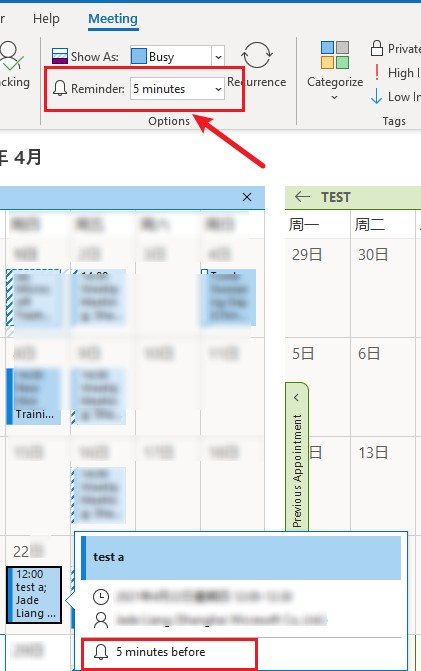
Recurring meeting series setting:
Rescheduled single occurrence setting:
-
C Gordon • 30 Reputation points
2023-08-07T18:23:49.4233333+00:00 And in case someone asks (See: https://answers.microsoft.com/en-us/outlook_com/forum/all/outlook-appointment-series-reminders-not-working/3cdacf05-c241-490f-8644-ab2671cd1bae). My default reminders are set to 15 minutes:
-
LJ • 41 Reputation points
2023-08-07T18:28:08.3133333+00:00 Microsoft has told me that this [drop the reminder notification] will only occur when you attempt to reschedule a single occurrence of a recurring meeting AFTER the meeting has passed the start time. If the meeting you are attempting to reschedule is rescheduled prior to the start time, the reminder notification should stay as the default. Either way, this is still annoying.
-
M. B. Howard • 10 Reputation points
2023-09-05T14:46:34.19+00:00 This is an ongoing problem with my Outlook. Unlike some others, this occurs on both recurring and single one-off meetings in my calendar (removes the flag or changes it to 18 hours instead of the default 15 minutes). It also will change the meeting so it is not blocking the time as "busy". This also applies to meetings which have not started yet and ones which the start time has passed. This is a huge problem!!
-
Knott, Ron • 10 Reputation points
2023-10-20T21:46:40.4133333+00:00 Still a problem. :-( Have been late for countless meetings over the years. Happened again today.
-
Anonymous
2024-02-05T20:04:51.9466667+00:00 This happens not only on recurring meetings. This happens also consistently for a standalone meeting that is scheduled and then re-scheduled - even if the reschedule happens prior to the start of the meeting.
-
Annemarie • 25 Reputation points
2024-04-18T13:57:20.2866667+00:00 Why is this 3 yours later still not solved? I've missed multiple meetings because other departments dont schedule a follow up but move the same meeting to a new date. This can be days later when i've already dismissed the notification. Meaning there will not be a new notification for the "new" meeting. This can't be too difficult to fix!
-
Anonymous
2024-05-03T17:36:06.36+00:00 This has been an issue for many years. I can't believe it hasn't been fixed yet. Ridiculous. Every day at work I have to tell people when they move a meeting that no one is going to show up to it unless you manually add back the reminder. FIX IT !!!!!
-
Lara Delacourt • 0 Reputation points
2024-06-14T08:47:07.9866667+00:00 Hi, I've noticed this issue also occurs when using the new Outlook and duplicating meetings. It's indeed very annoying and impact our business & business relationships negatively.
-
Kevin • 0 Reputation points
2024-07-23T07:17:17.16+00:00 Upvote,
the issue lead to several missed meeting from my side, because I was focused on another task. -
Jimmy Reno • 0 Reputation points
2024-09-09T19:31:24.4466667+00:00 This needs to be fixed and the reminder needs to stay with the appt whenever you change it. There's already enough going on with Teams meeting we don't need anything else to look for.
-
Deleted
This comment has been deleted due to a violation of our Code of Conduct. The comment was manually reported or identified through automated detection before action was taken. Please refer to our Code of Conduct for more information.
-
Negrillo, Delmart • 5 Reputation points
2025-03-31T13:16:21.0366667+00:00 This is actually a much bigger issue than an annoyance. ALL recurring series are in the past because the meeting date takes the very first meeting into account. This means that every time one instance of a series is moved, it automatically removes the reminder. If the person forgets to reset the reminder when rescheduling one instance, no one gets a reminder for that instance. I have also had people miss meetings, and I have missed my own meetings, because no reminder went off. This is a very big bug that needs to be corrected quickly.
-
Hal Slaughter • 0 Reputation points
2025-05-24T15:32:37.18+00:00 If I open a single future instance of a recurring meeting and change the date, the reminder is turned off for that instance and cannot be set. It stays turned off, even when I enter a time, i.e., "2 weeks," or "3 days," etc. The remaining instances are unaffected.
1 commentHide comments for this answerReport a concern
Sign in to comment
3 answers
Sort by: Most helpful
-
Levitt, Bruce • 10 Reputation points
2024-08-26T01:06:56.7966667+00:00 -
Jade Liang-MSFT • 9,986 Reputation points • Microsoft Employee
2021-04-15T03:04:52.717+00:00 Hi @Hill, Simon (Group) ,
When rescheduling a meeting (whether it has started or not) the moved meetings loses any reminder set
How did you reschedule the meeting? And what would the reminder become(the default reminder time or None)?
Based on my test on Outlook 365 Version 2103 (Build 13901.20400), once we set the reminder for the meeting, it wouldn't be changed when we reschedule the meeting via open it and change the date whatever we are the organizer or attendee. But if we changed the date to a time in the past, the reminder would pop up immediately , and if we choose dismiss accidentally, the reminder would be changed to None, please kindly check if it's your case.
If that's not your case, in order to further analyze your issue and perform more targeted test on my environment, please provide us with more detailed information about your issue(account type, Outlook version and your reschedule steps).
If your issue has any update, please feel free to post back.
If the response is helpful, please click "Accept Answer" and upvote it.
Note: Please follow the steps in our documentation to enable e-mail notifications if you want to receive the related email notification for this thread.-
Hill, Simon (Group) • 291 Reputation points
2021-04-15T08:31:07.197+00:00 It was a colleagues meeting and it had already passed it's start time. How they moved it I'm not sure.
However, I've seen the same behaviour when clicking on and dragging a meeting to a new slot, where it's not occurred yet. It appears that clicking and dragging rather than actually opening and changing the times, can cause this to happen.
In any case, logically, if any meeting is rescheduled, whether in the past or not, having a reminder indicates the organiser wanted a reminder set. However a meeting is rescheduled, there's no logical reason to remove the reminder?
-
Jade Liang-MSFT • 9,986 Reputation points • Microsoft Employee
2021-04-19T07:20:33.893+00:00 Thanks for your update, have you checked the reminder before you drag it? And whether you are the meeting organizer?
I have performed many tests on my Outlook 365 but still couldn't reproduce your issue, here are my test steps:- create a meeting in my calendar in the past and set the reminder to 5 minutes
- click the meeting and drag it to a new slot in the future, Outlook would promt and ask me if I would like to send update, choose ok , then it would open the meeting automatically.
- in the update invitation, the meeting reminder wouldn't be changed. After that, I check the new item, it also couldn't be changed in my calendar.
If there are any differences between my test and yours, please kindly point out it, if it's actually same with yours, the issue may be related to your client, in order to further analyze it, please provide us your client version.
-
Jade Liang-MSFT • 9,986 Reputation points • Microsoft Employee
2021-04-23T10:00:27.127+00:00 Hi,
Just checking if your issue has any update, if so, please feel free to post back, thanks for your understanding :) -
Hill, Simon (Group) • 291 Reputation points
2021-04-23T10:16:57.73+00:00 The issue appears to happen in these circumstances. 1) Meeting passed (notification likely dismissed), 2) meeting moved by dragging it to new slot in calendar view, 3) new slot does not show notification that was set on original meeting.
If a meeting is moved without opening it, why would the original settings for the meeting be changed? What you are suggesting is that 'drag & drop' should NOT be used when rescheduling an earlier meeting (open and change the instance, not drag it), and that's something that functionality should fix or block from happening. If users don't know this is necessary, how are they going to learn that's how to ensure the earlier meeting set up needs re-validation if they aren't told?
-
Jade Liang-MSFT • 9,986 Reputation points • Microsoft Employee
2021-04-28T09:31:51.007+00:00 Hi @Hill, Simon (Group) ,
Thanks for your reply, according to your description, the issue occurred on these meetings whose notification were dismissed by youself, is it right? If so, please understand that the reminder would be changed to None once you click dismiss the reminder, which has nothing to do with whether you move this meeting. So the focus of the question should be whether the reminder still exists before you reschedule/drag it, we could check it via click the meeting like below:
If I have any misunderstandings or you still need further assistance, please feel free to post back.
-
alhowarthWF • 301 Reputation points
2022-05-11T21:24:07.5+00:00 Based on your explanation, I (and I hope others) understand why this is happening. By default, once a meeting has passed, Outlook changes the Reminder to "None". I don't agree with this logic, but understand that is what is causing this problem.
Since it is behaving as the developers expected, I would suggest an enhancement request. I suggest there be a setting, if enabled, to retain the Reminder time when the meeting was last saved, not set by "Dismiss" or "Snooze". That way if a past meeting is rescheduled, it will retain a reminder.
-
Sandi Uligian • 5 Reputation points
2023-06-20T14:26:52.0633333+00:00 Meetings rescheduled by accepting a proposed new time, which happens constantly, also lose the reminder. It makes no sense. It doesn’t only happen when a reminder has been dismissed.
Sign in to comment -
-
Hal Slaughter • 0 Reputation points
2025-05-24T15:23:01.8366667+00:00 If I open a single instance of a series and change the date, the reminder is turned off for that instance and cannot be set. It stays turned off, even when I enter a time, i.e., "2 weeks," or "3 days," etc. The rest of the series is unaffected.
-
Hal Slaughter • 0 Reputation points
2025-05-24T15:25:42.4566667+00:00 This happens when changing a single instance occurring in the future.
Sign in to comment -