
SessionTimeout set by Set-SmbClientConfiguration does not work and alawys less than 20 seconds
' cx='32' cy='32' r='32' /%3E%3Ctext x='50%25' y='55%25' dominant-baseline='middle' text-anchor='middle' fill='%23FFF' %3EHH%3C/text%3E%3C/svg%3E)
hzz hzz
6
Reputation points
This question is about samba,the environment is as follows :
Samba Server
System info : CentOS Linux release 7.6.1810
Network : Virtual IP create byifconfig eth0:231 192.168.0.231 netmask 255.255.255.0 up
Samba Client
System info : Windows Server 2012R2
**Here are the steps to reproduce the problem : **
- Create a samba share in
CentOS - Creates a SMB mapping on the
Windows Server 2012R2SMB client to the SMB share created in step 1 - In
Windows Server 2012R2SMB client path, Usefioto simulate a given I/O workload :fio -filename=cifs.txt -iodepth=1 -direct=1 -ioengine=windowsaio -thread -rw=write -bs=1k -size=1g -numjobs=1 -group_reporting -name=mytest - In CentOS samba server, run the command
date; ifconfig eth0:230 down - We found that the
fiofailed after 20 seconds and windows smb client disconnect with smb server
I want to increase the disconnect time,Microsoft Doc tells me that the parameter SessionTimeout set by Set-SmbClientConfiguration means the number of seconds that the client waits before disconnecting an inactive session. But When I set this parameter to more than 20 by Set-SmbClientConfiguration -SessionTimeout 60, the timeout is always 20 seconds, this parameter only works when be set to less than 20 ,e.g. Set-SmbClientConfiguration -SessionTimeout 10
Windows for business | Windows Client for IT Pros | Networking | Network connectivity and file sharing
Windows for business | Windows Server | User experience | Other
{count} vote
-
hzz hzz 6 Reputation points
2021-04-16T02:46:32.773+00:00 SMB Dialect is SMBv3
PS C:\Users\Administrator> Get-SmbConnection ServerName ShareName UserName Credential Dialect NumOpens ---------- --------- -------- ---------- ------- -------- 192.168.0.231 cifs-01 W\Administrator W\Administrator 3.1.1 2 -
' cx='32' cy='32' r='32' /%3E%3Ctext x='50%25' y='55%25' dominant-baseline='middle' text-anchor='middle' fill='%23FFF' %3EA%3C/text%3E%3C/svg%3E) Anonymous
Anonymous2021-04-16T10:28:08.987+00:00 Hi,
Thanks for your update.
May I know whether the issue occurred between Windows SMB client and Windows SMB server? Please understand that Linux is a third party OS which we're not familiar and we do not have such Linux device for testing in our lab.
Meanwhile, I will consult this issue with our PowerShell support engineer and will get back to you if there is any update.
Best Regards,
Sunny -
hzz hzz 6 Reputation points
2021-04-20T02:07:58.137+00:00 Thanks for your reply.
My issue occurred between Windows SMB client and Linux SMB server.
And I have test Windows SMB client and Windows SMB server, the parameter
SessionTimeoutfor smb client maybe also doesn't work because the disconnect time after disable the smb server's network is not equal toSessionTimeout.Looking forward to your update, Best Regards.
-
Anonymous
2021-04-20T08:05:02.847+00:00 Hi,
Thanks for your feedback.
the parameter SessionTimeout for smb client maybe also doesn't work because the disconnect time after disable the smb server's network is not equal to SessionTimeout .
May I know how do you detect the disconnect time after disable the SMB server's network? Could you please help to provide more details that we can test in our lab.
Best Regards,
Sunny -
hzz hzz 6 Reputation points
2021-04-21T02:16:36.983+00:00 After mounted SMB server's shared directory on SMB client, I use the following three steps to calculate the disconnect time :
- In SMB client 's mount path , Use fio to simulate a given I/O workload :
fio -filename=cifs.txt -iodepth=1 -direct=1 -ioengine=windowsaio -thread -rw=write -bs=1k -size=1g -numjobs=1 -group_reporting -name=mytest,Z:is the mount path, we should switch to this directory and runfiocommand. And we can get more information about fio in github/fio.
- In SMB server, disable the network and record the time.
- In SMB client, fio command will stop and print the end time. Subtract
the record in step 2from this end time and we have the disconnect time.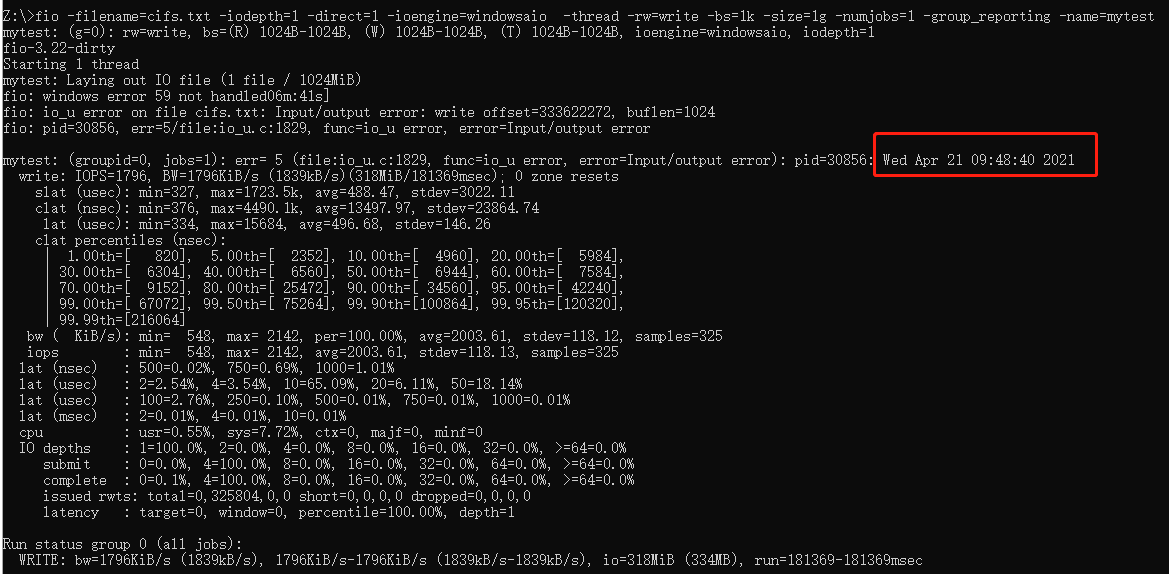
- In SMB client 's mount path , Use fio to simulate a given I/O workload :
-
Anonymous
2021-04-22T09:43:11.827+00:00 Thank you very much for your update. I will perform some test in my lab environment and will feedback to you if there is any update. Thank you for your patience and understanding.
Sign in to comment
Sign in to answer