SQL Server Reporting Services
A SQL Server technology that supports the creation, management, and delivery of both traditional, paper-oriented reports and interactive, web-based reports.
This browser is no longer supported.
Upgrade to Microsoft Edge to take advantage of the latest features, security updates, and technical support.
' cx='32' cy='32' r='32' /%3E%3Ctext x='50%25' y='55%25' dominant-baseline='middle' text-anchor='middle' fill='%23FFF' %3EA%3C/text%3E%3C/svg%3E)
Hi All,
My SSRS report contains two reports.
Applied the grouping on DEPT No.
When I export to excel,
I want to see each group of two reports into a sheet.
DEPT10 in 1st page,DEPT20 in 2ndt page,DEPT30 in 3rd page
How to achieve?
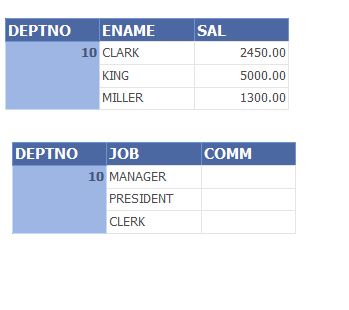
Please download the SSRS sample file from here
https://drive.google.com/file/d/1i8pT9_OeexFX86GwUebax6RmT7eSaYVy/view?usp=sharing

Hi @Arjun ,
I want to see each group of two reports into a sheet.
Here you only need to select "DEPTNO", right click-add parent group-row group-Group by "DEPTNO"
After that , follow the steps of your previous case link: https://learn.microsoft.com/en-us/answers/questions/359414/how-to-export-get-each-separate-report-on-34page-b.html?childToView=361743#comment-361743
I have already given the direction to resolve the issue, you need to try it by yourself.
Best Regards,
Joy
If the answer is helpful, please click "Accept Answer" and upvote it.
Note: Please follow the steps in our documentation to enable e-mail notifications if you want to receive the related email notification for this thread.