Azure App Service
Azure App Service is a service used to create and deploy scalable, mission-critical web apps.
This browser is no longer supported.
Upgrade to Microsoft Edge to take advantage of the latest features, security updates, and technical support.
' cx='32' cy='32' r='32' /%3E%3Ctext x='50%25' y='55%25' dominant-baseline='middle' text-anchor='middle' fill='%23FFF' %3EAR%3C/text%3E%3C/svg%3E)
I am getting an issue with my web app hosted on linux app service plan which is a static next js site and is running perfectly fine in Azure storage with cdn & window based web app (with extra files like web.config & server.js)
I would like to run this in Azure web app (Linux app service plan) but the refresh is not working except for the home page. This works perfectly in my local as well. I have below settings in my web app
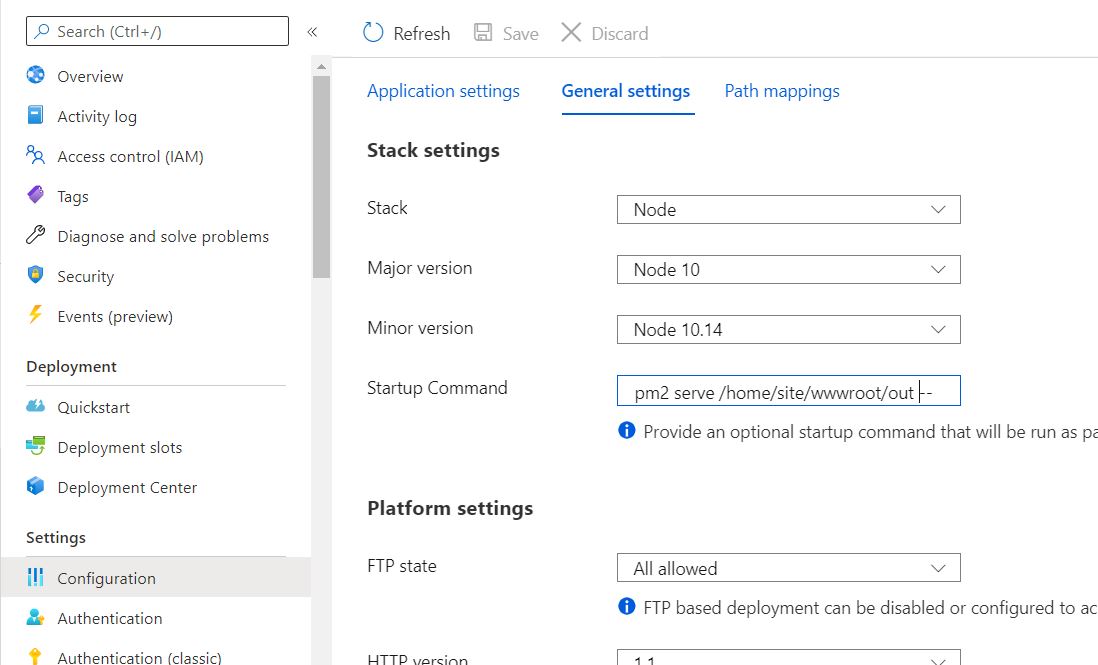
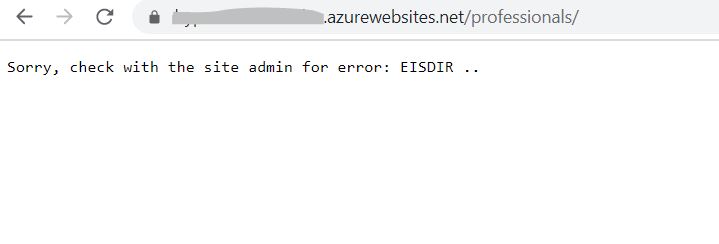
Suppose my website homepage URL is xyz.azurewebsites.net and when I navigate to the help page (xyz.azurewebsites.net/professionals) it works fine. But, if I refresh the page or try to go to the URL directly it gives me below error
' cx='32' cy='32' r='32' /%3E%3Ctext x='50%25' y='55%25' dominant-baseline='middle' text-anchor='middle' fill='%23FFF' %3EJM%3C/text%3E%3C/svg%3E)
According to your description, your issue is not in Teams for Linux scope. I will remove teams for Linux tag from your thread. Thanks for your understanding and patience!
' cx='32' cy='32' r='32' /%3E%3Ctext x='50%25' y='55%25' dominant-baseline='middle' text-anchor='middle' fill='%23FFF' %3EKP%3C/text%3E%3C/svg%3E)
Arun Rana Were you able to resolve the issue?
' cx='32' cy='32' r='32' /%3E%3Ctext x='50%25' y='55%25' dominant-baseline='middle' text-anchor='middle' fill='%23FFF' %3ECL%3C/text%3E%3C/svg%3E)
I'm having the same problem.
In the startup command, I have npx serve /home/site/wwwroot -s, but when I refresh the page within a subpage, it redirects me back to the home page, and the browser URL stays on the same subpage it was on.
Any solution for this?