Developer technologies | Windows Presentation Foundation
A part of the .NET Framework that provides a unified programming model for building line-of-business desktop applications on Windows.
This browser is no longer supported.
Upgrade to Microsoft Edge to take advantage of the latest features, security updates, and technical support.

I am trying to understand Drag and Drop login in WPF application. I have made simple example and I think I got ListBox items already, but I can't understand how to Drop selected item from ListBox into TreeView. Can somebody provide the solution to this problem so I can understand the logic? I have went through many examples, but couldn't get it working in my model. What is currently wrong?
MainWindow.xaml.cs:
using DragnDrop.Models;
using System;
using System.Collections;
using System.Diagnostics;
using System.Windows;
using System.Windows.Controls;
using System.Windows.Input;
using System.Windows.Media;

namespace DragnDrop
{
  /// <summary>
  /// Interaction logic for MainWindow.xaml
  /// </summary>
  public partial class MainWindow : Window
  {
    public MainWindow()
    {
      InitializeComponent();
    }

    ListBox dragSource = null;

    private void TreeView_Drop(object sender, DragEventArgs e)
    {
      TreeView parent = (TreeView)sender;
      object data = e.Data.GetData(typeof(string));
      ((IList)dragSource.ItemsSource).Remove(data);
      //parent.Items.Add(data);
      Debug.WriteLine(data);
    }

    private void ListBox_PreviewMouseLeftButtonDown(object sender, MouseButtonEventArgs e)
    {
      ListBox parent = (ListBox)sender;
      dragSource = parent;
      object data = GetDataFromListBox(dragSource, e.GetPosition(parent));

      if (data != null)
      {
        DragDrop.DoDragDrop(parent, data, DragDropEffects.Move);
      }
    }

    private static object GetDataFromListBox(ListBox source, Point point)
    {
      UIElement element = source.InputHitTest(point) as UIElement;
      if (element != null)
      {
        object data = DependencyProperty.UnsetValue;
        while (data == DependencyProperty.UnsetValue)
        {
          data = source.ItemContainerGenerator.ItemFromContainer(element);

          if (data == DependencyProperty.UnsetValue)
          {
            element = VisualTreeHelper.GetParent(element) as UIElement;
          }

          if (element == source)
          {
            return null;
          }
        }

        if (data != DependencyProperty.UnsetValue)
        {
          return data;
        }
      }

      return null;
    }
  }
}
MainWindow.xaml:
<Window x:Class="DragnDrop.MainWindow"
        xmlns="http://schemas.microsoft.com/winfx/2006/xaml/presentation"
        xmlns:x="http://schemas.microsoft.com/winfx/2006/xaml"
            xmlns:self="clr-namespace:DragnDrop"
        xmlns:model="clr-namespace:DragnDrop.Models"
        Title="MainWindow" Height="450" Width="800">

  <Window.DataContext>
    <self:MainViewModel />
  </Window.DataContext>

  <Grid Margin="10">

    <Grid.RowDefinitions>
      <RowDefinition Height="Auto"/>
      <RowDefinition Height="*"/>
    </Grid.RowDefinitions>
    <Grid.ColumnDefinitions>
      <ColumnDefinition Width="*"/>
      <ColumnDefinition Width="*"/>
    </Grid.ColumnDefinitions>

    <TextBlock Grid.Column="0" Grid.Row="0" Text="Category structure" FontSize="18" Margin="0,0,0,10"/>
    <TreeView Grid.Column="0" Grid.Row="1"
              ItemsSource="{Binding TreeViewItems}"
              FontSize="14"
              AllowDrop="True"
              Drop="TreeView_Drop">
      <TreeView.ItemContainerStyle>
        <Style TargetType="{x:Type TreeViewItem}">
          <Setter Property="IsExpanded" Value="True"/>
        </Style>
      </TreeView.ItemContainerStyle>
      <TreeView.Resources>
        <HierarchicalDataTemplate DataType="{x:Type model:CategoryItem}" ItemsSource="{Binding Path=CategoryItems}">
          <TextBlock Text="{Binding Path=ItemName}" Margin="3,3,3,3"/>
        </HierarchicalDataTemplate>
      </TreeView.Resources>
    </TreeView>

    <TextBlock Grid.Column="1" Grid.Row="0" Text="Applications" FontSize="18" Margin="0,0,0,10"/>
    <ListBox Grid.Column="1" Grid.Row="1" Name="lbTodoList"
             HorizontalContentAlignment="Stretch"
             FontSize="14"
             ItemsSource="{Binding ListBoxItems}"
             PreviewMouseLeftButtonDown="ListBox_PreviewMouseLeftButtonDown">
      <ListBox.ItemTemplate>
        <DataTemplate>
          <Grid Margin="0,2">
            <Grid.ColumnDefinitions>
              <ColumnDefinition Width="*" />
              <ColumnDefinition Width="100" />
            </Grid.ColumnDefinitions>
            <TextBlock Text="{Binding}" />
          </Grid>
        </DataTemplate>
      </ListBox.ItemTemplate>
    </ListBox>

  </Grid>

</Window>
Here is link to repo with working example: https://github.com/vadimffe/DragnDrop

@mrw
Did your project refer to WPF Drag-and-Drop Smorgasbord? If it does, you need to add parts which related to ListBoxToTreeView to convert ListBox To TreeView.
This was just unnecessary part left. I was first following example you mentioned, but later decided to proceed without any framework at this point to understand the basics better. I have now excluded framework part from repo. How do I do it in my example without framework? As I understand I am now dragging ListBox and code is able to detect dragged ListBox items title, but it is not able to catch "dragged over" source, that is TreeView item. How to do that? Any help would be appreciated!
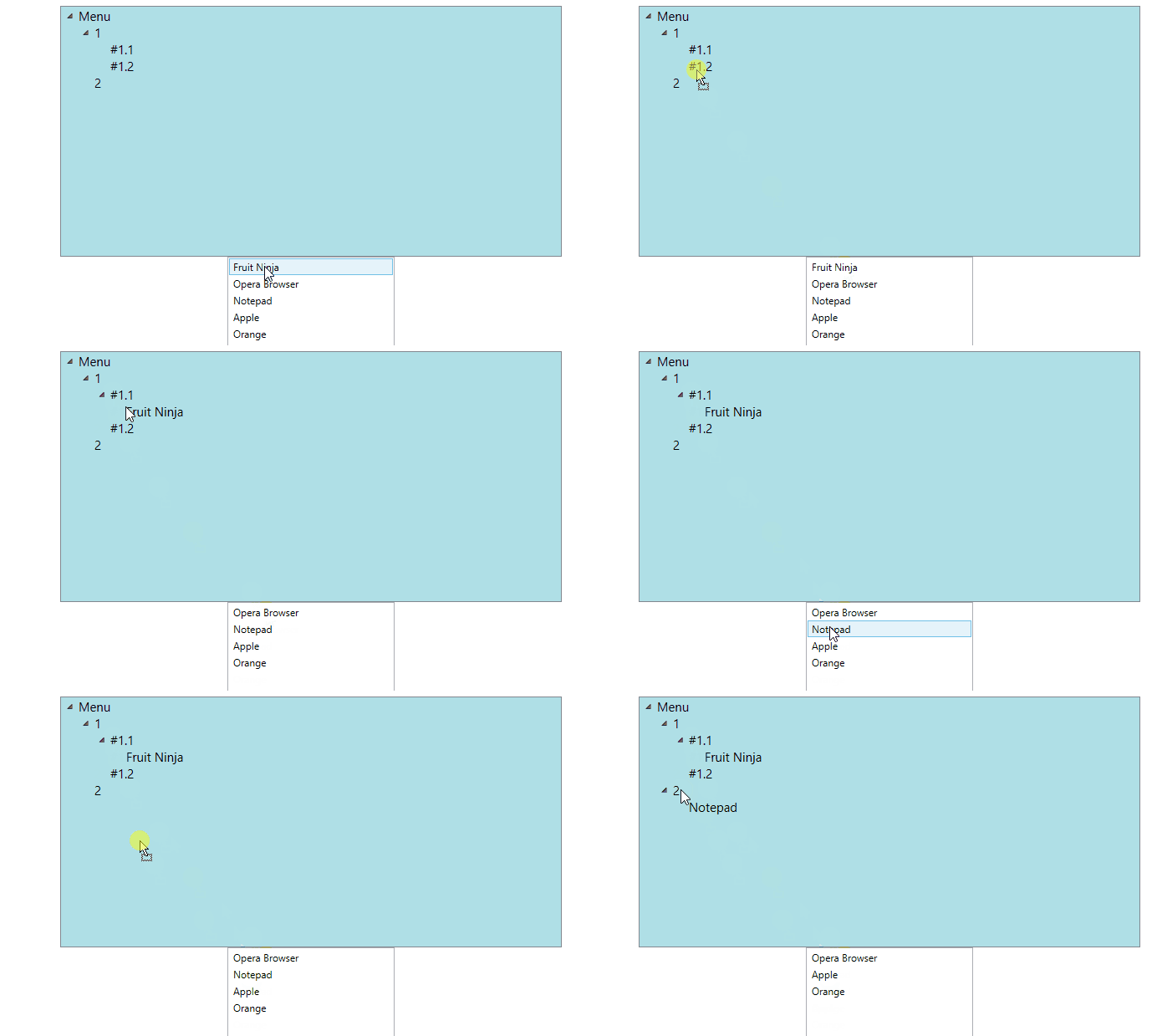
I made a demo to drag and drop from ListBox into TreeView for you.
xaml code:
 <StackPanel Width="800" Height="600">
        <TreeView Width="600" Height="300" Name="tvParameters" AllowDrop="True" Background="PowderBlue" Foreground="DarkBlue" FontSize="15" >
            <TreeView.ItemTemplate>
                <HierarchicalDataTemplate DataType="{x:Type local:MenuItem}" ItemsSource="{Binding Items,Mode=TwoWay,UpdateSourceTrigger=PropertyChanged}">
                    <TextBlock Text="{Binding Title ,Mode=TwoWay,UpdateSourceTrigger=PropertyChanged}" />
                </HierarchicalDataTemplate>
            </TreeView.ItemTemplate>
            <TreeView.ItemContainerStyle>
                <Style TargetType="{x:Type TreeViewItem}">
                    <EventSetter Event="TreeViewItem.Drop" Handler="treeView_Drop"/>
                    <Setter Property="IsExpanded" Value="True"></Setter>
                </Style>

            </TreeView.ItemContainerStyle>
        </TreeView>
        <ListBox Name="lb" Width="200" Height="200" SelectionMode="Single" PreviewMouseLeftButtonDown="ListBox_PreviewMouseLeftButtonDown"
                 ItemsSource="{Binding ListBoxItems,UpdateSourceTrigger=PropertyChanged}">
        </ListBox>
    </StackPanel>
C# code:
public partial class Window2 : Window
    {
        ViewModel viewModel = new ViewModel();
        TreeViewItem draggedItem;
        public Window2()
        {
            InitializeComponent();
            this.tvParameters.Items.Add(viewModel.TreeViewItems);
            lb.ItemsSource = viewModel.ListBoxItems;
        }

        private void treeView_Drop(object sender, DragEventArgs e)
        {
            try
            {
                e.Effects = DragDropEffects.None;
                e.Handled = true;
                draggedItem = new TreeViewItem() { Header = mydata };
                TreeViewItem TargetItem = GetNearestContainer(e.OriginalSource as UIElement);
                if (TargetItem != null && draggedItem != null)
                {
                    e.Effects = DragDropEffects.Move;
                    MenuItem original = viewModel.TreeViewItems;

                    MenuItem target = (MenuItem)TargetItem.Header;

                    if (target.Title == original.Title)
                    {
                        target.Level = original.Level;
                    }
                    else
                    {
                        CheckInTree(target, original.Items);
                    }
                    MenuItem draggedMeun = new MenuItem() { Items = null, Title = mydata.ToString() };
                    addChild(draggedMeun, target);
                    viewModel.ListBoxItems.Remove(mydata.ToString());
                    lb.ItemsSource = viewModel.ListBoxItems;
                }
            }
            catch (Exception)
            {
            }
        }

        private MenuItem CheckInTree(MenuItem target, ObservableCollection<MenuItem> originalItems)
        {
            MenuItem newtarget = originalItems.Where(m => m.Title == target.Title).FirstOrDefault();
            if (originalItems.Count != 0 && newtarget == null)
            {
                foreach (MenuItem menu in originalItems)
                {
                    ObservableCollection<MenuItem> menus = new ObservableCollection<MenuItem>();
                    menus = menu.Items;
                    CheckInTree(target, menus);
                }
            }
            return newtarget;
        }

        public void addChild(MenuItem _sourceItem, MenuItem _targetItem)
        {

            if (_targetItem == null) return;
            MenuItem item1 = new MenuItem();
            item1.Title = _sourceItem.Title;
            _targetItem.Items.Add(item1);

            if (_sourceItem.Items != null)
            {
                foreach (MenuItem item in _sourceItem.Items)
                {
                    addChild(item, item1);
                }
            }

        }


        ListBox dragSource = null;
        object mydata;
        private void ListBox_PreviewMouseLeftButtonDown(object sender, MouseButtonEventArgs e)
        {
            ListBox parent = (ListBox)sender;
            dragSource = parent;
            mydata = GetDataFromListBox(dragSource, e.GetPosition(parent));

            if (mydata != null)
            {
                DragDrop.DoDragDrop(parent, mydata, DragDropEffects.Move);
            }
        }

        private static object GetDataFromListBox(ListBox source, Point point)
        {
            UIElement element = source.InputHitTest(point) as UIElement;
            if (element != null)
            {
                object data = DependencyProperty.UnsetValue;
                while (data == DependencyProperty.UnsetValue)
                {
                    data = source.ItemContainerGenerator.ItemFromContainer(element);

                    if (data == DependencyProperty.UnsetValue)
                    {
                        element = VisualTreeHelper.GetParent(element) as UIElement;
                    }

                    if (element == source)
                    {
                        return null;
                    }
                }

                if (data != DependencyProperty.UnsetValue)
                {
                    return data;
                }
            }

            return null;
        }


        private TreeViewItem GetNearestContainer(UIElement element)
        {
            TreeViewItem container = element as TreeViewItem;
            while ((container == null) && (element != null))
            {
                element = VisualTreeHelper.GetParent(element) as UIElement;
                container = element as TreeViewItem;
            }
            return container;
        }
    }


  public class ViewModel : NotifyObject
    {
        public ViewModel()
        {
            this.ListBoxItems.Add("Fruit Ninja");
            this.ListBoxItems.Add("Opera Browser");
            this.ListBoxItems.Add("Notepad");
            this.ListBoxItems.Add("Apple");
            this.ListBoxItems.Add("Orange");


            TreeViewItems = new MenuItem() { Title = "Menu",Level="0" };
            MenuItem childItem1 = new MenuItem() { Title = "1", Level = "1" };
            childItem1.Items.Add(new MenuItem() { Title = "#1.1",Level="2" });
            childItem1.Items.Add(new MenuItem() { Title = "#1.2", Level = "2" });
            TreeViewItems.Items.Add(childItem1);
            TreeViewItems.Items.Add(new MenuItem() { Title = "2" ,Level = "1" });
        }
        public ObservableCollection<string> ListBoxItems = new ObservableCollection<string>();

        public MenuItem tireeViewItems  = new MenuItem();
        public MenuItem TreeViewItems
        {
            get { return tireeViewItems; }
            set
            {
                tireeViewItems = value;
                OnPropertyChange("TreeViewItems");
            }
        }

    }

    public class MenuItem: NotifyObject
    {
        private string level;
        public string Level
        {
            get { return level; }
            set
            {
                level = value;
                OnPropertyChange("Level");
            }
        }


        private string title;
        public string Title
        {
            get { return title; }
            set
            {
                title = value;
                OnPropertyChange("Title");
            }
        }

        private ObservableCollection<MenuItem> items = new ObservableCollection<MenuItem>();
        public ObservableCollection<MenuItem> Items
        {
            get { return items; }
            set
            {
                items = value;
                OnPropertyChange("Items");
            }
        }
    }

    public class NotifyObject : INotifyPropertyChanged
    {
        public event PropertyChangedEventHandler PropertyChanged;

        protected void OnPropertyChange(string propertyName)
        {
            if (PropertyChanged != null)
            {
                PropertyChanged(this, new PropertyChangedEventArgs(propertyName));
            }
        }

    }
The result picture:
If the response is helpful, please click "Accept Answer" and upvote it.
Note: Please follow the steps in our documentation to enable e-mail notifications if you want to receive the related email notification for this thread.
Wow, thank you! I will take a look!

Hi,
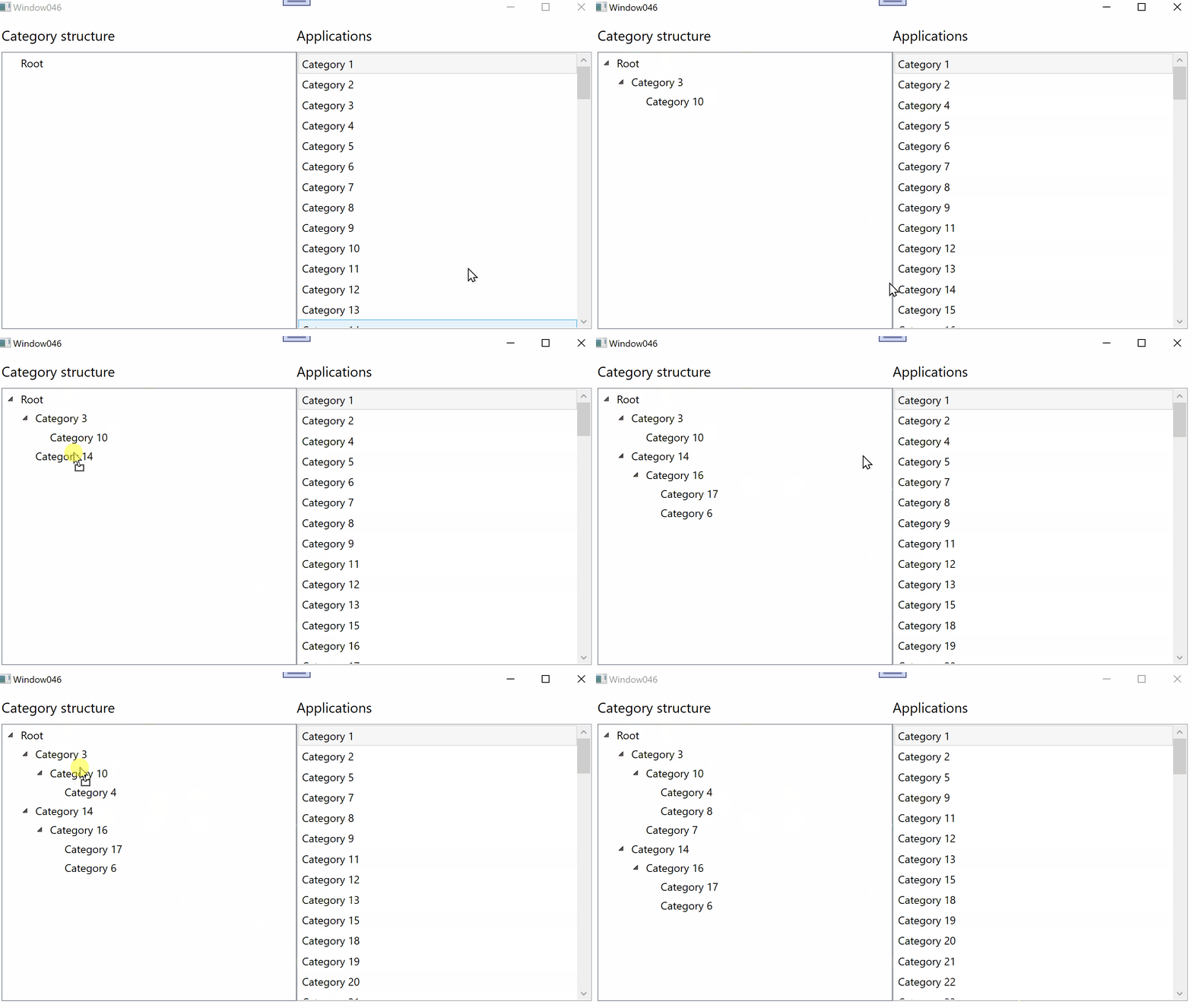
try my MVVM demo with your XAML and Interactivity dll from NuGet.
XAML:
<Window x:Class="WpfApp1.Window046"
        xmlns="http://schemas.microsoft.com/winfx/2006/xaml/presentation"
        xmlns:x="http://schemas.microsoft.com/winfx/2006/xaml"
        xmlns:d="http://schemas.microsoft.com/expression/blend/2008"
        xmlns:mc="http://schemas.openxmlformats.org/markup-compatibility/2006"
        xmlns:local="clr-namespace:WpfApp046"
        xmlns:self="clr-namespace:WpfApp046"
        xmlns:model="clr-namespace:WpfApp046"
        xmlns:i="clr-namespace:System.Windows.Interactivity;assembly=System.Windows.Interactivity"
        mc:Ignorable="d"
        Title="Window046" Height="450" Width="800">
  <Window.DataContext>
    <self:MainViewModel />
  </Window.DataContext>

  <Grid Margin="10">

    <Grid.RowDefinitions>
      <RowDefinition Height="Auto"/>
      <RowDefinition Height="*"/>
    </Grid.RowDefinitions>
    <Grid.ColumnDefinitions>
      <ColumnDefinition Width="*"/>
      <ColumnDefinition Width="*"/>
    </Grid.ColumnDefinitions>

    <TextBlock Grid.Column="0" Grid.Row="0" Text="Category structure" FontSize="18" Margin="0,0,0,10"/>
    <TreeView Grid.Column="0" Grid.Row="1"
               ItemsSource="{Binding TreeViewItems}"
               FontSize="14"
               AllowDrop="True">
      <i:Interaction.Behaviors>
        <local:DragDropBehavior/>
      </i:Interaction.Behaviors>
      <TreeView.ItemContainerStyle>
        <Style TargetType="{x:Type TreeViewItem}">
          <Setter Property="IsExpanded" Value="True"/>
        </Style>
      </TreeView.ItemContainerStyle>
      <TreeView.Resources>
        <HierarchicalDataTemplate DataType="{x:Type model:CategoryItem}" ItemsSource="{Binding Path=CategoryItems}">
          <TextBlock Text="{Binding Path=ItemName}" Margin="3,3,3,3"/>
        </HierarchicalDataTemplate>
      </TreeView.Resources>
    </TreeView>

    <TextBlock Grid.Column="1" Grid.Row="0" Text="Applications" FontSize="18" Margin="0,0,0,10"/>
    <ListBox Grid.Column="1" Grid.Row="1" Name="lbTodoList" AllowDrop="True"
              HorizontalContentAlignment="Stretch"
              FontSize="14"
              ItemsSource="{Binding ListBoxItems}">
      <i:Interaction.Behaviors>
        <local:DragDropBehavior/>
      </i:Interaction.Behaviors>
      <ListBox.ItemTemplate>
        <DataTemplate>
          <Grid Margin="0,2">
            <Grid.ColumnDefinitions>
              <ColumnDefinition Width="*" />
              <ColumnDefinition Width="100" />
            </Grid.ColumnDefinitions>
            <TextBlock Text="{Binding ItemName}" />
          </Grid>
        </DataTemplate>
      </ListBox.ItemTemplate>
    </ListBox>
  </Grid>
</Window>
and classes:
using System.Collections.ObjectModel;
using System.ComponentModel;
using System.Windows;
using System.Windows.Controls;
using System.Windows.Data;
using System.Windows.Input;
using System.Windows.Interactivity;
using System.Windows.Media;

namespace WpfApp046
{
  public class MainViewModel
  {
    public MainViewModel()
    {
      for (int i = 1; i < 100; i++) colListBox.Add(new CategoryItem() { ItemName = $"Category {i}" });
      cvsListBox.Source = colListBox;
      colTreeView.Add(new CategoryItem() { ItemName = "Root" });
      cvsTreeView.Source = colTreeView;
    }
    public ObservableCollection<CategoryItem> colListBox = new ObservableCollection<CategoryItem>();
    private CollectionViewSource cvsListBox = new CollectionViewSource();
    public ListCollectionView ListBoxItems { get => (ListCollectionView)cvsListBox.View; }

    public ObservableCollection<CategoryItem> colTreeView = new ObservableCollection<CategoryItem>();
    private CollectionViewSource cvsTreeView = new CollectionViewSource();
    public ICollectionView TreeViewItems { get => cvsTreeView.View; }
  }

  public class CategoryItem
  {
    public string ItemName { get; set; }
    public ObservableCollection<CategoryItem> CategoryItems { get; } = new ObservableCollection<CategoryItem>();
  }

  public class DragDropBehavior : Behavior<UIElement>
  {
    protected override void OnAttached()
    {
      AssociatedObject.PreviewMouseLeftButtonDown += PreviewMouseLeftButtonDown;
      AssociatedObject.Drop += Tv_Drop;
    }

    private void PreviewMouseLeftButtonDown(object sender, MouseButtonEventArgs e)
    {
      if (sender is ListBox)
      {
        ListBox dragSource = (ListBox)sender;
        object data = GetDataFromListBox(dragSource, e.GetPosition(AssociatedObject));
        if (data != null) DragDrop.DoDragDrop(dragSource, data, DragDropEffects.Move);
      }
    }

    private static object GetDataFromListBox(ListBox source, Point point)
    {
      UIElement element = source.InputHitTest(point) as UIElement;
      if (element != null)
      {
        object data = DependencyProperty.UnsetValue;
        while (data == DependencyProperty.UnsetValue)
        {
          data = source.ItemContainerGenerator.ItemFromContainer(element);
          if (data == DependencyProperty.UnsetValue) element = VisualTreeHelper.GetParent(element) as UIElement;
          if (element == source) return null;
        }
        if (data != DependencyProperty.UnsetValue) return data;
      }
      return null;
    }

   private void Tv_Drop(object sender, DragEventArgs e)
    {
      if (sender is TreeView)
      {
        e.Effects = DragDropEffects.None;
        e.Handled = true;
        // Verify that this is a valid drop and then store the drop target
        CategoryItem targetItem = (e.OriginalSource as TextBlock)?.DataContext as CategoryItem;
        MainViewModel vm = (sender as TreeView).DataContext as MainViewModel;
        if (targetItem != null && vm != null)
        {
          object data = e.Data.GetData(typeof(CategoryItem));
          ((ListCollectionView)vm.ListBoxItems).Remove(data);
          targetItem.CategoryItems.Add((CategoryItem)data);
          e.Effects = DragDropEffects.Move;
        }
      }
    }
  }
}
Result:
Thank you, I will check this one as well! Nice to see different options, one with DragDropBehavior another with code behind.
' cx='32' cy='32' r='32' /%3E%3Ctext x='50%25' y='55%25' dominant-baseline='middle' text-anchor='middle' fill='%23FFF' %3EB%3C/text%3E%3C/svg%3E)
That looks like exactly what I need.
I am trying to implement this in a UserControl, but I always get error saying that DragDrogBehavior does not exist in the namespace.
Please, open a new question (tread).
I have opened a new question. https://learn.microsoft.com/en-us/answers/questions/1362485/how-to-implement-drag-drop-in-treeview-among-treev