Azure Internet of Things
A category of Azure services for internet of things devices.
This browser is no longer supported.
Upgrade to Microsoft Edge to take advantage of the latest features, security updates, and technical support.
' cx='32' cy='32' r='32' /%3E%3Ctext x='50%25' y='55%25' dominant-baseline='middle' text-anchor='middle' fill='%23FFF' %3EAV%3C/text%3E%3C/svg%3E)
Hi,
I want to use azure-blob-storage container to store data in a local directory. I have used the upload_blob from another container for this purpose. The file is getting uploaded to the cloud but not getting stored in the local path. I have given binds, device to cloud upload properties and also changed the permissions for the directory with "chmod 777". After doing all this the file is not getting saved locally.
I want the blob-storage container to upload the blob not my container. What is the better practice to do that.
python function to upload
with blob_service_client.get_blob_client(container=container_name, blob=local_file_name) as upload_client:
    with open(upload_file_path, "rb") as data:
        print("Uploading the file")
        upload_client.upload_blob(data, blob_type="BlockBlob", overwrite=True)
        print("Finished uploading")
Deployment manifest
BINDS-
"HostConfig": {
      "Binds": [
          "/opt/localstorage/blob/:/blobroot"
      ]
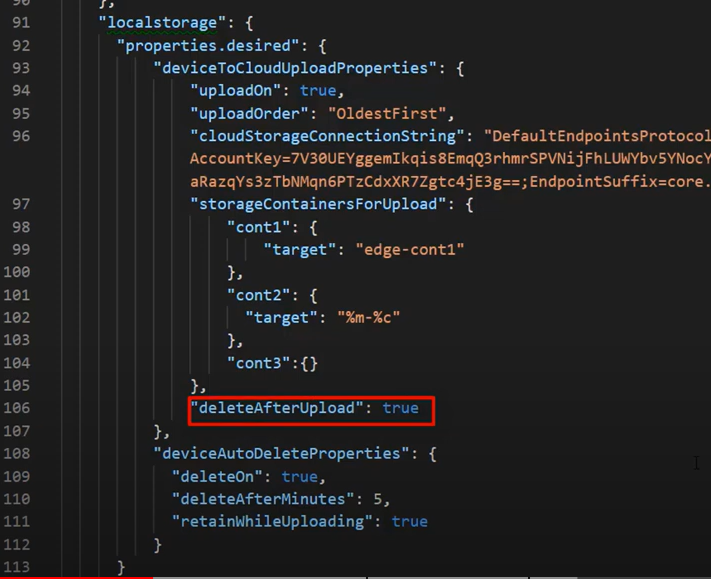
Upload properties
    "blobstorage": {
      "properties.desired": {
        "deviceToCloudUploadProperties": {
          "uploadOn": true,
          "uploadOrder": "NewestFirst",
          "cloudStorageConnectionString": "xxxx"
          "storageContainersForUpload": {
            "bloboutput": {
              "target": "bloboutput"
            }
          }
        },
        "deviceAutoDeleteProperties": {
          "deleteOn": false,
          "deleteAfterMinutes": 15
        }
logs-
[2021-04-20 04:23:57.857] [info    ] [tid 1] Info: Successfully loaded {0}: {1}, p0="Nephos.MaskClientIPAddressesInLogs", p1="False"
[2021-04-20 04:23:57.857] [info    ] [tid 1] Info: Loading config Param {0} ({1}) read: {2}, p0="NephosIncludeInternalDetailsInErrorResponses", p1="Include internal details in error responses", p2="true"
[2021-04-20 04:23:57.857] [info    ] [tid 1] Info: Successfully loaded {0}: {1}, p0="NephosIncludeInternalDetailsInErrorResponses", p1="True"
[2021-04-20 04:23:57.857] [info    ] [tid 1] Info: Loading config Param {0} ({1}) read: {2}, p0="StampName", p1="Stamp Name", p2="Default Stamp"
[2021-04-20 04:23:57.924] [info    ] [tid 1] Microsoft.AzureStack.Services.Storage.EntryPoint.BlobService: BlobService - StartAsync completed
[2021-04-20 04:23:57.925] [info    ] [tid 1] Microsoft.Azure.Devices.BlobStorage.Tiering.BlobTieringService: Starting service...
[2021-04-20 04:23:57.937] [info    ] [tid 1] [BlobInterface.cc:1494] [ListBlobsInOrder] ListBlobsInOrder received. Container:bloboutput BlobNameStart:null MaxBlobNames:1 OrderType:1 Flags:1
[2021-04-20 04:23:57.937] [error   ] [tid 1] [MetaStore.cc:1953] [ListBlobsInOrder] Container not found. Name:bloboutput

@ambharesh venkatraman For understanding the issue: Your blob data which has been uploaded to Azure Blob(container) Storage account is not showing up in the local(on-perm machine) am I correct? If not can you please provide more information?
Are you using Azure Blob Storage on IoT Edge?
Yes @Sumarigo-MSFT That's the exact problem . And Yes I am using Azure Blob Storage on IoT Edge.
' cx='32' cy='32' r='32' /%3E%3Ctext x='50%25' y='55%25' dominant-baseline='middle' text-anchor='middle' fill='%23FFF' %3EQ%3C/text%3E%3C/svg%3E)
Duplicate StackOverflow Question: https://stackoverflow.com/questions/67225334/azure-blob-storage-not-storing-locally
Hello @ambharesh venkatraman Please have a look at the below sections to make changes to the Upload properties: Please follow the instructions in the below reference documents.
How to use Azure Blob Storage on IoT Edge