Azure Data Factory
An Azure service for ingesting, preparing, and transforming data at scale.
This browser is no longer supported.
Upgrade to Microsoft Edge to take advantage of the latest features, security updates, and technical support.
' cx='32' cy='32' r='32' /%3E%3Ctext x='50%25' y='55%25' dominant-baseline='middle' text-anchor='middle' fill='%23FFF' %3EPR%3C/text%3E%3C/svg%3E)
I've searched forums for days, but cannot find answer to this problem.
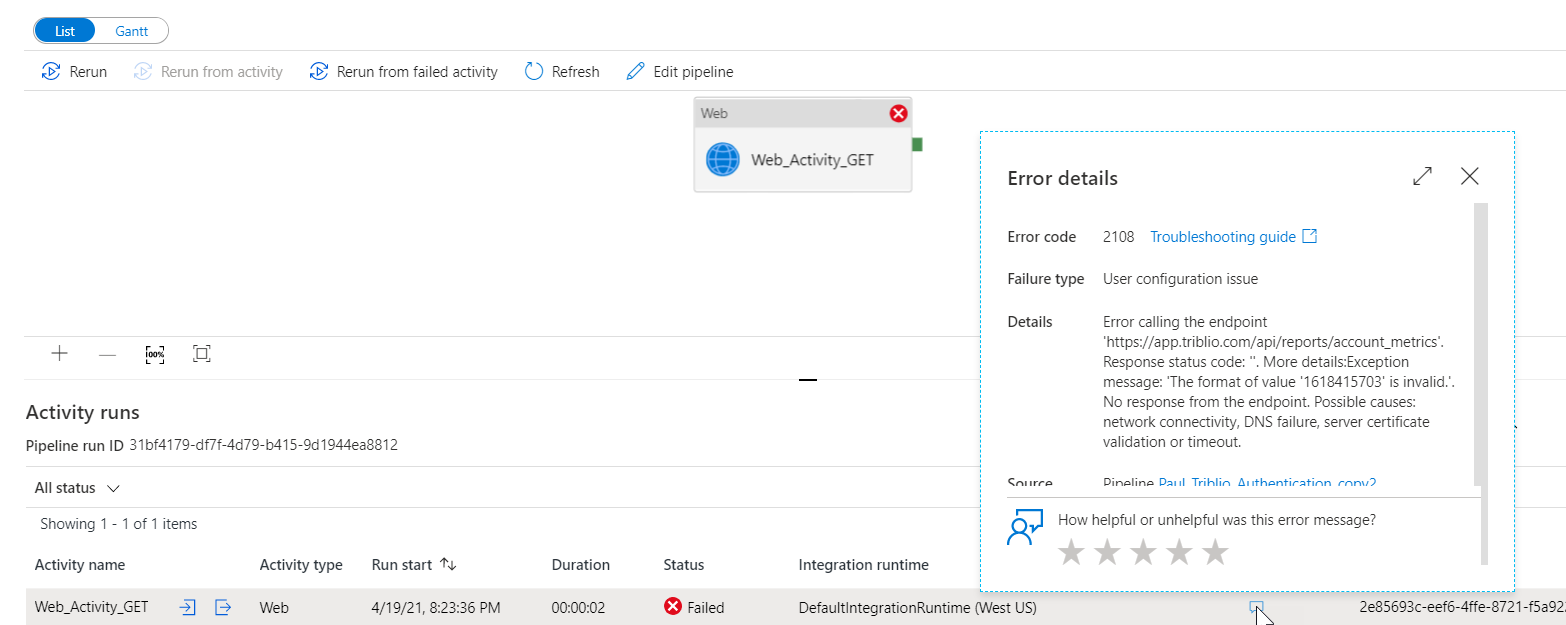
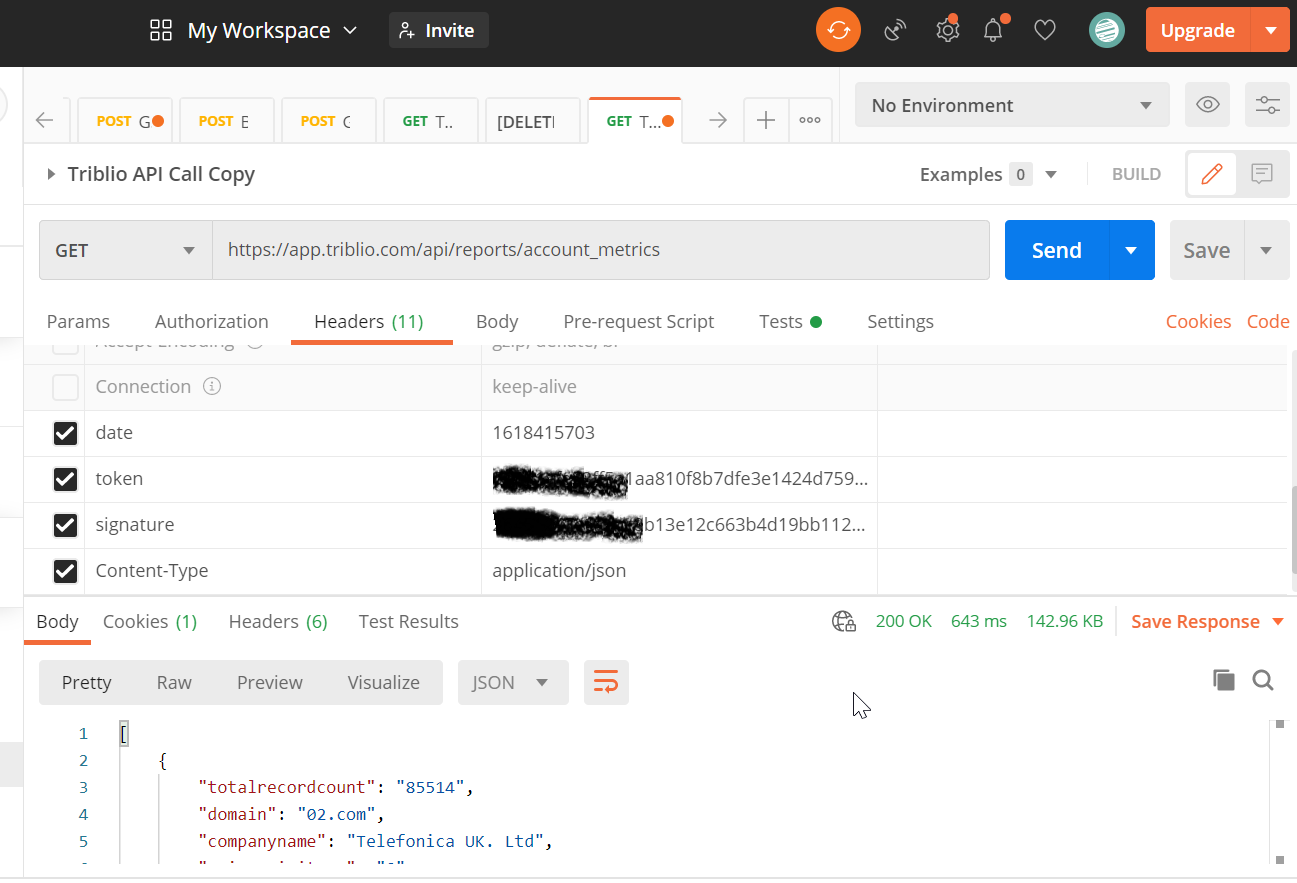
*I have a simple GET API call that works fine in Postman, but my Web Activity fails with Error Code 2108:
Error calling the endpoint 'https://app.triblio.com/api/reports/account_metrics'. Response status code: ''. More details: Exception message: 'The format of value '1618415703' is invalid.'. No response from the endpoint. Possible causes: network connectivity, DNS failure, server certificate validation or timeout.
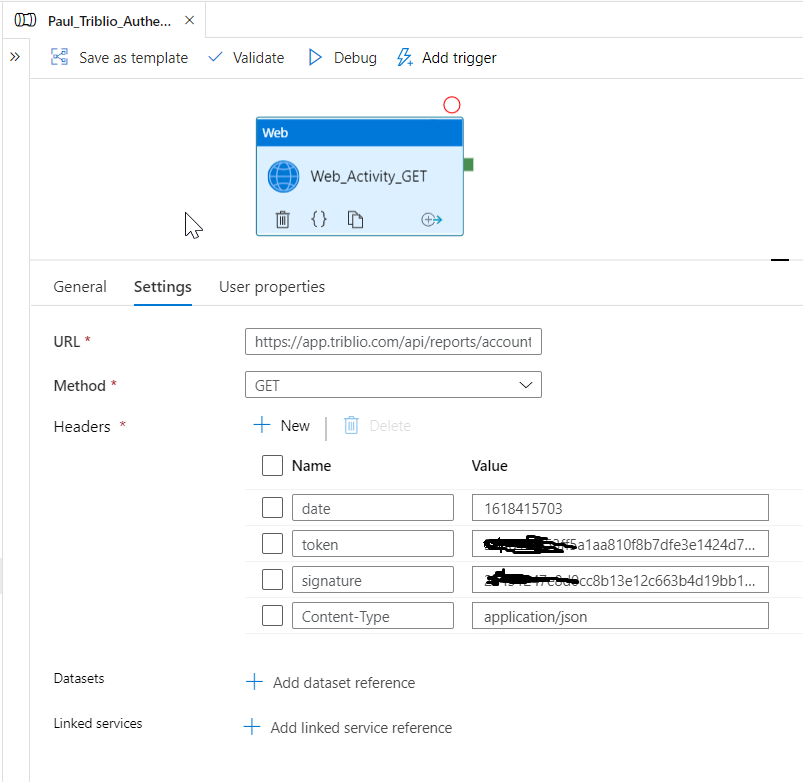
*The error refers to value '1618415703', which a header item called date. The value is a Epoch Timestamp. (that value is from a few days ago, but still works fine in Postman. When I use current Epoch Timestamp, I get the same error).
*There are three headers required to authenticate: date, token, and signature. When I remove one of those headers, I get an "Unauthorized" error....so I know that it is connecting to the URL successfully.
*Per other forum suggestions, I have increased the timeout but I think that is unrelated because the Web Activity fails almost instantly. In Postman, the API calls takes 3 seconds to run.
*I have also experimented with adding in a Linked Service that calls that same URL, but that didn't seem to make a difference.
Thank you for any help; I'm watching for replies so that I can respond quickly to follow-up questions.
' cx='32' cy='32' r='32' /%3E%3Ctext x='50%25' y='55%25' dominant-baseline='middle' text-anchor='middle' fill='%23FFF' %3EH%3C/text%3E%3C/svg%3E)
Hello @Paul R ,
Thanks for the ask and using the Microsoft Q&A platform . Thanks for the very descriptive ask and also sharing the different things which you tried , that always help.
Can you please check if you can call any other API where you do not need to pass the date header ? I tried to use the API mentioned myself , but i dont think triblio had any concept of free account .
What I have done is I have also reached out to internal team and to see if I can get some help on this .
Also please send an email to azcommunity@microsoft.com with the below details .
Subscription ID:
Subject : Attn Himanshu
Activity runid :
Please let me know once you have done the same.
Thanks
Himanshu
Hello @HimanshuSinha ;
Thank you so much for the response...I'm emailing you directly with the details.
But to answer your one question here: I have tried many other API calls where I do not need to pass an Epoch Datetime, and they all work fine.
Most API calls require a date range so that you don't get an overwhelming amount of data. My other API calls that require date range in the body or as a parameter work fine.
For some reason, the Epoch datetime is confusing the Web Activity, even though it appears as a string and doesn't look like a date. In my case here, the Epoch Datatime is used as part of the authentication, and not used as part of the actual data request.
Paul
Himanshu wrote me and said:
"We did had discussed internally this issue and we aggreged that mostly the header is passed as string in WebActivity whereas Postman it is integer/long."
Conclusion: it appears that WebActivity is doing something to a piece of data that I don't intend for it to do (treating it as a string).
I'm going to close this issue because it doesn't seem like there's a way to get around this problem in Web Activity. Personally, my workaround will be to make the API call using Powershell, and I'll call that Powershell script from within Data Factory.
' cx='32' cy='32' r='32' /%3E%3Ctext x='50%25' y='55%25' dominant-baseline='middle' text-anchor='middle' fill='%23FFF' %3EJS%3C/text%3E%3C/svg%3E)
Most of us face this err while try to open URL:
Above issue is resolved now we can easily pass the cookie values from one web component to another web component using Azure Data Factory below is the screenshots to demonstrate.
Passing Web2 component cookie values to Web3 component.
Need to set this in the header section with the given expression.
Set the reference of cookie values in Web2 component.
Passed the reference of cookie values to Web3 component and attach with the given URL section in settings.
Below URL accessed using cookie value passed to this Web3 component.
Hope this will help Azure community to fix this issue.
Article published by - Jagjeet Makhija
' cx='32' cy='32' r='32' /%3E%3Ctext x='50%25' y='55%25' dominant-baseline='middle' text-anchor='middle' fill='%23FFF' %3ECW%3C/text%3E%3C/svg%3E)
This worked for me! thank you so much!!