Azure Data Factory
An Azure service for ingesting, preparing, and transforming data at scale.
This browser is no longer supported.
Upgrade to Microsoft Edge to take advantage of the latest features, security updates, and technical support.

I am using Azure Data Factory Copy activity to copy data from CSV file on Google S3 storage to MySQL. I can successfully connect to the storage, list the files, locate the CSV file, extract schema from it and preview data, however when I try to execute the pipeline, it finishes successfully indicating that it read exactly 0 bytes from the source and inserted 0 rows.
' cx='32' cy='32' r='32' /%3E%3Ctext x='50%25' y='55%25' dominant-baseline='middle' text-anchor='middle' fill='%23FFF' %3EKM%3C/text%3E%3C/svg%3E)
Hi @Dronec ,
Welcome to Microsoft Q&A forum and thanks for reaching out.
As per the description it looks like a configuration issue. Could you please share the screenshot of your copy activity source settings as well as the the source data set configuration so that it will give better understanding to assist further.
Also please confirm from where did you previewed the data? Is it at dataset level or copy activity source setting level?
We look forward to your response.
Thank you
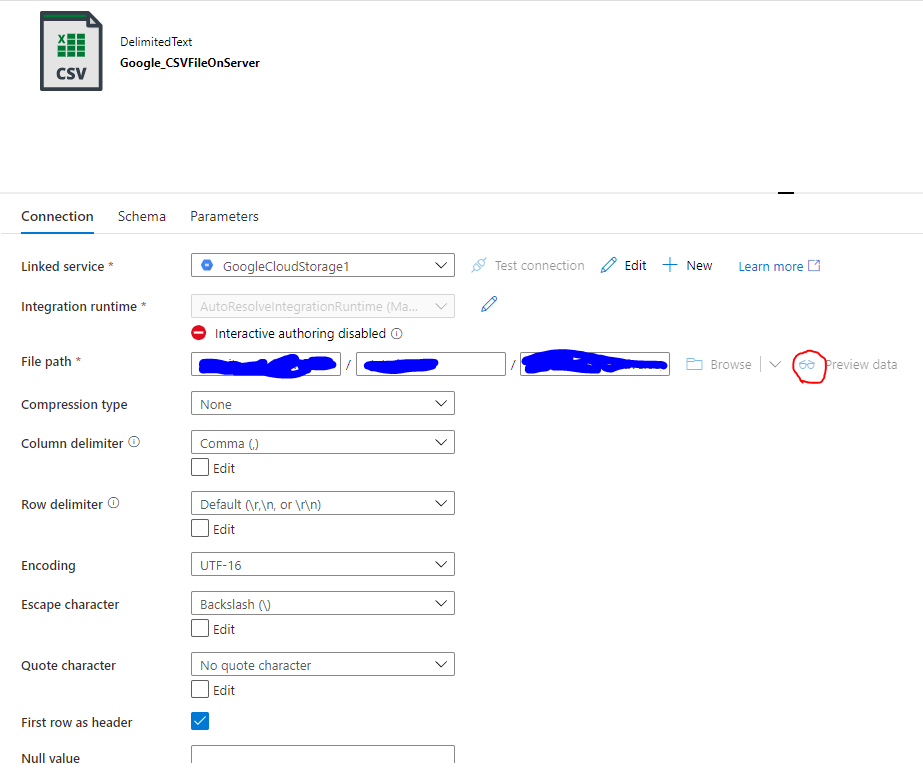
Here's the screenshot of the dataset. When I enable "Interactive Authoring" and press "Preview data" on this page, I can see the data in the CSV file (in fact there's only 17 rows):
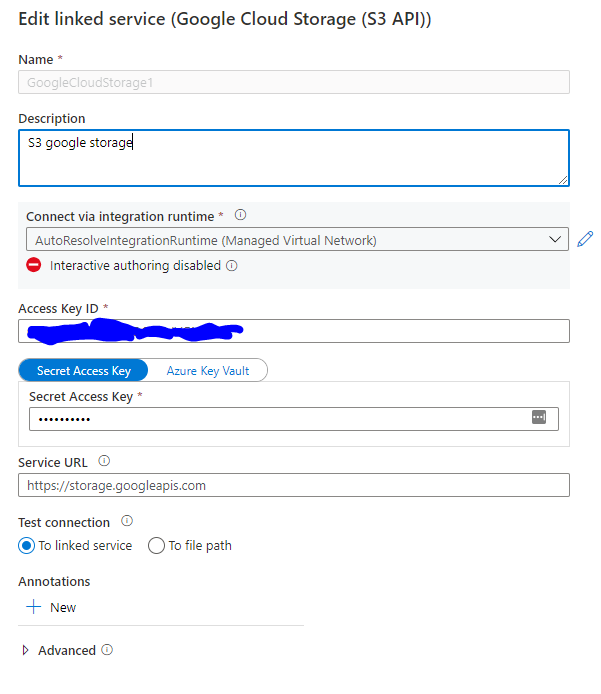
This is the linked service configuration:
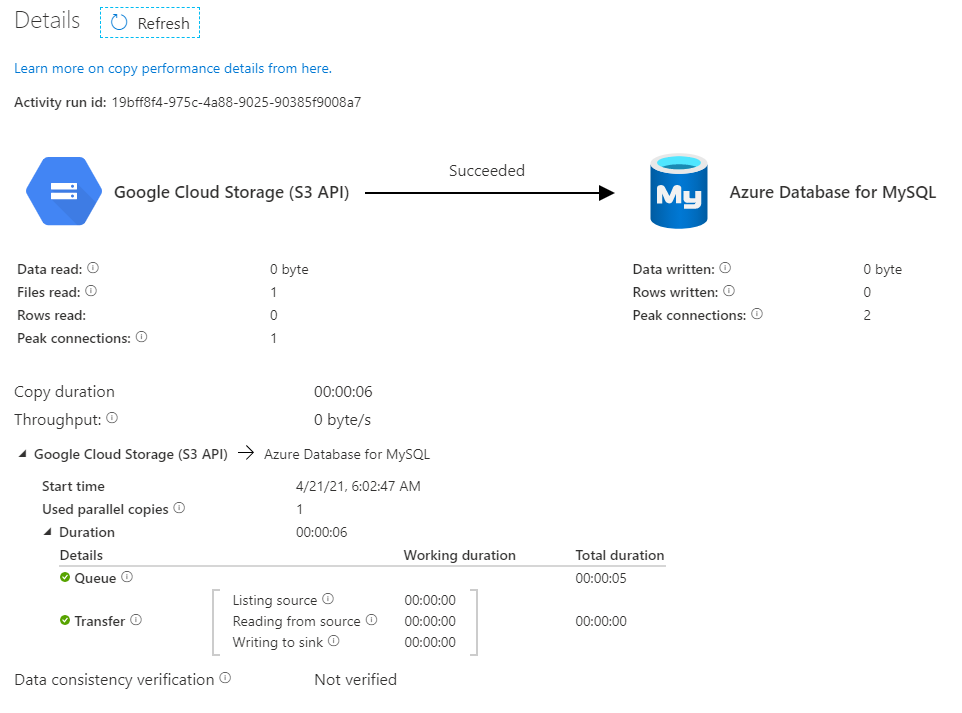
The operation result:
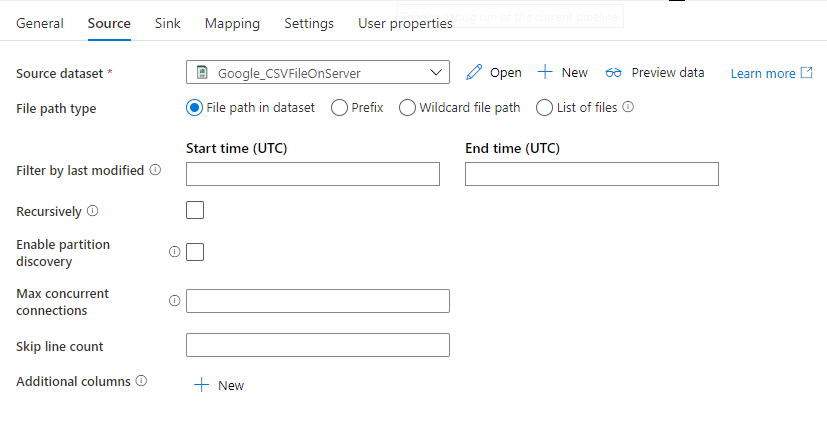
The copy activity screenshots:
' cx='32' cy='32' r='32' /%3E%3Ctext x='50%25' y='55%25' dominant-baseline='middle' text-anchor='middle' fill='%23FFF' %3EM%3C/text%3E%3C/svg%3E)
You specified encoding as UTF-16. Is it intentional file format?
Could you please change from UTF-16 to to UTF-8(default) and see if that solves your issue.
I tried with both UTF-8 and UTF-16, same results: the data can be pre-viewed, but cannot be transferred. The data are stored on the source in UTF-16
Thanks for sharing the additional info with screenshots.
By looking at the screenshots filesRead = 1 and dataRead = 0 bytes which mean file is empty or no data in the file. But you have confirmed that when you do preview on the dataset level, you were able to see the data records. This looks weird to me unless your copy activity source data settings pointing to a dataset that points to an empty file.
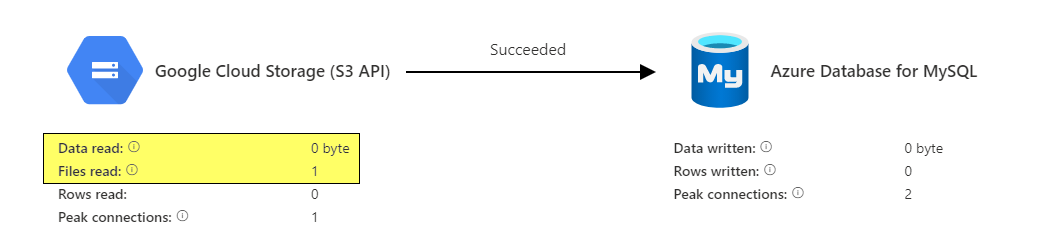
I would recommend filing a support case for this to have deeper investigation. In case if you don't have a support plan, do let us know we can work with you on it.
Looking forward to your confirmation.
Hi @Dronec ,
Following up to see if you have got a chance to file a support ticket for this issue, if so would you please share the SR# with us here so that we can track it internally. In case if you don't have a support plan do let us know.
Thank you
Hi KranthiPakala,
Thanks for following up! Yes, I had a chance to file a ticket, TrackingID#2104230060000281
Hi KranthiPakala,
Would you have a chance to track my ticket internally? I had an initial session with the support specialist and demonstrated the issue, the only thing she could say is "How this can be?". I haven't heard anything else from them in the last few days.
HI @Dronec ,
I have reached out to the support engineer who is working on this issue and awaiting response. Will keep you posted as soon as I have a response from the team.
Sorry for delay in resposne.
Thanks so much!
Hi @Dronec , As per the latest update update from the support engineer, this issue has been escalated to Product team and the support engineer is working with them. Hopefully you should have an update from the support engineer soon.
Sorry for the delay and we appreciate your patience.
Thanks for the update @KranthiPakala-MSFT
Update: just had a meeting with the Microsoft engineers.
Looks like the root cause is that Google storage that emulates Amazon S3 API returns file size = -1, which is interpreted as infinite by Copy activity.
In the regular mode, when Copy activity using multiple threads, it tries to split -1 and gets 0 for each thread.
However, if I use (as MS engineers suggested) undocumented sequential mode
                        "storeSettings": {
                            "type": "GoogleCloudStorageReadSettings",
                            "multipartSourceType": "Sequential",
                            "recursive": true,
                            "enablePartitionDiscovery": false
                        },
                        "formatSettings": {
                            "type": "DelimitedTextReadSettings"
                        }
It actually copies file, but infinitely and never finishes. I've stopped it when it inserted 510k rows from a tiny 17-rows file.
' cx='32' cy='32' r='32' /%3E%3Ctext x='50%25' y='55%25' dominant-baseline='middle' text-anchor='middle' fill='%23FFF' %3ENL%3C/text%3E%3C/svg%3E)
I have the same issue with you, whereas my GCS bucket is external linking (my account assigned from Google Play Console), so actually my account could preview it, but copy read 0 bytes as well. I have tested with multipartSourceType, it is infinity and never finish. When I tested with my file in my bucket, it worked.
' cx='32' cy='32' r='32' /%3E%3Ctext x='50%25' y='55%25' dominant-baseline='middle' text-anchor='middle' fill='%23FFF' %3EA%3C/text%3E%3C/svg%3E)
Has anyone been able to resolve this? I am currently facing the same issue as described above, when trying to copy data from a GCS bucket. I can preview the data but the copy job can not read it.
I implemented a workaround which worked: instead of direct copying from the bucket, I generate a link for downloading a file from it.