Developer technologies | Transact-SQL
A Microsoft extension to the ANSI SQL language that includes procedural programming, local variables, and various support functions.
This browser is no longer supported.
Upgrade to Microsoft Edge to take advantage of the latest features, security updates, and technical support.
' cx='32' cy='32' r='32' /%3E%3Ctext x='50%25' y='55%25' dominant-baseline='middle' text-anchor='middle' fill='%23FFF' %3EZ%3C/text%3E%3C/svg%3E)
Is there a way of converting svg code into SQL spatial queries?
Thanks

Hi @Zolotoy ,
Welcome to Microsoft Q&A!
You could try to firstly converts SVG (Scalable Vector Graphics) into WKT (Well-Known Text), a markup language for representing vector geometry on maps implemented by spatially-enabled databases like SQL Server and MySQL.
Please refer a little library called SVG-to-WKT that does the conversion.
Example:
SVGtoWKT.convert('<svg><polygon points="1,2 3,4 5,6" /><line x1="7" y1="8" x2="9" y2="10" /></svg>');
>>> "GEOMETRYCOLLECTION(POLYGON((1 -2,3 -4,5 -6,1 -2)),LINESTRING(7 -8,9 -10))"
Secondly you could work with WKT in SQL Server as below:
 create table geometry_polygons(
     id int identity(1,1) ,
     polygon geometry,
     label varchar(50),
     area decimal(10,4));

 declare @g geometry;
 set @g=geometry::STGeomFromText('POLYGON((175.0305935740471 -39.924665194652604,175.03033608198166 -39.924387504970255,175.0301563739777 -39.92449035313209,175.03041118383408 -39.92474952981466,175.0305935740471 -39.924665194652604))', 4326);
 insert into geometry_polygons (polygon) values (@g);

 select * from geometry_polygons
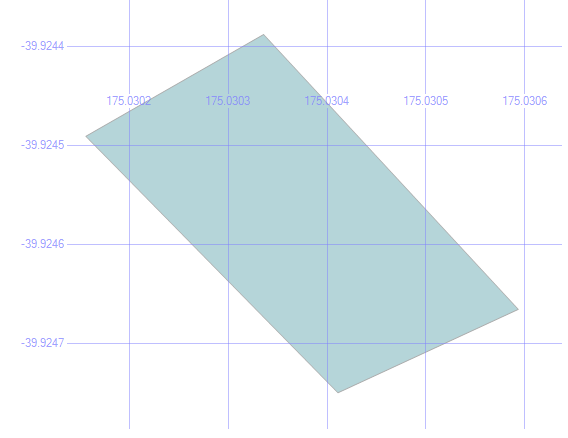
Best regards
Melissa
If the answer is helpful, please click "Accept Answer" and upvote it.
Note: Please follow the steps in our documentation to enable e-mail notifications if you want to receive the related email notification for this thread.

Would it be possible to show the results of a spatial query in a SSRS report?
Obviously you can. It is very common.
Think about it... Spatial Data are by definition values which meant to present visualize of "location".
For Geographic data type you can add a Map to Your Report, and add your Geographic data above the map. There is a Map Wizard and Map Layer Wizard build in which you can use.
Check this full document on this topic:
https://learn.microsoft.com/en-us/sql/reporting-services/report-design/maps-report-builder-and-ssrs?view=sql-server-ver15
' cx='32' cy='32' r='32' /%3E%3Ctext x='50%25' y='55%25' dominant-baseline='middle' text-anchor='middle' fill='%23FFF' %3EMG%3C/text%3E%3C/svg%3E)
Will something like this work?

Also, what about css classes? Are they ignored?
Thanks
I am running your SQL code and I get this:

Where do I go from here?
To see the image in SSMS click on "Spatial results"
When you will do this then you will get the same image that MelissaMa-msft present in his answer.
Hi @mark goldin ,
Thanks for your update.
You could click below button in red to see the spatial result.

If it is not working, please provide more details so that we could check further.
Besides, it is recommened to login with the account which posted this question so that you could be posted.
Please also remember to accept the answers if they helped. Your action would be helpful to other users who encounter the same issue and read this thread.
Thank you for understanding!
Best regards
Melissa
Here is a full awesome tutorial with example of presenting images in SSMS
Notice that the main part of convert the SVG code into WKT is NOT don in transact SQL but by using external tool which is the same as MelissaMa-msft solution (which does not fully cover your question in transact sql forum) - MelissaMa-msft solution uses JS to make this part while the link above simply use an online convert service. To do this part in Transact SQL is possible but can be very long to write and I am not familiar with such code (and did not find such code in Google)
This image is one of the samples in this tutorial