Share via

Problem with adding new db source column to existing table in existing SSAS model

Terry Williams 41 Reputation points
2021-04-21T16:15:50.353+00:00

I am using Visual Studio 2019 to build a SSAS Tabular Model from a database in MS SQL Server 2019. The SQL server is on the local computer.

I connected to the MSSS and imported a table.

Then a new column was added to the table in MSSS.

I can go into the model to Table Properties --> Design --> Query --> Refresh Preview (ALL) and the column will appear on in the table in the query WITH all of the data.

I Import the query and it appears to be successful. After closing the Table Properties, I return to the model and view the data in the table. The column is there; however NONE of the data appears.

How do I add a new column to an existing model?

TIA,
Terry

SQL Server Analysis Services

A Microsoft online analytical data engine used in decision support and business analytics, providing the analytical data for business reports and client applications such as Power BI, Excel, Reporting Services reports, and other data visualization tools.


Answer accepted by question author

David Browne - msft 3,856 Reputation points
2021-04-21T19:08:34.257+00:00

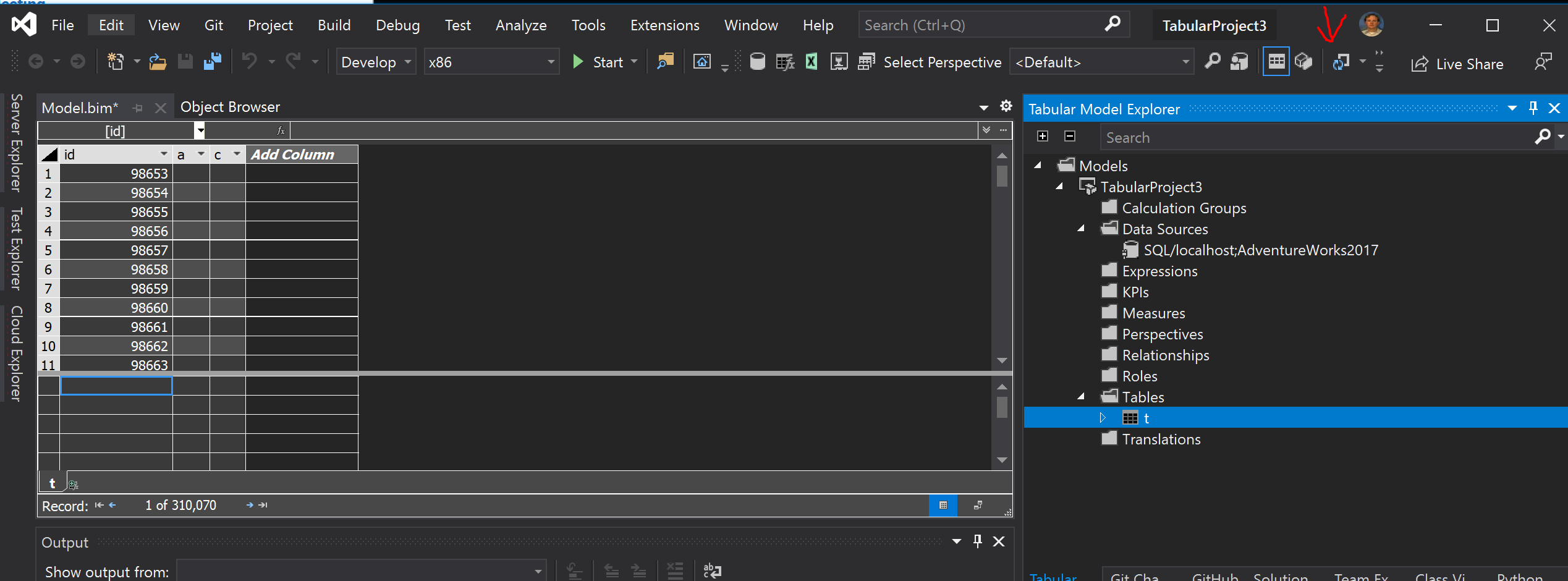
In Visual Studio you're always working against an SSAS instance, and changing the source query doesn't automatically cause the SSAS to reload or "process" the data in the query. PowerBI Desktop always does these two steps together, but in Visual Studio they are seperate and you must reprocess the table to see the new column populated.

90084-image.png

Was this answer helpful?

1 person found this answer helpful.
0 comments No comments

1 additional answer

Sort by: Most helpful
  1. Terry Williams 41 Reputation points
    2021-04-21T21:59:47.137+00:00

    Thank you!!! This is exactly what I needed.

    Was this answer helpful?

    0 comments No comments

Your answer

Answers can be marked as 'Accepted' by the question author and 'Recommended' by moderators, which helps users know the answer solved the author's problem.