Developer technologies | XAML
A language based on Extensible Markup Language (XML) that enables developers to specify a hierarchy of objects with a set of properties and logic.
This browser is no longer supported.
Upgrade to Microsoft Edge to take advantage of the latest features, security updates, and technical support.

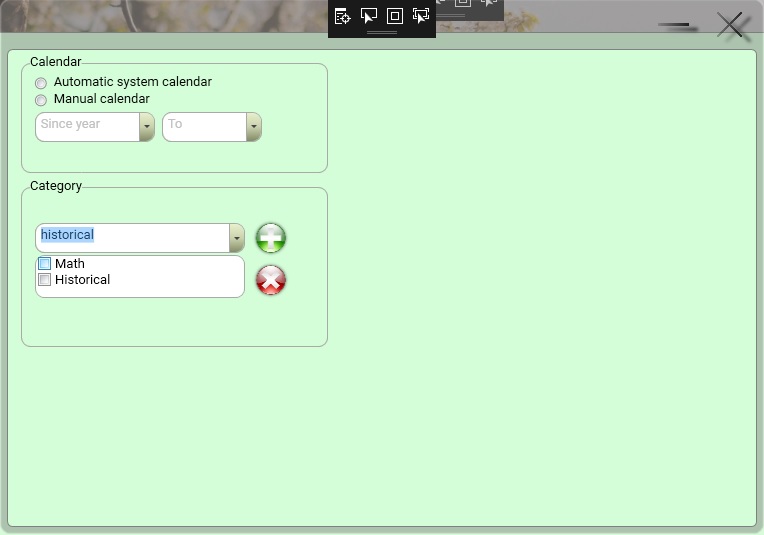
First of all I am sorry for my language grammar because my first language is Persian (Iran). I have a ComboBox which has CheckBox for multi selection and multi deletion then i tried to following codes but i did not reach a conclusion.
<Style x:Key="{x:Type ComboBoxItem}" TargetType="{x:Type ComboBoxItem}">
        <Setter Property="SnapsToDevicePixels" Value="true" />
        <Setter Property="OverridesDefaultStyle" Value="true" />
        <Setter Property="Template">
            <Setter.Value>
                <ControlTemplate TargetType="{x:Type ComboBoxItem}">
                    <Border x:Name="Border" SnapsToDevicePixels="true" Background="Transparent">
                        <VisualStateManager.VisualStateGroups>
                            <VisualStateGroup x:Name="SelectionStates">
                                <VisualState x:Name="Unselected" />
                                <VisualState x:Name="Selected">
                                    <Storyboard>
                                        <ColorAnimationUsingKeyFrames Storyboard.TargetName="Border" Storyboard.TargetProperty="(Panel.Background).(SolidColorBrush.Color)">
                                            <EasingColorKeyFrame KeyTime="0" Value="#FFC5CBF9" />
                                        </ColorAnimationUsingKeyFrames>
                                    </Storyboard>
                                </VisualState>
                                <VisualState x:Name="SelectedUnfocused">
                                    <Storyboard>
                                        <ColorAnimationUsingKeyFrames Storyboard.TargetName="Border" Storyboard.TargetProperty="(Panel.Background).(SolidColorBrush.Color)">
                                            <EasingColorKeyFrame KeyTime="0" Value="#FFDDDDDD" />
                                        </ColorAnimationUsingKeyFrames>
                                    </Storyboard>
                                </VisualState>
                            </VisualStateGroup>
                        </VisualStateManager.VisualStateGroups>
                        <CheckBox Name="MultiSelectCheckBox" Content="{Binding}" Checked="MultiSelectCheckBox_Checked">
                        </CheckBox>
                    </Border>
                </ControlTemplate>
            </Setter.Value>
        </Setter>
</Style>
Code behind:
    List<string> CheckedList = new List<string>();
    private void MultiSelectCheckBox_Checked(object sender, RoutedEventArgs e)
    {
        CheckBox CB = sender as CheckBox;
        CheckedList.Add(CB.Content.ToString());
    }
    private void Delete_Button_PreviewMouseLeftButtonDown(object sender, MouseButtonEventArgs e)
    {
        switch (BookCategory_ComboBox.Text)
        {
            case null:
                break;
            default:
                for (int i = 0; i < CheckedList.Count - 1; i++)
                {
                    string a = CheckedList[i].ToString();
                    if (CheckedList[i].ToString()==BookCategory_ComboBox.Items[i].ToString())
                    {
                        BookCategory_ComboBox.Items.Remove(BookCategory_ComboBox.Items[i]);
                    }
                }
                break;
        }
    }
Thanks
A language based on Extensible Markup Language (XML) that enables developers to specify a hierarchy of objects with a set of properties and logic.
An object-oriented and type-safe programming language that has its roots in the C family of languages and includes support for component-oriented programming.
Answer accepted by question author
Thank you, but I found a solution that is simpler and more complete.
<Style x:Key="{x:Type ComboBoxItem}" TargetType="{x:Type ComboBoxItem}">
        <Setter Property="SnapsToDevicePixels" Value="true" />
        <Setter Property="OverridesDefaultStyle" Value="true" />
        <Setter Property="Template">
            <Setter.Value>
                <ControlTemplate TargetType="{x:Type ComboBoxItem}">
                    <Border x:Name="Border" SnapsToDevicePixels="true" Background="Transparent">
                        <VisualStateManager.VisualStateGroups>
                            <VisualStateGroup x:Name="SelectionStates">
                                <VisualState x:Name="Unselected" />
                                <VisualState x:Name="Selected">
                                    <Storyboard>
                                        <ColorAnimationUsingKeyFrames Storyboard.TargetName="Border" Storyboard.TargetProperty="(Panel.Background).(SolidColorBrush.Color)">
                                            <EasingColorKeyFrame KeyTime="0" Value="#FFC5CBF9" />
                                        </ColorAnimationUsingKeyFrames>
                                    </Storyboard>
                                </VisualState>
                                <VisualState x:Name="SelectedUnfocused">
                                    <Storyboard>
                                        <ColorAnimationUsingKeyFrames Storyboard.TargetName="Border" Storyboard.TargetProperty="(Panel.Background).(SolidColorBrush.Color)">
                                            <EasingColorKeyFrame KeyTime="0" Value="#FFDDDDDD" />
                                        </ColorAnimationUsingKeyFrames>
                                    </Storyboard>
                                </VisualState>
                            </VisualStateGroup>
                        </VisualStateManager.VisualStateGroups>
                        <CheckBox Name="MultiSelectCheckBox" Content="{Binding}" Checked="MultiSelectCheckBox_Checked" Unchecked="MultiSelectCheckBox_Unchecked">
                        </CheckBox>
                    </Border>
                </ControlTemplate>
            </Setter.Value>
        </Setter>
    </Style>
Code behind
//Global List<string>
List<string> CheckedList = new List<string>();
    private void Add_Button_PreviewMouseLeftButtonDown(object sender, MouseButtonEventArgs e)
    {
        switch (BookCategory_ComboBox.Text)
        {
            case null:
                break;
            default:
                //In order to avoid duplication
                if (!BookCategory_ComboBox.Items.Contains(BookCategory_ComboBox.Text.Trim().Substring(0, 1).ToUpper() + BookCategory_ComboBox.Text.Trim().Substring(1, BookCategory_ComboBox.Text.Trim().Length - 1).ToLower()))
                {
                 //Uppercase first letter of string
                    BookCategory_ComboBox.Items.Add(BookCategory_ComboBox.Text.Trim().Substring(0, 1).ToUpper() + BookCategory_ComboBox.Text.Trim().Substring(1, BookCategory_ComboBox.Text.Trim().Length - 1).ToLower());
                }
                //Sort
                BookCategory_ComboBox.Items.SortDescriptions.Add(new System.ComponentModel.SortDescription("", System.ComponentModel.ListSortDirection.Ascending));

                CheckedList.Clear();
                break;
        }
    }

    private void MultiSelectCheckBox_Checked(object sender, RoutedEventArgs e)
    {
        CheckBox CB = sender as CheckBox;
        CheckedList.Add(CB.Content.ToString());
    }
    private void MultiSelectCheckBox_Unchecked(object sender, RoutedEventArgs e)
    {
        CheckBox CB = sender as CheckBox;
        CheckedList.Remove(CB.Content.ToString());
    }
    private void Delete_Button_PreviewMouseLeftButtonDown(object sender, MouseButtonEventArgs e)
    {
        switch (BookCategory_ComboBox.Items)
        {
            case null:
                break;
            default:
                List<string> CB_Item = new List<string>();
                for (int i = BookCategory_ComboBox.Items.Count - 1; i >= 0; i--)
                {
                    if (!CheckedList.Contains(BookCategory_ComboBox.Items[i].ToString()))
                    {
                        CB_Item.Add(BookCategory_ComboBox.Items[i].ToString());
                    }
                }
                BookCategory_ComboBox.Items.Clear();
                for (int i = CB_Item.Count - 1; i >= 0; i--)
                {
                    BookCategory_ComboBox.Items.Add(CB_Item[i].ToString());
                }
                //Uppercase first letter of string
                BookCategory_ComboBox.Items.SortDescriptions.Add(new System.ComponentModel.SortDescription("", System.ComponentModel.ListSortDirection.Ascending));
                BookCategory_ComboBox.Items.Refresh();
                break;
        }
    }
100% works.
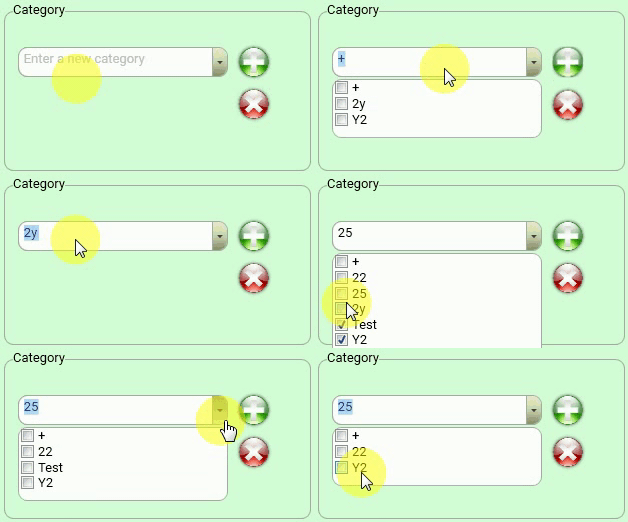

Did you want delete the selected items in ComboBox which named BookCategory_ComboBox by clicking the Button which named Delete_Button? I made a demo to implement it as below, if I misunderstand your quesion, please point out.
  public partial class MainWindow : Window
    {
        ObservableCollection<City> oldlist = new ObservableCollection<City>();
        ObservableCollection<City> newlist = new ObservableCollection<City>();
        ViewModel vm = new ViewModel();

        public MainWindow()
        {
            InitializeComponent();
            oldlist = vm.list;
            BookCategory_ComboBox.ItemsSource = oldlist;

        }

        ObservableCollection<string> CheckedList = new ObservableCollection<string>();
        private void MultiSelectCheckBox_Checked(object sender, RoutedEventArgs e)
        {
            CheckBox CB = sender as CheckBox;
            CheckedList.Add(CB.Content.ToString());
            //MessageBox.Show(CB.Content.ToString());
        }
        private void Delete_Button_PreviewMouseLeftButtonDown(object sender, MouseButtonEventArgs e)
        {
            switch (BookCategory_ComboBox.Text)
            {
                case null:
                    break;
                default:
                    for (int i = 0; i < CheckedList.Count; i++)
                    {
                        string a = CheckedList[i].ToString();
                        newlist = (new ViewModel()).list;
                        foreach (City item in oldlist)
                        {
                            if (a == item.Name.ToString())
                            {
                                newlist.Remove(newlist.Where(o=>o.Name==a).FirstOrDefault());
                            }
                        }
                        BookCategory_ComboBox.ItemsSource = newlist;
                        BookCategory_ComboBox.Items.Refresh();

                    }
                    break;
            }
        }


    }

    public class ViewModel
    {

        public ViewModel()
        {
            list.Add(new City { ID = 1, Name = "City1" });
            list.Add(new City { ID = 2, Name = "City2" });
            list.Add(new City { ID = 3, Name = "City3" });
        }

       public ObservableCollection<City> list { get; set; } = new ObservableCollection<City>();

    }

    public class City
    {
        public int ID { get; set; }
        public string Name { get; set; }

        public override string ToString()
        {
            return $"{ Name}";
        }
    }
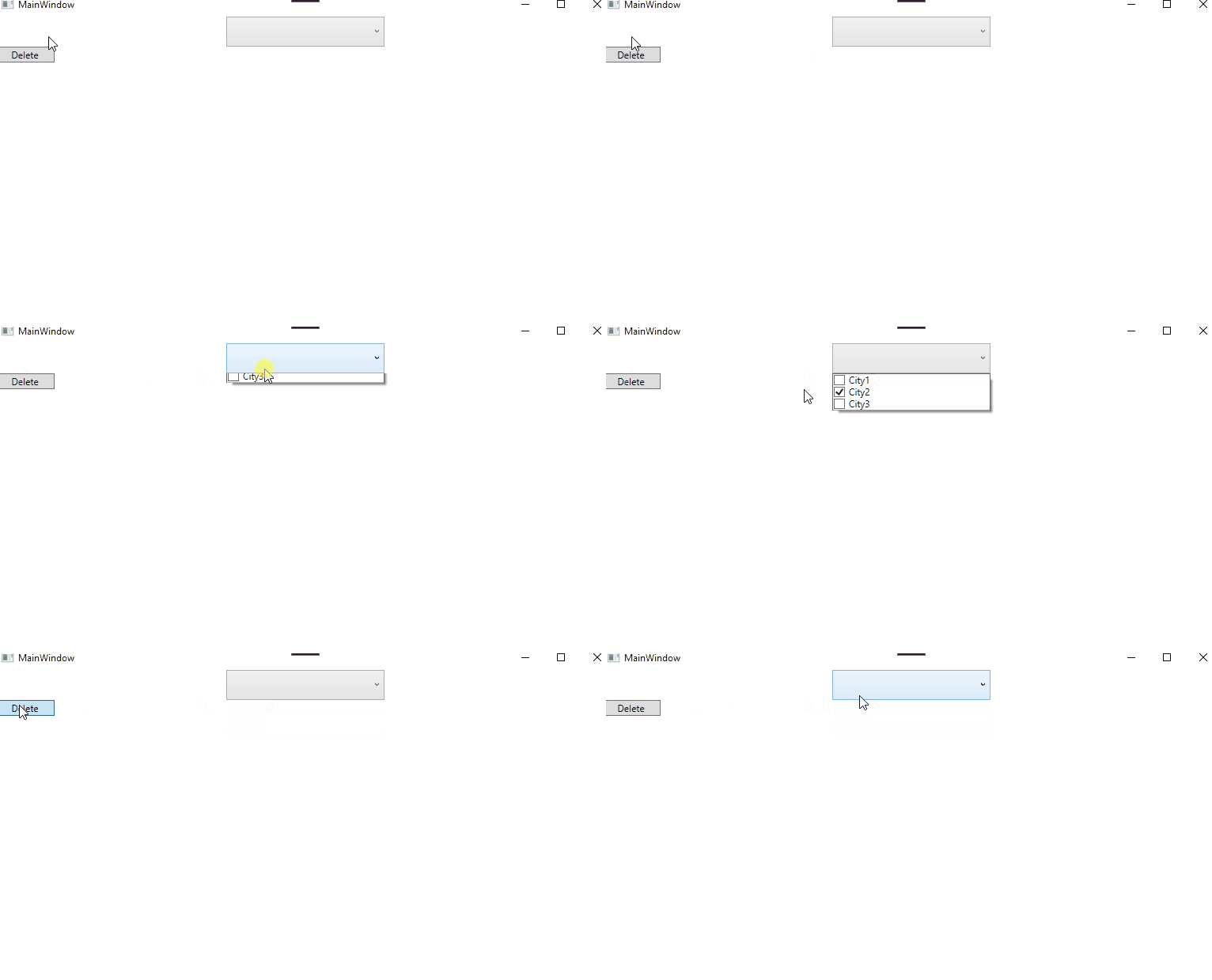
The result picture:
If the response is helpful, please click "Accept Answer" and upvote it.
Note: Please follow the steps in our documentation to enable e-mail notifications if you want to receive the related email notification for this thread.