Azure Data Factory
An Azure service for ingesting, preparing, and transforming data at scale.
This browser is no longer supported.
Upgrade to Microsoft Edge to take advantage of the latest features, security updates, and technical support.
' cx='32' cy='32' r='32' /%3E%3Ctext x='50%25' y='55%25' dominant-baseline='middle' text-anchor='middle' fill='%23FFF' %3EB9%3C/text%3E%3C/svg%3E)
I created an Azure Data Factory pipeline that uses a Rest data source to pull data from a Rest API and copy it to an Azure SQL database. Each row in the Rest data source contains approx. 8 fields but one of those fields contains an array of values. I'm using a Copy Data task. How do I get all values from that field to map into 1 of my database fields, possibly as a string? I've tried clicking on "Collection Reference" for that field but if the array field has 5 values, it creates 5 different records in my SQL table for the one source row. I looked into using the Data Flow mapping task instead, but that one doesn't seem to support a Rest API dataset as a data source.
Please help.
' cx='32' cy='32' r='32' /%3E%3Ctext x='50%25' y='55%25' dominant-baseline='middle' text-anchor='middle' fill='%23FFF' %3EMM%3C/text%3E%3C/svg%3E)
@BizLight-9871 did my suggestion help you? If it solved your issue, please mark as accepted answer, otherwise let me know how I may better assist.
Hello @BizLight-9871 and welcome to Microsoft Q&A.
There is a feature you overlooked, "Map complex values to string". This option found in the Mapping tab does exactly what you are asking for. The "collectionReference" is almost opposite what you want.
CollectionReference is for when you have heirarchical data where some details, common to all records, are stored at a higher level than the individual records. CollectionReference is for iterating over the inner records as you have found.
See below image for where to find "Map complex values to string".
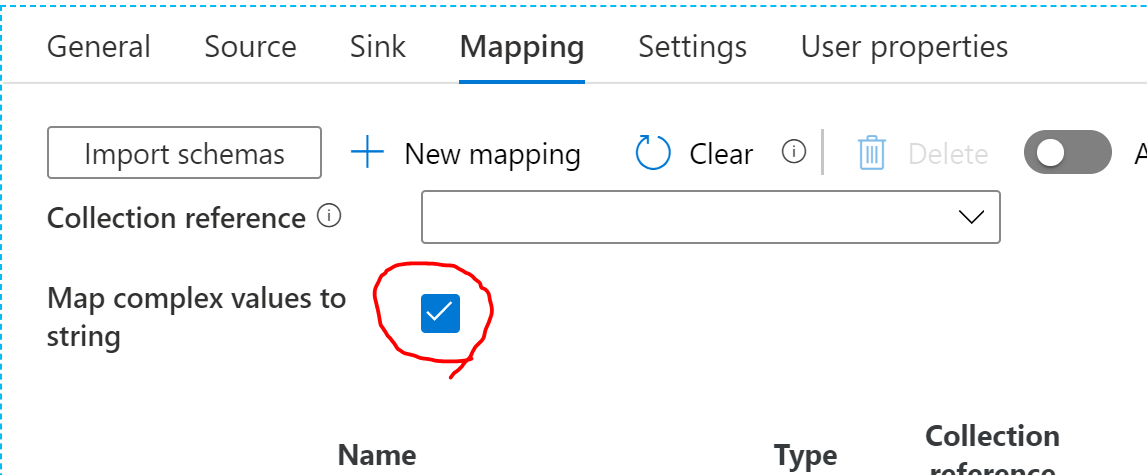
Thanks - I was able to get it to work by switching to Advanced Editor mode and changing the default field mapping from [field][value][0]['label'] to [field][value] to get the full array and then YES, I checked "map complex values to string".
Great! Thank you for letting us know.
' cx='32' cy='32' r='32' /%3E%3Ctext x='50%25' y='55%25' dominant-baseline='middle' text-anchor='middle' fill='%23FFF' %3E7%3C/text%3E%3C/svg%3E)
Hey,
After that what you did to the that column containing string values.
I have similar data, now I want to extract the data from that column using adf. How ?