Add NTFS Permission only to folders/files with inheritance disable

Brandon Hofmann 21 Reputation points
2021-04-28T12:19:11.127+00:00

Our file servers have been around for years, and as such, the permissions have gotten a bit crazy.

To start the clean-up effort, I would to make sure our "File Server Admins" group has Full Control to all files folders on our file servers.

I tried the below command, which does work, but for folders with inheritance enabled it gets the ACL twice (once inherited and once explicitly).

We are hoping to avoid having duplicate entries, so I'm wondering if there is a way using icacls (or another tool) to only apply the ACL the folders/files that have inheritance disabled - so those folders get the explicit permission, but any folders/files inheriting from them get only the inherited permission.

icacls "E:\Group\Operations" /c /grant "File Server Admins":(OI)(CI)F /T
Windows for business | Windows Server | User experience | Other
0 comments No comments
{count} votes

Answer accepted by question author
  1. Anonymous
    2021-04-29T07:44:58.303+00:00

    Hi,
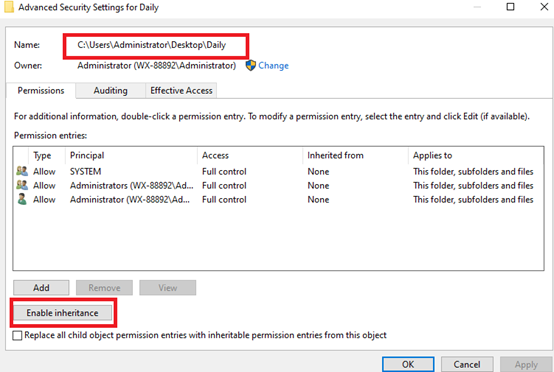
    I tried the same command in my lab, and it didn’t work out. It seems that there’re some conflict in the command. Therefore, I tried another command on my computer:
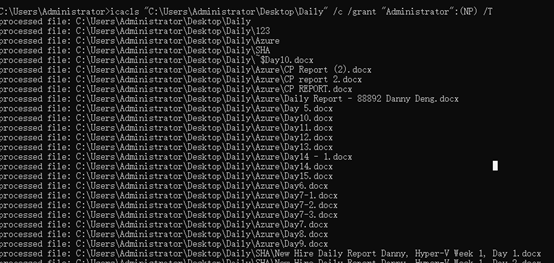
    icacls "C:\Users\Administrator\Desktop\Daily" /c /grant "Administrator":(NP) /T
    92410-image.png
    And it worked:
    92571-image.png

    For your reference:
    https://learn.microsoft.com/en-us/windows-server/administration/windows-commands/icacls

    Thanks for your time.
    Best regards,
    Danny

    -----------------------------

    If the Answer is helpful, please click "Accept Answer" and upvote it.

    Note: Please follow the steps in our documentation to enable e-mail notifications if you want to receive the related email notification for this thread.

    0 comments No comments

1 additional answer

Sort by: Most helpful
  1. Brandon Hofmann 21 Reputation points
    2021-04-29T18:36:37.147+00:00

    Hi Danny,

    Thank you very much for your response - it looks like that does resolve my duplicate ACL issues. When I run that command on my folders they all get the ACL as explicit, regardless of whether or not inheritance is turned on.

    I was originally hoping to have folders/files with inheritance to just inherit the ACL, and folders/files without inheritance get it explicitly, but from my research it appears that may not be possible. I think your solution is going to be the best way to go.

    If I do find another resolution I'll certainly post, but I think yours will do the trick. Have a great day!

    0 comments No comments

Your answer

Answers can be marked as 'Accepted' by the question author and 'Recommended' by moderators, which helps users know the answer solved the author's problem.