Hi,
I just reset my windows 10 since I think it is about time I do.
so the main problems are:
extremely slow booting up times (it used to be ~12 seconds, now it takes 2 minutes)
crashes every time I try to interact with my local disk (D:)
If the specs have anything to do with it, they are here:
Toshiba HDWD110Kingston SA2000M (where windows is located)
I factory reset my pc today (around 6 hours ago) and I tried to open my HDD drive because there was no blue line indicating the storage or anything.
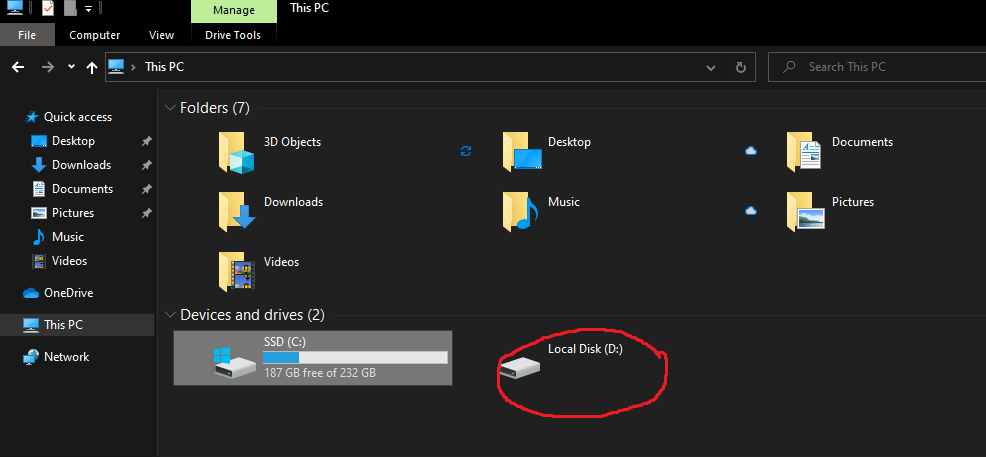 So I right clicked it and waited for it to load, after around 2 seconds my file explorer crashed, at the time I was with a couple of friends on discord, I couldn't do anything with the file explorer, discord was working perfectly and so was everything else. Yes I did try to end the task, then run explorer.exe.
At this point I am too tired from everything, I skipped school just to fix this and I am not letting it go to waste.
if anyone knows a fix for at least ONE of them, I will love you forever.
Thanks for any info.
' cx='32' cy='32' r='32' /%3E%3Ctext x='50%25' y='55%25' dominant-baseline='middle' text-anchor='middle' fill='%23FFF' %3EA%3C/text%3E%3C/svg%3E)

' cx='32' cy='32' r='32' /%3E%3Ctext x='50%25' y='55%25' dominant-baseline='middle' text-anchor='middle' fill='%23FFF' %3EIL%3C/text%3E%3C/svg%3E)