Developer technologies | .NET | Xamarin
A Microsoft framework for building cross-platform mobile apps using .NET and C# with native performance and user interfaces.
This browser is no longer supported.
Upgrade to Microsoft Edge to take advantage of the latest features, security updates, and technical support.
' cx='32' cy='32' r='32' /%3E%3Ctext x='50%25' y='55%25' dominant-baseline='middle' text-anchor='middle' fill='%23FFF' %3EJ%3C/text%3E%3C/svg%3E)
I was wondering what could have gone wrong with this build that I deployed.
Referring to the image, on the left side is the simulator, the right side is the actual app image.
The text is missing on the actual app.
Has anyone faces this issue before?

As you can see the location (last row) of the grid is displaying the text and as for first and second was not.
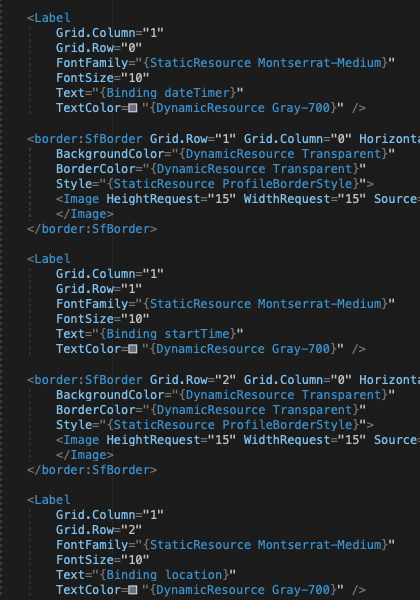
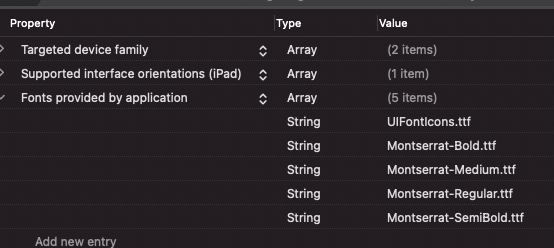
Besides that, I checked if (Resources -> Montserratt-Medium.tff) build action was under Bundle Resources and Montseratt-Medium was added in info.plist. Both of them exist.
At this point I have no idea where to tackle this issue because the build I have works perfectly fine during debugging and the deployed version completely opposite of what I expected.
As I'm new to xamarin, please bare with me and do no hesitate to ask if I were to left out some important resources that might help with this issue. Thank you.
' cx='32' cy='32' r='32' /%3E%3Ctext x='50%25' y='55%25' dominant-baseline='middle' text-anchor='middle' fill='%23FFF' %3EJ%3C/text%3E%3C/svg%3E)
Hello,
Welcome to our Microsoft Q&A platform!
Do you place the font file under the Resources folder of the iOS project? To use custom fonts in Xamarin.Forms, you could just add the font file to shared project and consumed by platform projects without any additional work.
The process for accomplishing:
1.Add the font to your Xamarin.Forms shared project as an embedded resource (Build Action: EmbeddedResource).
2.Register the font file with the assembly, in a file such as AssemblyInfo.cs, using the ExportFont attribute. An optional alias can also be specified.
   using Xamarin.Forms;

   [assembly: ExportFont("Lobster-Regular.ttf", Alias = "Lobster")]
Check the doc: https://learn.microsoft.com/en-us/xamarin/xamarin-forms/user-interface/text/fonts#set-the-font-family
Best Regards,
Jarvan Zhang
If the response is helpful, please click "Accept Answer" and upvote it.
Note: Please follow the steps in our documentation to enable e-mail notifications if you want to receive the related email notification for this thread.
Thanks for the approach Jarvan, I've tried the following instruction as you mention :-
1.Add the font to your Xamarin.Forms shared project as an embedded resource (Build Action: EmbeddedResource).
2.Register the font file with the assembly, in a file such as AssemblyInfo.cs, using the ExportFont attribute. An optional alias can also be specified.
The outcome was expected (for Android & IOS) during debugging mode, but as for the actual published on App Store Connect (IOS) is still on pending.
Mind if I ask why is the published app on IOS has different result like I mention above? At this point I could not simulate the actual situation for my previous published app in SIMULATORS and it dint seems practical to publish IOS app to App Store for test case purpose.
Hi, will the custom font work fine when deploying the project on the physcial device directly.

What is your linker setting set to?
Can you make sure it is "Link SDK Only"
Do not set it to "All"
Sorry to for the late update guys, as I dig deeper the issues doesn't relate to font at all but binding context and I'm going to close this question as the issue is starting to become irrelevant to the the topic itself. Appreciate for the up-coming help.