Azure Synapse Analytics
An Azure analytics service that brings together data integration, enterprise data warehousing, and big data analytics. Previously known as Azure SQL Data Warehouse.
This browser is no longer supported.
Upgrade to Microsoft Edge to take advantage of the latest features, security updates, and technical support.

Hi. I'm trying to capture error logging in Notebooks or Dataflows in Azure Synapse Workspace.
I have tried a few approaches, passing the string value from the activity as a Dynamic Content.

Raise and Error here simply takes input and uses it for the following method: throw new InvalidOperationException(message); I then use the dynamic content to attempt to store this in storage using the dynamic content. activity('Raise an Error').error.errorCode
The above example is a dataflow but I've tried this with notebooks in pyspark and .Net Spark(C#). I invariably get different errors. The input into my second activity I get it is "ErrorDescription": "'System.InvalidOperationException: File creation\n at Submission#18.<<Initialize>>d__0.MoveNext()\n--- End of stack trace from previous location where exception was thrown ---\n at Microsoft.CodeAnalysis.Scripting.ScriptExecutionState.RunSubmissionsAsyncTResult'" The errors I get include 1. Pyspark: EOL error 2. .NET Spark: errors similar to "Evalue": "(1,205): error CS1056: Unexpected character '`'\n(1,206): error CS1002: ; expected", 3. Dataflows: Expression cannot be parsed. Details:Parameter stream has parsing errors\nLine 13 Position 17: extraneous input ''' expecting {DECIMAL_LITERAL, HEX_LITERAL, OCT_LITERAL, BINARY_LITERAL, '-', '!', '$', '~', ':', '(', '#', '[', '@(', '[]', FLOAT_LITERAL, HEX_FLOAT_LITERAL, STRING_LITERAL, REGEX_LITERAL, 'parameters', 'functions', 'as', 'input', 'output', 'constant', 'expression', 'integer', 'short', 'long', 'double', 'float', 'decimal', 'boolean', 'timestamp', 'date', 'byte', 'binary', 'integral', 'number', 'fractional', 'any', IDENTIFIER, ANY_IDENTIFIER, META_MATCH, '$$', OPEN_INTERPOLATE}","failureType":"UserError","target":"Data flow1","errorCode":"DF-Executor-ParseError"}
I have tried replace() on the error code and trim() for leading \n\n\n - which works for simple strings but not for actual error messages. I have also tried to convert the error using binary(). In this last case my output is: ErrorDescription": { "value": { "$content-type": "application/octet-stream", "$content": "U3lzdGVtLkludmFsaWRPcGVyYXRpb25FeGNlcHRpb246IEZpbGUgY3JlYXRpb24KICAgYXQgU3VibWlzc2lvbiMxOC48PEluaXRpYWxpemU+PmRfXzAuTW92ZU5leHQoKQotLS0gRW5kIG9mIHN0YWNrIHRyYWNlIGZyb20gcHJldmlvdXMgbG9jYXRpb24gd2hlcmUgZXhjZXB0aW9uIHdhcyB0aHJvd24gLS0tCiAgIGF0IE1pY3Jvc29mdC5Db2RlQW5hbHlzaXMuU2NyaXB0aW5nLlNjcmlwdEV4ZWN1dGlvblN0YXRlLlJ1blN1Ym1pc3Npb25zQXN5bmNbVFJlc3VsdF0oSW1tdXRhYmxlQXJyYXlgMSBwcmVjZWRpbmdFeGVjdXRvcnMsIEZ1bmNgMiBjdXJyZW50RXhlY3V0b3IsIFN0cm9uZ0JveGAxIGV4Y2VwdGlvbkhvbGRlck9wdCwgRnVuY2AyIGNhdGNoRXhjZXB0aW9uT3B0LCBDYW5jZWxsYXRpb25Ub2tlbiBjYW5jZWxsYXRpb25Ub2tlbik=" }, "type": "string" }, This seems promising as I suspect if I can get the $content: portion I suspect I code decode it but can't find any advice on how to handle the resultng System.Collections.Generic.Dictionary`2[System.String,System.Object]. Any suggestions on the approach to take would be helpful. I'm happy to put in the work but just have currently exhausted my ideas.
Slight correction
I am using error.message not error.code.
' cx='32' cy='32' r='32' /%3E%3Ctext x='50%25' y='55%25' dominant-baseline='middle' text-anchor='middle' fill='%23FFF' %3ESS%3C/text%3E%3C/svg%3E)
Hi Stephen,
You've clearly put in quite a bit of work into getting this working. This may be explained in the broken image link, but I'm trying to understand more about what you are trying to capture. Are the error logs coming from somewhere earlier in the pipeline or are you trying to capture logs within a dataflow?
It would also be helpful to have the pyspark or C# code you were working (minus any sensitive info) with to understand where those errors are coming from. Or are you getting there error loading the data into the notebook, and your code is never run?
Hi. Samara. I broke the post by merging my accounts. Oops.
Yes I am trying to catch errors from activities within the pipeline. The need arose as I was getting errors in a for each and the only way I could think of was to log an error somewhere.
My notebooks are pretty simple. A set of parameters including
ErrorCode =''
ErrorDescription = ''
FailureType = ''
ErrorLoggedTIme = ''
I have set these in a parameters cell. I then create two arrays one for the column names and one for the values which I use to get a dataframe:
df = spark.createDataFrame(data,columns)
df.write.parquet(WriteToPath,'append',None,'Snappy')
The .Net version does similar. Where I get failures is the execution of the parameters where I get EOL or CS1002 errors. I have a notebook to simulate getting an error which runs the following.
throw new InvalidOperationException(message);

Here is a view of what I am passing and the parameters I supply
I'm trying to paste a sample error but these forums are a bit buggy. I'll keep trying.
Example error:
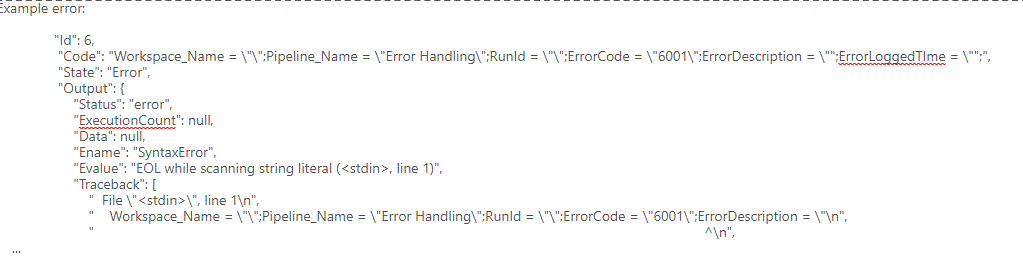
More complications afoot. I had read something suggesting the python has a raw string type so thought to check that out. It now looks as if the way errors are raised in pipeline in Synapse has changed:

As such now my input looks like this:
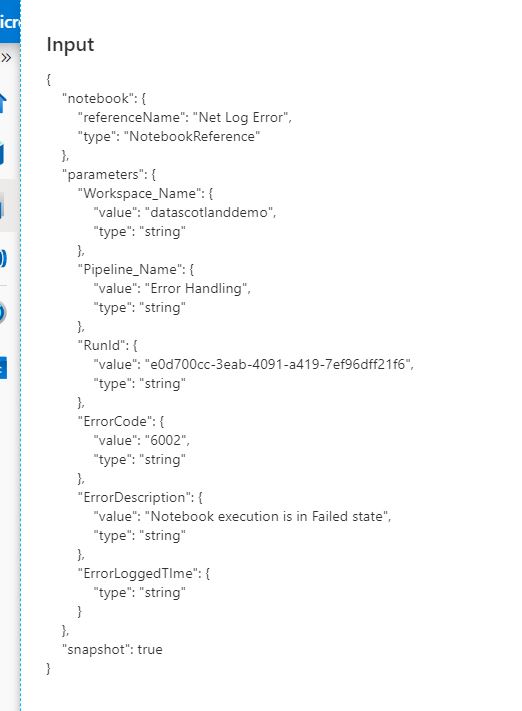
I'll investigate how to get the portion of the error that includes eval. I not also that the way that Notebook execution displays in the out put has changed. The previous out put displayed each cell Id, Code, State, Output. This is no longer displayed. This is more of a curio - for those following this than helpful in solving the issue of the string processing.
I did get this working in python and I have two possible solutions to look at. The problem there is definitely with the line breaks. The issue with a plain replace for /n is that Pipelines sees the string '/n' and the newline character as two different things. There are a couple workarounds for this:
@replace(activity('Error').error.message,'<hit the enter key here>', ''). It looks the same when in code view, but it does behave differently behind the scenes.
Thanks. I'll try these. I've still to look at how to get the error message details with the current changes to Notebook logging and error handling.
Still waiting to find the time to test its a backlog item. Hopefully this weekend. Posting to keep alive.