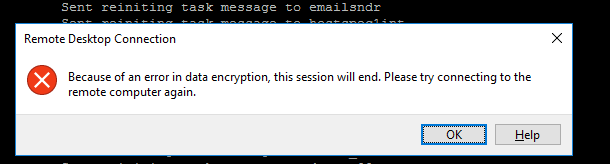
RDP connection error (Encryption error)

AHMED MAXSOOD 31 Reputation points
2021-05-02T08:46:15.71+00:00

Good Day Dears,

I have this error that keeps showing much time while trying to work on a remote desktop :

Because of an error in data encryption, this session will end. Please try connecting to the remote computer again.

check the attached picture93141-image-2021-04-20t10-22-43-060z.png

Note: I enabled Remote desktop service on this server, also note this issue happens on many servers.

Br,

Ahmed Maxsood

Windows for business | Windows Client for IT Pros | User experience | Remote desktop services and terminal services
{count} votes

5 answers

Sort by: Most helpful
  1. Carl Fan 6,886 Reputation points
    2021-05-03T03:29:16.86+00:00

    Hi,
    Firstly, I suggest that you could reinstall your network driver. Then open cmd window and try the command below:
    ipconfig /flushdns
    netsh int reset all
    netsh int ip reset
    netsh winsock reset
    Also check if delete any network protocols except the basics to see. Some information you could follow in the link below:
    https://social.technet.microsoft.com/Forums/windowsserver/en-US/1fe7892c-36c3-479a-8e51-cd7f94ea2e87/quotbecause-of-an-error-in-data-encryption-this-session-will-endquot?forum=winserverTS
    Meanwhile, I consider that system file may be failed such as RDC version. So I suggest that we could check for update firstly, if any security update could be found, installing them.
    Hope this helps and please help to accept as Answer if the response is useful.
    Best Regards,
    Carl

    0 comments No comments

  2. AHMED MAXSOOD 31 Reputation points
    2021-05-03T10:28:14.987+00:00

    Thanks Dear, I will check, I followed up with these steps :

    ipconfig /flushdns
    netsh int reset all
    netsh int ip reset
    netsh winsock reset

    and the same issue, I will try to update the windows server.

    Br,

    Ahmed Maxsood.

    0 comments No comments

  3. Carl Fan 6,886 Reputation points
    2021-06-04T01:53:26.153+00:00

    Hi,
    Thank you for your information.
    Any update? You can also try to configure the target server NIC properties to see whether solve this issue.

    Local Area Connection -> Properties -> Configure -> Advanced -> IPv4 Large Send Offload =Disabled.
    I consider that this has more to do with your network. Try to install the latest network driver from the manufacturer's official website.
    Are you using a VPN? Please refer to the information below:
    https://social.technet.microsoft.com/Forums/windows/en-US/1fe7892c-36c3-479a-8e51-cd7f94ea2e87/quotbecause-of-an-error-in-data-encryption-this-session-will-endquot?forum=winserverTS
    Hope this helps and please help to accept as Answer if the response is useful.
    Best Regards,
    Carl

    0 comments No comments

  4. Brad Johnson 42 Reputation points
    2021-07-26T01:57:24.497+00:00

    i have the same problem
    Windows 11 installed, i have the issue accessing some servers, and not all

    0 comments No comments

  5. Dean Hall 0 Reputation points
    2023-01-21T11:22:18.3133333+00:00

    This will not be relevant for all. If you are attaching over the internet then the most likely cause is an insecure/public network. The cause I detected on mine was whilst overseas attempting to connect back to my customers server was someone attempting a man in the middle attack on my connection. Logged in via an alternate trusted connection and no further issues.

    0 comments No comments

Your answer

Answers can be marked as 'Accepted' by the question author and 'Recommended' by moderators, which helps users know the answer solved the author's problem.