Developer technologies | C#
An object-oriented and type-safe programming language that has its roots in the C family of languages and includes support for component-oriented programming.
This browser is no longer supported.
Upgrade to Microsoft Edge to take advantage of the latest features, security updates, and technical support.
' cx='32' cy='32' r='32' /%3E%3Ctext x='50%25' y='55%25' dominant-baseline='middle' text-anchor='middle' fill='%23FFF' %3EPF%3C/text%3E%3C/svg%3E)
Hi
I am returned JSON from a 3rd party in the following format:
{
    "Status": {
        "Success": true,
        "ErrorMessage": null
    },
    "Results": [
        {
            "Address": {
                "Lines": [
                    "The Lodge Cafe",
                    "149 Piccadilly",
                    "",
                    "",
                    "LONDON",
                    "",
                    "W1J 7NT"
                ]
            },
            "RawAddress": {
                "Organisation": "THE LODGE CAFE",
                "Department": "",
                "AddressKey": 27233995
            }
        },
        {
            "Address": {
                "Lines": [
                    "The Wellington Museum",
                    "149 Piccadilly",
                    "",
                    "",
                    "LONDON",
                    "",
                    "W1J 7NT"
                ]
            },
            "RawAddress": {
                "Organisation": "THE WELLINGTON MUSEUM",
                "Department": "",
                "AddressKey": 27233995
            }
        }
    ]
}
Whats the best/most efficient way to convert the address to the following format?:
{
    "Status": {
        "Success": true,
        "ErrorMessage": null
    },
    "Results": [
        {
            "Address": {
                "line1": "The Lodge Cafe",
                "line2": "149 Piccadilly",
                "line3": "",
                "line4": "",
                "line5": "LONDON",
                "line6": "",
                "line7": "W1J 7NT"

            },
            "RawAddress": {
                "Organisation": "THE LODGE CAFE",
                "Department": "",
                "AddressKey": 27233995
            }
        },
        {
            "Address": {
                "line1": "The Wellington Museum",
                "line2": "149 Piccadilly",
                "line3": "",
                "line4": "",
                "line5": "LONDON",
                "line6": "",
                "line7": "W1J 7NT"
            },
            "RawAddress": {
                "Organisation": "THE WELLINGTON MUSEUM",
                "Department": "",
                "AddressKey": 27233995
            }
        }
    ]
}
Many thanks
Paul
An object-oriented and type-safe programming language that has its roots in the C family of languages and includes support for component-oriented programming.

Maybe it is more efficient to avoid converting the format.

Hello Paul.
I can give you 95 percent of the code while the last part essentially requires another set of classes to exclude the Address part and in the other container Address property which I call Details will be called Address.
Other alternatives? Yep, loop through data using logic to determine what and what not to serialize with either System.Text.Json or 'Json.net'` which will be more work.
In this code sample System.Text.Json is used in a C#9/.NET 5 Framework.
The following I had already in a class project for serializing an de-serializing (one method is not coded yet but not needed)
using System;
using System.Collections.Generic;
using System.IO;

using System.Text.Json;

namespace Json.Library
{
    public class JSonHelper
    {
        /// <summary>
        ///
        /// </summary>
        /// <typeparam name="TModel"></typeparam>
        /// <param name="json"></param>
        /// <returns></returns>
        public static TModel JSonToObject<TModel>(string json) => JsonSerializer.Deserialize<TModel>(json);

        public static List<T> JSonToList<T>(string jsonString) => JsonSerializer.Deserialize<List<T>>(jsonString);

        /// <summary>
        /// Write T to json file
        /// </summary>
        /// <typeparam name="T">Type</typeparam>
        /// <param name="type">Type</param>
        /// <param name="path">File name with optional path</param>
        /// <returns></returns>
        public static bool JsonToObjectFormatted<T>(T type, string path)
        {
            throw new NotImplementedException();
        }

        /// <summary>
        /// Serialize a list to a file
        /// </summary>
        /// <typeparam name="TModel"></typeparam>
        /// <param name="sender">Type to serialize</param>
        /// <param name="fileName">File json to this file</param>
        /// <param name="format">true to format json, otherwise no formatting</param>
        /// <returns>Value Tuple, on success return true/null, otherwise false and the exception thrown</returns>
        public static (bool result, Exception exception) JsonToListFormatted<TModel>(List<TModel> sender, string fileName, bool format = true)
        {

            try
            {

                var options = new JsonSerializerOptions { WriteIndented = true, };
                File.WriteAllText(fileName, JsonSerializer.Serialize(sender, format ? options : null));

                return (true, null);

            }
            catch (Exception e)
            {
                return (false, e);
            }

        }
        public static (bool result, Exception exception) JsonToFormatted<TModel>(TModel sender, string fileName, bool format = true)
        {

            try
            {

                var options = new JsonSerializerOptions { WriteIndented = true, };
                File.WriteAllText(fileName, JsonSerializer.Serialize(sender, format ? options : null));

                return (true, null);

            }
            catch (Exception e)
            {
                return (false, e);
            }

        }
    }
}
Classes representing your data
using System.Linq;

namespace SomeProject.Classes
{

    public class AddressInformation
    {
        public Status Status { get; set; }
        public Result[] Results { get; set; }
    }

    public class Status
    {
        public bool Success { get; set; }
        public object ErrorMessage { get; set; }
    }

    public class Result
    {

        public Address Address { get; set; }
        public string[] Details => Address.Lines.Select((t, index) => $"Line{index + 1}:\"{t}\"").ToArray();
        public Rawaddress RawAddress { get; set; }
    }

    public class Address
    {
        public string[] Lines { get; set; }
    }

    public class Rawaddress
    {
        public string Organisation { get; set; }
        public string Department { get; set; }
        public int AddressKey { get; set; }
    }

}
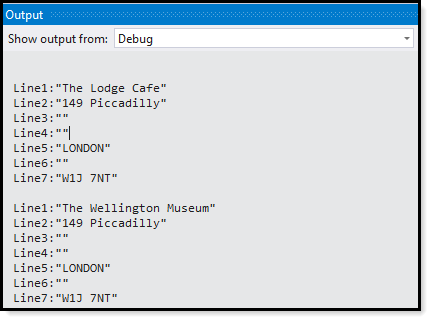
Test to read original json into a container then back out to another file then iterate the new data.
private static void SampleJsonExample()
{
    var json = File.ReadAllText("sample.json");
    AddressInformation results = JSonHelper.JSonToObject<AddressInformation>(json);

    JSonHelper.JsonToFormatted(results,"sample1.json");


    json = File.ReadAllText("sample1.json");
    results = JSonHelper.JSonToObject<AddressInformation>(json);

    foreach (var result in results.Results)
    {
        foreach (var resultDetail in result.Details)
        {
            Debug.WriteLine(resultDetail);
        }
    }
}
---