How to display attribute description in Master Data Services Explorer for end user

Gianna Neeser 1 Reputation point
2021-05-03T13:28:53.657+00:00

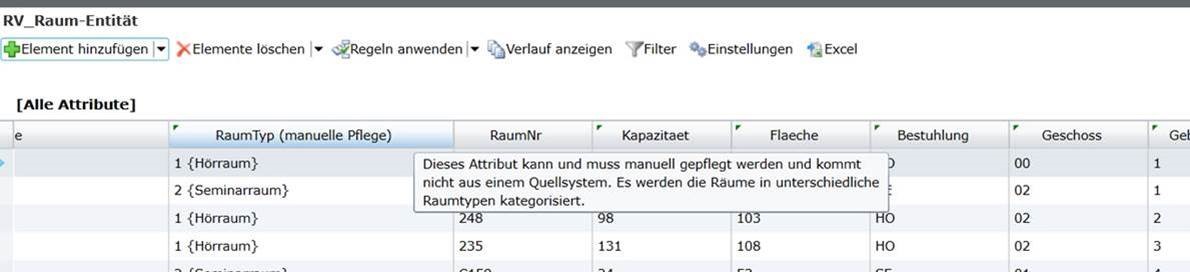
Unfortunately, we are not able to display the Attribute Description in Explorer (visible to end user). We think there may have been such a functionality in the past, as a tooltip on the green triangle on the attribute name.
Does anybody know how to display the the description when moving the mouse over the green triangle? Or is it a discontinued functionality?
Thank you very much!

--Edited--
The question is regarding MDS (Master data services).
This is the desired outcome when moving the mouse over the green triangle:
93857-mds-attributedescription.jpg

Currently, no description is displayed when moving the mouse over the green triangle.

Windows for business | Windows Server | User experience | Other
0 comments No comments
{count} votes

1 answer

Sort by: Most helpful
  1. Teemo Tang 11,496 Reputation points
    2021-05-04T06:41:53.977+00:00

    In Explorer, open a folder, go to "View" mode, choose a view setting or set the view settings as you wish.
    Then click "Options", and under "view" tab select "Apply to folders".
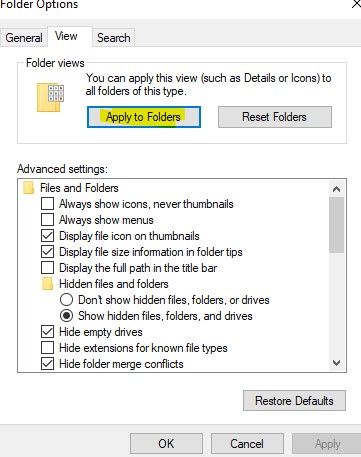
    93410-a.jpg

    -------------------------------------------------------------------------------------

    If the Answer is helpful, please click "Accept Answer" and upvote it.
    Information posted in the given link is hosted by a third party. Microsoft does not guarantee the accuracy and effectiveness of information.
    Note: Please follow the steps in our documentation to enable e-mail notifications if you want to receive the related email notification for this thread.


Your answer

Answers can be marked as 'Accepted' by the question author and 'Recommended' by moderators, which helps users know the answer solved the author's problem.