Developer technologies | Windows Presentation Foundation
A part of the .NET Framework that provides a unified programming model for building line-of-business desktop applications on Windows.
This browser is no longer supported.
Upgrade to Microsoft Edge to take advantage of the latest features, security updates, and technical support.
' cx='32' cy='32' r='32' /%3E%3Ctext x='50%25' y='55%25' dominant-baseline='middle' text-anchor='middle' fill='%23FFF' %3EE%3C/text%3E%3C/svg%3E)
is there a way to bind xaml control mouse event to mouse event handler in viewmodel?
i'm using wpf core3.1 MS VS2019.

Hi, without seeing your code I cannot reproduce your problems. Try following demo:
<Window x:Class="WpfApp1.Window03"
        xmlns="http://schemas.microsoft.com/winfx/2006/xaml/presentation"
        xmlns:x="http://schemas.microsoft.com/winfx/2006/xaml"
        xmlns:d="http://schemas.microsoft.com/expression/blend/2008"
        xmlns:mc="http://schemas.openxmlformats.org/markup-compatibility/2006"
        xmlns:local="clr-namespace:WpfApp03"
        mc:Ignorable="d"
        Title="Window03" Height="450" Width="400">
  <Window.DataContext>
    <local:ViewModel/>
  </Window.DataContext>
  <Grid>
    <Grid.RowDefinitions>
      <RowDefinition/>
      <RowDefinition/>
    </Grid.RowDefinitions>
    <Viewport3D Grid.Row="0" local:ViewModel.Reference="True">
      <Viewport3D.Camera>
        <PerspectiveCamera Position="-40,40,40" LookDirection="40,-40,-40 "
                         UpDirection="0,0,1" />
      </Viewport3D.Camera>
      <ModelVisual3D>
        <ModelVisual3D.Content>
          <Model3DGroup>
            <DirectionalLight Color="White" Direction="-1,-1,-3" />
            <GeometryModel3D>
              <GeometryModel3D.Geometry>
                <MeshGeometry3D Positions="0,0,0 10,0,0 10,10,0 0,10,0 0,0,10
                        10,0,10 10,10,10 0,10,10"
                        TriangleIndices="0 1 3 1 2 3  0 4 3 4 7 3  4 6 7 4 5 6
                                         0 4 1 1 4 5  1 2 6 6 5 1  2 3 7 7 6 2"/>
              </GeometryModel3D.Geometry>
              <GeometryModel3D.Material>
                <DiffuseMaterial Brush="Red"/>
              </GeometryModel3D.Material>
            </GeometryModel3D>
          </Model3DGroup>
        </ModelVisual3D.Content>
      </ModelVisual3D>
    </Viewport3D>
    <Viewport3D Grid.Row="1" local:ViewModel.Reference="True">
      <Viewport3D.Camera>
        <PerspectiveCamera Position="-40,40,40" LookDirection="40,-40,-40 "
                         UpDirection="0,0,1" />
      </Viewport3D.Camera>
      <ModelVisual3D>
        <ModelVisual3D.Content>
          <Model3DGroup>
            <DirectionalLight Color="White" Direction="-1,-1,-3" />
            <GeometryModel3D>
              <GeometryModel3D.Geometry>
                <MeshGeometry3D Positions="0,0,0 10,0,0 10,10,0 0,10,0 0,0,10
                        10,0,10 10,10,10 0,10,10"
                        TriangleIndices="0 1 3 1 2 3  0 4 3 4 7 3  4 6 7 4 5 6
                                         0 4 1 1 4 5  1 2 6 6 5 1  2 3 7 7 6 2"/>
              </GeometryModel3D.Geometry>
              <GeometryModel3D.Material>
                <DiffuseMaterial Brush="Green"/>
              </GeometryModel3D.Material>
            </GeometryModel3D>
          </Model3DGroup>
        </ModelVisual3D.Content>
      </ModelVisual3D>
    </Viewport3D>
  </Grid>
</Window>
--------------------------------------
using System;
using System.Collections.Generic;
using System.Linq;
using System.Windows;
using System.Windows.Controls;
using System.Windows.Input;
using System.Windows.Media.Media3D;

namespace WpfApp03
{
  public class ViewModel
  {

    List<MyViewPort> ViewPorts = new List<MyViewPort>();

    public static readonly DependencyProperty ReferenceProperty =
      DependencyProperty.RegisterAttached("Reference", typeof(bool),
                                          typeof(FrameworkElement),
                                          new UIPropertyMetadata(false, OnReferenceChanged));
    public static bool GetReference(DependencyObject obj) => (bool)obj.GetValue(ReferenceProperty);
    public static void SetReference(DependencyObject obj, bool value) => obj.SetValue(ReferenceProperty, value);

    private static void OnReferenceChanged(DependencyObject depObj, DependencyPropertyChangedEventArgs e)
    {
      var vp = depObj as Viewport3D;
      if (vp == null || !(e.NewValue is Boolean)) return;
      var vm = vp.DataContext as ViewModel;
      if (vm.ViewPorts.Count == 0 || vm.ViewPorts.Where((v) => v.VPort == vp).Count() == 0)
        vm.ViewPorts.Add(new MyViewPort() { VPort = vp });
    }
  }

  public class MyViewPort
  {
    private Viewport3D _vPort;
    public Viewport3D VPort
    {
      get => this._vPort;
      set
      {
        if (this._vPort == null)
        {
          this._vPort = value;
          this._vPort.MouseDown += _vPort_MouseDown;
          this._vPort.MouseMove += _vPort_MouseMove;
          this._vPort.MouseUp += _vPort_MouseUp;
          this._vPort.Loaded += _vPort_Loaded;
        }
      }
    }

    private AxisAngleRotation3D rot = new AxisAngleRotation3D(new Vector3D(0, 2, 0), 0);
    private void _vPort_Loaded(object sender, RoutedEventArgs e)
    {
      var mod = this._vPort.Children[0] as ModelVisual3D;
      mod.Transform = new RotateTransform3D(rot);
    }

    private Point pt = new Point(double.NaN, double.NaN);
    private void _vPort_MouseDown(object sender, MouseButtonEventArgs e) =>       pt = e.GetPosition(this._vPort);
    private void _vPort_MouseMove(object sender, MouseEventArgs e)
    {
      if (!double.IsNaN(pt.X))
      {
        Point pt1 = e.GetPosition(this._vPort);
        double ang = pt1.X - pt.X;
        rot.Angle = ang;
      }
    }
    private void _vPort_MouseUp(object sender, MouseButtonEventArgs e)=>       pt = new Point(double.NaN, double.NaN);
  }
}
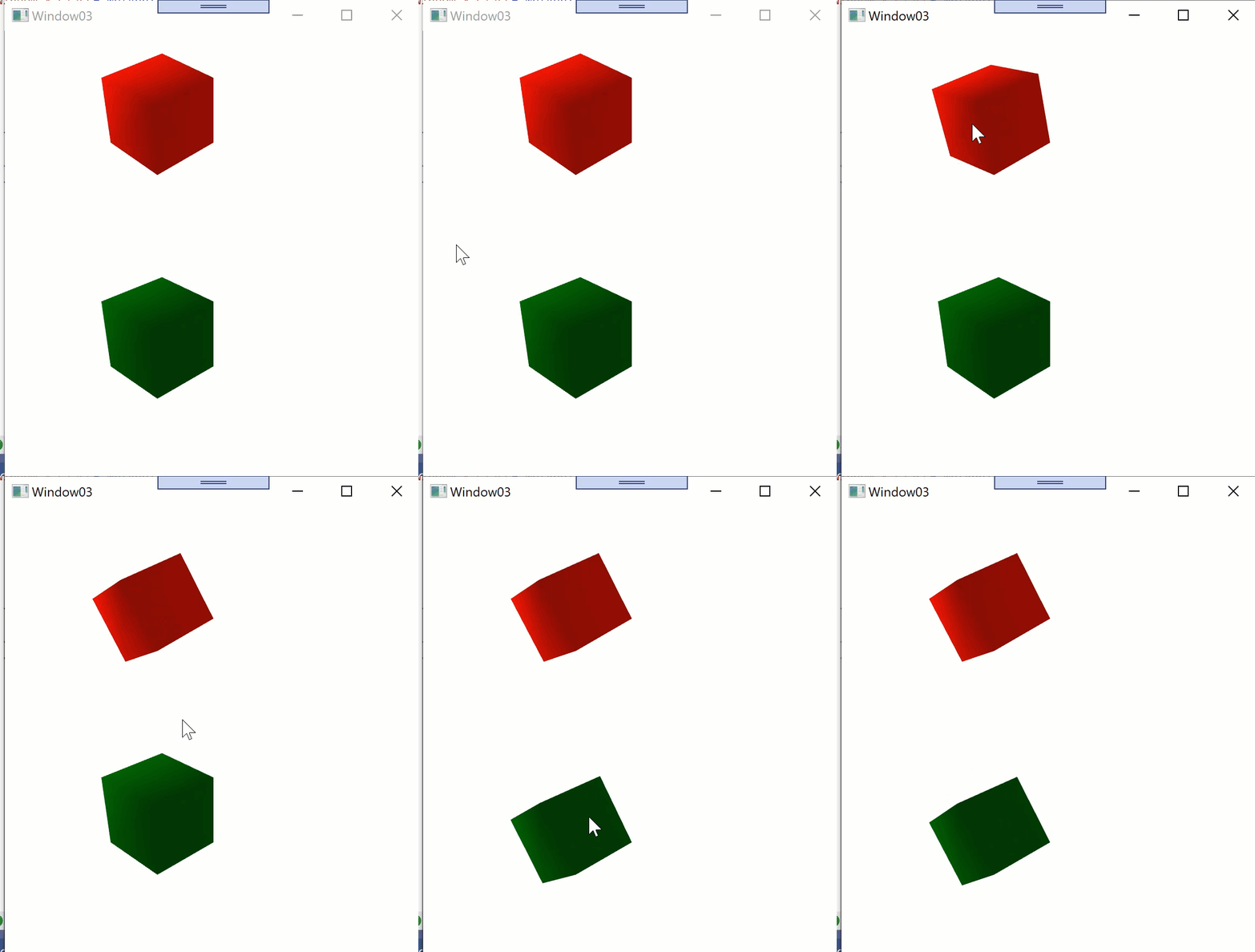
hi *anonymous user*-3316, thank you so much , one last question;
when and how many times private static void OnReferenceChanged will be invoked.
tanks again.
is there a way to add another event handler OnKeyUp to mainWindow the container of our Viewport, so that our Viewport will respond to mainWindow.KeyUp
Hi, OnReferenceChanged will be invoked once during instantiation of UIElement (once for each UIElement where you set local:ViewModel.Reference="True").
Hi, you can include local:ViewModel.Reference="True" on different UIElements. In OnReferenceChanged you can catch the sender (depObj) and store this reference in ViewModel for later use, e.g. OnKey events.
hi *anonymous user*-3316, i've added this code (without adding local:ViewModel.Reference to main window). inside OnReferenceChanged
             if (viewModel.ViewportOperations.Count == 0 ||
                 viewModel.ViewportOperations.Where(vpo => vpo.Viewport == viewport).Count() == 0)
             {
                 var vpo = new ViewportOperations() { Viewport = viewport, };
                 viewModel.ViewportOperations.Add(vpo);

                 // subscribe to mainwindow.KeyUp
                 var window = ui.FindLogicalParent<Window>(viewport);
                 if (window != null)
                 {
                     window.KeyUp += vpo.OnKeyUp;
                 }
Hi, you can use "attached property" pattern like in following demo:
<Window x:Class="WpfApp1.Window02"
        xmlns="http://schemas.microsoft.com/winfx/2006/xaml/presentation"
        xmlns:x="http://schemas.microsoft.com/winfx/2006/xaml"
        xmlns:d="http://schemas.microsoft.com/expression/blend/2008"
        xmlns:mc="http://schemas.openxmlformats.org/markup-compatibility/2006"
        xmlns:local="clr-namespace:WpfApp02"
        mc:Ignorable="d"
        Title="Window02" Height="450" Width="800">
  <Window.DataContext>
    <local:ViewModel/>
  </Window.DataContext>
  <Grid>
    <ListBox ItemsSource="{Binding Log}" local:ViewModel.MouseEvents="True"/>
  </Grid>
</Window>
----------------------------------------------------------
using System;
using System.Collections.ObjectModel;
using System.Windows;

namespace WpfApp02
{
  public class ViewModel
  {
    public ObservableCollection<string> Log { get; set; } = new ObservableCollection<string>();
    public void InsertLogEntry(string msg) => Log.Insert(0, msg);

    public static readonly DependencyProperty MouseEventsProperty =
      DependencyProperty.RegisterAttached("MouseEvents", typeof(bool),
                                          typeof(FrameworkElement),
                                          new UIPropertyMetadata(false, OnMouseEventsChanged));
    public static bool GetMouseEvents(DependencyObject obj) => (bool)obj.GetValue(MouseEventsProperty);
    public static void SetMouseEvents(DependencyObject obj, bool value) => obj.SetValue(MouseEventsProperty, value);

    private static void OnMouseEventsChanged(DependencyObject depObj, DependencyPropertyChangedEventArgs e)
    {
      var fwe = depObj as FrameworkElement;
      if (fwe == null || !(e.NewValue is Boolean)) return;
      if ((bool)(e.NewValue)) fwe.MouseDown += OnMouseDown;
      else fwe.MouseDown -= OnMouseDown;
    }

    private static void OnMouseDown(object sender, EventArgs e)
    {
      var uie = sender as FrameworkElement;
      var vm = uie.DataContext as ViewModel;
      vm.InsertLogEntry($"MouseDown: {DateTime.Now:HH:mm:ss.fff}");
    }
  }
}
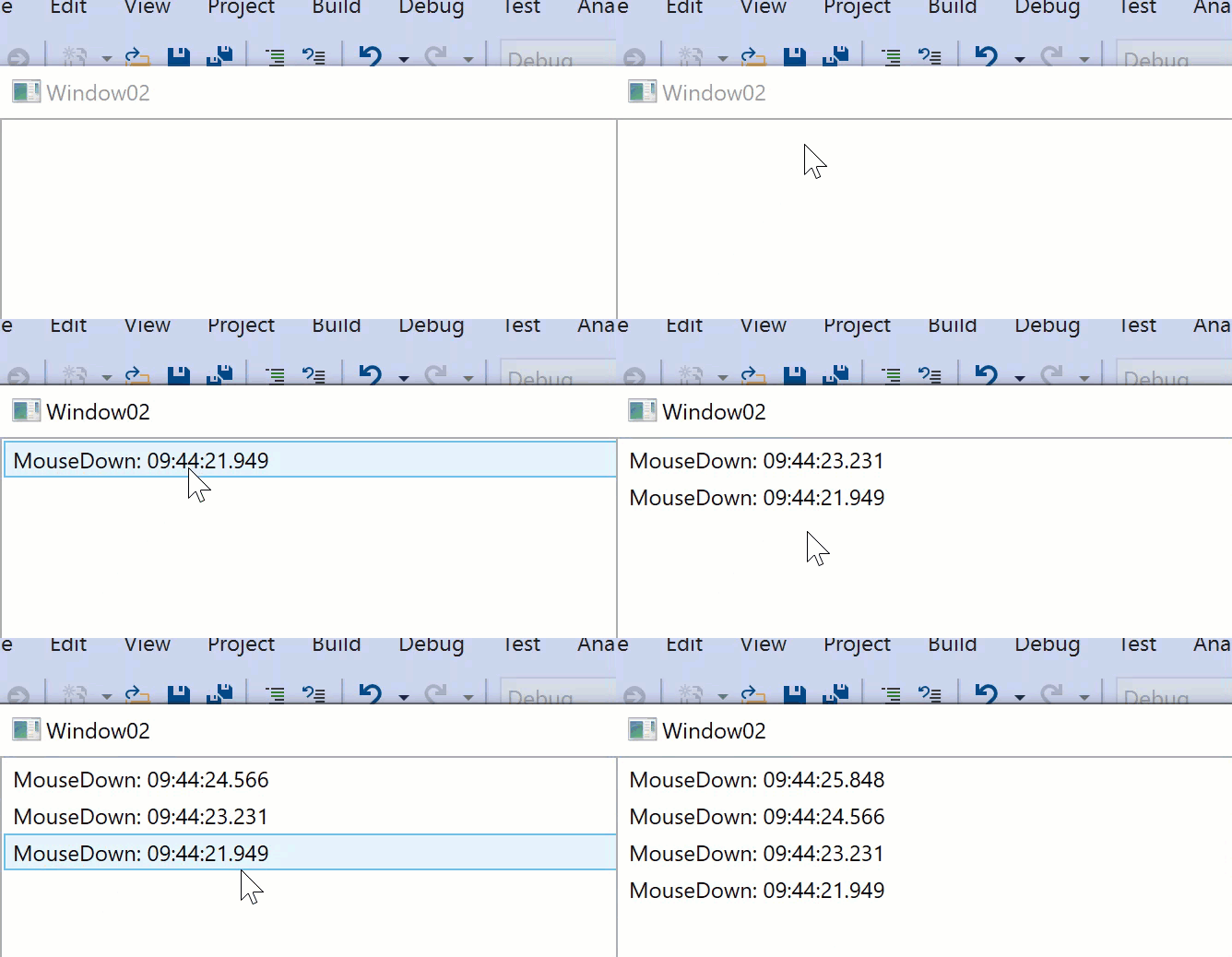
hi *anonymous user*-3316, it works well,
but how to add another events to the same class (the code u provided supports only MouseDown event)
i want to add MouseUp ,MouseMove.
thanks in advance.
Hi, extend code:
   if ((bool)(e.NewValue)) fwe.MouseDown += OnMouseDown;
   else fwe.MouseDown -= OnMouseDown;
with additional event methods:
    if ((bool)(e.NewValue))
     {
       fwe.MouseDown += OnMouseDown;
       fwe.MouseUp += OnMouseUp;
       fwe.MouseMove += OnMouseMove;
     }
     else
     {
       fwe.MouseDown -= OnMouseDown;
       fwe.MouseUp -= OnMouseUp;
       fwe.MouseMove -= OnMouseMove;
     }
hi *anonymous user*-3316, this pattern is so easy and helps me a lot specially avoiding code behind,
but the event MouseMove performance is bad in comparison to the same event in code behind, is there a way to enhance the code u provided such as make it specific to Viewport3d control, actually it's the first time for me to use AttachProperty.
any help will be appreciated.
another problem occurs when I'm using 2 different controls implemented the same event I don't know how/where to write a specific handlers for each control,
also the class xy that owns the attached property definition is a property of the ViewModel not the ViewModel itself, so I can create different instances of xy class.