Developer technologies | Universal Windows Platform (UWP)
A Microsoft platform for building and publishing apps for Windows devices.
This browser is no longer supported.
Upgrade to Microsoft Edge to take advantage of the latest features, security updates, and technical support.
' cx='32' cy='32' r='32' /%3E%3Ctext x='50%25' y='55%25' dominant-baseline='middle' text-anchor='middle' fill='%23FFF' %3EAA%3C/text%3E%3C/svg%3E)
How can I dynamically use a Boolean that I created to control the visibility of an item via a decision making statement? I created one in my control class but don't know how to link it to the item myself (i.e. a TextBlock).
Update
Page1.xaml
<Page
    x:Class="MyApp.Page1"
    xmlns="http://schemas.microsoft.com/winfx/2006/xaml/presentation"
    xmlns:x="http://schemas.microsoft.com/winfx/2006/xaml"
    xmlns:local="using:MyApp"
    xmlns:d="http://schemas.microsoft.com/expression/blend/2008"
    xmlns:mc="http://schemas.openxmlformats.org/markup-compatibility/2006"
    xmlns:local1="using:MyApp.UserControls"
    mc:Ignorable="d"
    Background="{ThemeResource ApplicationPageBackgroundThemeBrush}">

    <StackPanel>
        <Border BorderBrush="LightGreen" BorderThickness="3" Margin="5">
            <StackPanel>
                <TextBlock Text="UserControl"/>
                <Border BorderBrush="Red" BorderThickness="3" Margin="5">
                    <local1:MyUserControl1 x:Name="uc"/>
                </Border>
            </StackPanel>
        </Border>
    </StackPanel>
</Page>
Page1.xaml.cs
namespace MyApp
{
    public sealed partial class Page1 : Page
    {
        public Page1()
        {
            this.InitializeComponent();

            this.uc.TitleText = "TitleText";
            this.uc.ShowTitleText = true;
        }
    }
}
MyUserControl1.xaml
<UserControl
    x:Class="MyApp.UserControls.MyUserControl1"
    xmlns="http://schemas.microsoft.com/winfx/2006/xaml/presentation"
    xmlns:x="http://schemas.microsoft.com/winfx/2006/xaml"
    xmlns:local="using:MyApp.UserControls"
    xmlns:d="http://schemas.microsoft.com/expression/blend/2008"
    xmlns:mc="http://schemas.openxmlformats.org/markup-compatibility/2006"
    mc:Ignorable="d"
    d:DesignHeight="300"
    d:DesignWidth="400">
    <UserControl.Resources>
        <local:BooleanToVisibilityConverter x:Key="b2vconv"/>
    </UserControl.Resources>

   <Grid x:Name="grd">
     <Grid.RowDefinitions>
       <RowDefinition Height="Auto"/>
       <RowDefinition Height="Auto"/>
     </Grid.RowDefinitions>

     <TextBlock Grid.Row="0" x:Name="txtTitle" Text="{Binding TitleText}" Visibility="{Binding ShowTitleText, Converter={StaticResource b2vconv}}"/>
     <Border Grid.Row="1" BorderBrush="Green" BorderThickness="3">
       <TextBlock Text="Body"/>
     </Border>
   </Grid>
</UserControl>
MyUserControl1.xaml.cs
namespace MyApp.UserControls
{
    public sealed partial class MyUserControl1 : UserControl
    {
        public MyUserControl1()
        {
            this.InitializeComponent();
            this.grd.DataContext = this;
        }

        public static readonly DependencyProperty TitleTextProperty =
          DependencyProperty.Register("TitleText", typeof(string), typeof(MyUserControl1),
            new PropertyMetadata(""));

        public static readonly DependencyProperty ShowTitleTextProperty =
          DependencyProperty.Register("ShowTitleText", typeof(bool), typeof(MyUserControl1),
            new PropertyMetadata(true));

        public string TitleText
        {
            get => GetValue(TitleTextProperty).ToString();
            set { SetValue(TitleTextProperty, value); }
        }

        public bool ShowTitleText
        {
            get => (bool)GetValue(ShowTitleTextProperty);
            set { SetValue(ShowTitleTextProperty, value); }
        }
    }

    public class BooleanToVisibilityConverter : IValueConverter
    {
        public object Convert(object value, Type targetType, object parameter, string language) =>
            (bool)value ? Visibility.Visible : Visibility.Collapsed;

        public object ConvertBack(object value, Type targetType, object parameter, string language) =>
            (Visibility)value == Visibility.Visible;
    }
}

Hi, it's impossible to assign bool (controlFacilitiesSummary.ShowTextTitle = true;) to Visibility property (public Visibility ShowTextTitle { get ...).
Hi, to use assign in code try following demo:
<Page
    x:Class="App1.Page03"
    xmlns="http://schemas.microsoft.com/winfx/2006/xaml/presentation"
    xmlns:x="http://schemas.microsoft.com/winfx/2006/xaml"
    xmlns:local="using:App03"
    xmlns:d="http://schemas.microsoft.com/expression/blend/2008"
    xmlns:mc="http://schemas.openxmlformats.org/markup-compatibility/2006"
    mc:Ignorable="d"
    Background="{ThemeResource ApplicationPageBackgroundThemeBrush}">
  <StackPanel>
    <Border BorderBrush="Green" BorderThickness="3" Margin="5">
      <StackPanel>
        <TextBlock Text="Text for UserControl"/>
        <TextBox x:Name="tb" Text="first title" TextChanged="tb_TextChanged"/>
        <TextBlock Text="Switch to show UserControl"/>
        <CheckBox x:Name="cb" IsChecked="True"/>
      </StackPanel>
    </Border>
    <Border BorderBrush="LightGreen" BorderThickness="3" Margin="5">
      <StackPanel>
        <TextBlock Text="UserControl"/>
        <Border BorderBrush="Red" BorderThickness="3" Margin="5">
          <local:UserControlFacilitiesSummary x:Name="uc"/>
        </Border>
      </StackPanel>
    </Border>
  </StackPanel>
</Page>
using Windows.UI.Xaml;
using Windows.UI.Xaml.Controls;

namespace App1
{
  public sealed partial class Page03 : Page
  {
    public Page03()
    {
      this.InitializeComponent();
      this.uc.TitleText = this.tb.Text;
      this.uc.ShowTitleText = this.cb.IsChecked.Value;
      this.cb.Checked += cb_Checked_Unchecked;
      this.cb.Unchecked += cb_Checked_Unchecked;
    }

    private void tb_TextChanged(object sender, TextChangedEventArgs e) => this.uc.TitleText = this.tb.Text;
    private void cb_Checked_Unchecked(object sender, RoutedEventArgs e) => this.uc.ShowTitleText = this.cb.IsChecked.Value;
  }
<UserControl
    x:Class="App03.UserControlFacilitiesSummary"
    xmlns="http://schemas.microsoft.com/winfx/2006/xaml/presentation"
    xmlns:x="http://schemas.microsoft.com/winfx/2006/xaml"
    xmlns:local="using:App03"
    xmlns:d="http://schemas.microsoft.com/expression/blend/2008"
    xmlns:mc="http://schemas.openxmlformats.org/markup-compatibility/2006"
    mc:Ignorable="d"
    d:DesignHeight="300"
    d:DesignWidth="400">
  <UserControl.Resources>
    <local:BooleanToVisibilityConverter x:Key="b2vconv"/>
  </UserControl.Resources>
  <Grid x:Name="grd">
    <Grid.RowDefinitions>
      <RowDefinition Height="auto"/>
      <RowDefinition Height="auto"/>
    </Grid.RowDefinitions>
    <TextBlock Grid.Row="0" Text="{Binding TitleText}" Visibility="{Binding ShowTitleText, Converter={StaticResource b2vconv}}"/>
    <Border Grid.Row="1" BorderBrush="Green" BorderThickness="3">
      <TextBlock Text="Body"/>
    </Border>
  </Grid>
using System;
using Windows.UI.Xaml;
using Windows.UI.Xaml.Controls;
using Windows.UI.Xaml.Data;

namespace App03
{

  public sealed partial class UserControlFacilitiesSummary : UserControl
  {
    public UserControlFacilitiesSummary()
    {
      this.InitializeComponent();
      this.grd.DataContext = this;
    }

    public static readonly DependencyProperty TitleTextProperty =
      DependencyProperty.Register("TitleText", typeof(string), typeof(UserControlFacilitiesSummary),
        new PropertyMetadata(""));

    public static readonly DependencyProperty ShowTitleTextProperty =
      DependencyProperty.Register("ShowTitleText", typeof(bool), typeof(UserControlFacilitiesSummary),
        new PropertyMetadata(true));

    public string TitleText
    {
      get => GetValue(TitleTextProperty).ToString();
      set { SetValue(TitleTextProperty, value); }
    }

    public bool ShowTitleText
    {
      get => (bool)GetValue(ShowTitleTextProperty);
      set { SetValue(ShowTitleTextProperty, value); }
    }
  }

  public class BooleanToVisibilityConverter : IValueConverter
  {
    public object Convert(object value, Type targetType, object parameter, string language) =>
        (bool)value ? Visibility.Visible : Visibility.Collapsed;

    public object ConvertBack(object value, Type targetType, object parameter, string language) =>
        (Visibility)value == Visibility.Visible;

  }
}
Hi,
'local:BooleanToVisibilityConverter' not found.
Which reference do I need to add to the XAML file?
Hi try my code. My code contains public class BooleanToVisibilityConverter. I think you set (in local) a wrong namespace.
This is so weird. I added this line to the UserControl XAML code as the user control itself is in a folder called 'UserControls', but my app still keeps crashing with the following errors:
xmlns:local="using:AppName.UserControls"
Error message 1
The name "BooleanToVisibilityConverter" does not exist in the namespace "using:MyApp.UserControls".
Error message 2
The type 'local:BooleanToVisibilityConverter' was not found. Verify that you are not missing an assembly reference and that all referenced assemblies have been built.
It's really annoying how Visual Studio doesn't offer helpful suggestions to fix this, like Android Studio does.
Hi, if you use
xmlns:local="using:AppName.UserControls"
and
<local:UserControlFacilitiesSummary x:Name="uc"/>
the class UserControlFacilitiesSummary must be in namespace
namespace AppName.UserControls
{
….
and if this class and namespace are in other assembly (exe/dll) the reference to this other assembly must be set. Open "Class View window" and check this.
Hello again. This was already the case. Please see my updated simplified code. I don't want to use a check box to control the visibility of the object, I want to use a boolean value in code only from the main page i.e.:
this.uc.ShowTitleText = true;
or
this.uc.ShowTitleText = false;

Code in my answer should fit your needs. If not, tell me which problem you have with it so that I can improve it.
Hi, I copy your code in a new App and it works fine, see here (download from OneDrive). I add only code to set ShowTitleText = false in main page after 5 seconds to show that work properly.
I think UserControlFacilitiesSummary code behind should be like
public sealed partial class UserControlFacilitiesSummary
{
    public UserControlFacilitiesSummary()
    {
        InitializeComponent();
        txtTitle.Text = TitleText ?? string.Empty;
        txtTitle.Visibility = ShowTitleText ? Visibility.Visible : Visibility.Collapsed;
        txtSubtitle.Text = TitleText ?? string.Empty;
        txtSubtitle.Visibility = ShowTitleText ? Visibility.Visible : Visibility.Collapsed;
        txtFacilities.Text = TextFacilities ?? string.Empty;
    }

    public static readonly DependencyProperty TitleTextProperty = DependencyProperty.Register(
        nameof(TitleText), typeof(string), typeof(UserControlFacilitiesSummary),
        new PropertyMetadata(default(string), (o, args) =>
        {
            var dependencyObject = (UserControlFacilitiesSummary)o;
            dependencyObject.txtTitle.Text = (string)args.NewValue ?? string.Empty;
        }));

    public string TitleText
    {
        get => (string)GetValue(TitleTextProperty);
        set => SetValue(TitleTextProperty, value);
    }

    public static readonly DependencyProperty ShowTitleTextProperty = DependencyProperty.Register(
        nameof(ShowTitleText), typeof(bool), typeof(UserControlFacilitiesSummary),
        new PropertyMetadata(default(bool), (o, args) =>
        {
            var dependencyObject = (UserControlFacilitiesSummary)o;
            dependencyObject.txtTitle.Visibility = (bool)args.NewValue ? Visibility.Visible : Visibility.Collapsed;
        }));

    public bool ShowTitleText
    {
        get => (bool)GetValue(ShowTitleTextProperty);
        set => SetValue(ShowTitleTextProperty, value);
    }

    public static readonly DependencyProperty TextSubtitleProperty = DependencyProperty.Register(
        nameof(TextSubtitle), typeof(string), typeof(UserControlFacilitiesSummary),
        new PropertyMetadata(default(string), (o, args) =>
        {
            var dependencyObject = (UserControlFacilitiesSummary)o;
            dependencyObject.txtSubtitle.Text = (string)args.NewValue ?? string.Empty;
        }));

    public string TextSubtitle
    {
        get => (string)GetValue(TextSubtitleProperty);
        set => SetValue(TextSubtitleProperty, value);
    }

    public static readonly DependencyProperty ShowTextSubtitleProperty = DependencyProperty.Register(
        nameof(ShowTextSubtitle), typeof(bool), typeof(UserControlFacilitiesSummary),
        new PropertyMetadata(default(bool), (o, args) =>
        {
            var dependencyObject = (UserControlFacilitiesSummary)o;
            dependencyObject.txtSubtitle.Visibility = (bool)args.NewValue ? Visibility.Visible : Visibility.Collapsed;
        }));

    public bool ShowTextSubtitle
    {
        get => (bool)GetValue(ShowTextSubtitleProperty);
        set => SetValue(ShowTextSubtitleProperty, value);
    }

    public static readonly DependencyProperty TextFacilitiesProperty = DependencyProperty.Register(
        nameof(TextFacilities), typeof(string), typeof(UserControlFacilitiesSummary),
        new PropertyMetadata(default(string), (o, args) =>
        {
            var dependencyObject = (UserControlFacilitiesSummary)o;
            dependencyObject.txtFacilities.Text = (string)args.NewValue ?? string.Empty;
        }));

    public string TextFacilities
    {
        get => (string) GetValue(TextFacilitiesProperty);
        set => SetValue(TextFacilitiesProperty, value);
    }
}
and your XAML something like
<UserControl [...]>
    <controls:DropShadowPanel HorizontalAlignment="Left">
        <Grid x:Name="grd">
            <Grid.RowDefinitions>
                <RowDefinition Height="Auto"/>
                <RowDefinition Height="Auto"/>
            </Grid.RowDefinitions>

            <StackPanel Grid.Row="0" HorizontalAlignment="Left">
                <TextBlock x:Name="txtFacilities" Style="{StaticResource SubheaderTextBlockStyle}"/>
            </StackPanel>
            <StackPanel Grid.Row="1" Orientation="Vertical">
                <TextBlock x:Name="txtTitle" />
                <TextBlock x:Name="txtSubtitle" />
            </StackPanel>
        </Grid>
    </controls:DropShadowPanel>
</UserControl>
In the code behind the page I tried the following but it didn't work for some reason:
UserControlName.ShowTitleText = false;
I forgot initialization, code updated with your new control definition.
Hi, try following demo with your code, which I have changed a little bit.
<Page
    x:Class="App1.Page02"
    xmlns="http://schemas.microsoft.com/winfx/2006/xaml/presentation"
    xmlns:x="http://schemas.microsoft.com/winfx/2006/xaml"
    xmlns:local="using:App02"
    xmlns:d="http://schemas.microsoft.com/expression/blend/2008"
    xmlns:mc="http://schemas.openxmlformats.org/markup-compatibility/2006"
    mc:Ignorable="d"
    Background="{ThemeResource ApplicationPageBackgroundThemeBrush}">
  <Page.DataContext>
    <local:ViewModel/>
  </Page.DataContext>
  <StackPanel>
    <Border BorderBrush="Green" BorderThickness="3" Margin="5">
      <StackPanel>
        <TextBlock Text="Text for UserControl"/>
        <TextBox Text="{Binding TextValue, Mode=TwoWay, UpdateSourceTrigger=PropertyChanged}"/>
        <TextBlock Text="Switch to show UserControl"/>
        <CheckBox IsChecked="{Binding SwitchValue, Mode=TwoWay}"/>
      </StackPanel>
    </Border>
    <Border BorderBrush="LightGreen" BorderThickness="3" Margin="5">
      <StackPanel>
        <TextBlock Text="UserControl"/>
        <Border BorderBrush="Red" BorderThickness="3" Margin="5">
          <local:UserControlFacilitiesSummary TitleText="{Binding TextValue}" ShowTitleText="{Binding SwitchValue}"/>
        </Border>
      </StackPanel>
    </Border>
  </StackPanel>
</Page>
---------------------------------------
using System.ComponentModel;
using System.Runtime.CompilerServices;
using Windows.UI.Xaml.Controls;

namespace App02
{
  public class ViewModel : INotifyPropertyChanged
  {
    private string _textValue = "Start-Text";
    public string TextValue { get => this._textValue; set { this._textValue = value; OnPropertyChanged(); } }

    private bool _switchValue = true;
    public bool SwitchValue { get => this._switchValue; set { this._switchValue = value; OnPropertyChanged(); } }

    public event PropertyChangedEventHandler PropertyChanged;
    internal void OnPropertyChanged([CallerMemberName] string propName = "") =>
      PropertyChanged?.Invoke(this, new PropertyChangedEventArgs(propName));
  }
}
------------------------------------------------------------
<UserControl
    x:Class="App02.UserControlFacilitiesSummary"
    xmlns="http://schemas.microsoft.com/winfx/2006/xaml/presentation"
    xmlns:x="http://schemas.microsoft.com/winfx/2006/xaml"
    xmlns:local="using:App02"
    xmlns:d="http://schemas.microsoft.com/expression/blend/2008"
    xmlns:mc="http://schemas.openxmlformats.org/markup-compatibility/2006"
    mc:Ignorable="d"
    d:DesignHeight="300"
    d:DesignWidth="400">
  <Grid x:Name="grd">
    <Grid.RowDefinitions>
      <RowDefinition Height="auto"/>
      <RowDefinition Height="auto"/>
    </Grid.RowDefinitions>
    <TextBlock Grid.Row="0" Text="{Binding TitleText}" Visibility="{Binding ShowTitleText}"/>
    <Border Grid.Row="1" BorderBrush="Green" BorderThickness="3">
      <TextBlock Text="Body"/>
    </Border>
  </Grid>
</UserControl>
------------------------------------------------
using Windows.UI.Xaml;
using Windows.UI.Xaml.Controls;

namespace App02
{

  public sealed partial class UserControlFacilitiesSummary : UserControl
  {
    public UserControlFacilitiesSummary()
    {
      this.InitializeComponent();
      this.grd.DataContext = this;
    }

    public static readonly DependencyProperty TitleTextProperty =
      DependencyProperty.Register("TitleText", typeof(string), typeof(UserControlFacilitiesSummary), new PropertyMetadata(""));

    public static readonly DependencyProperty ShowTitleTextProperty =
      DependencyProperty.Register("ShowTitleText", typeof(bool), typeof(UserControlFacilitiesSummary),
        new PropertyMetadata(true));

    public string TitleText
    {
      get { return GetValue(TitleTextProperty).ToString(); }
      set { SetValue(TitleTextProperty, value); }
    }

    public Visibility ShowTitleText
    {
      //get { return (bool)GetValue(ShowTitleTextProperty); }
      get { return ((bool)GetValue(ShowTitleTextProperty)) ? Visibility.Visible : Visibility.Collapsed; }
      set { SetValue(ShowTitleTextProperty, value); }
    }
  }
}
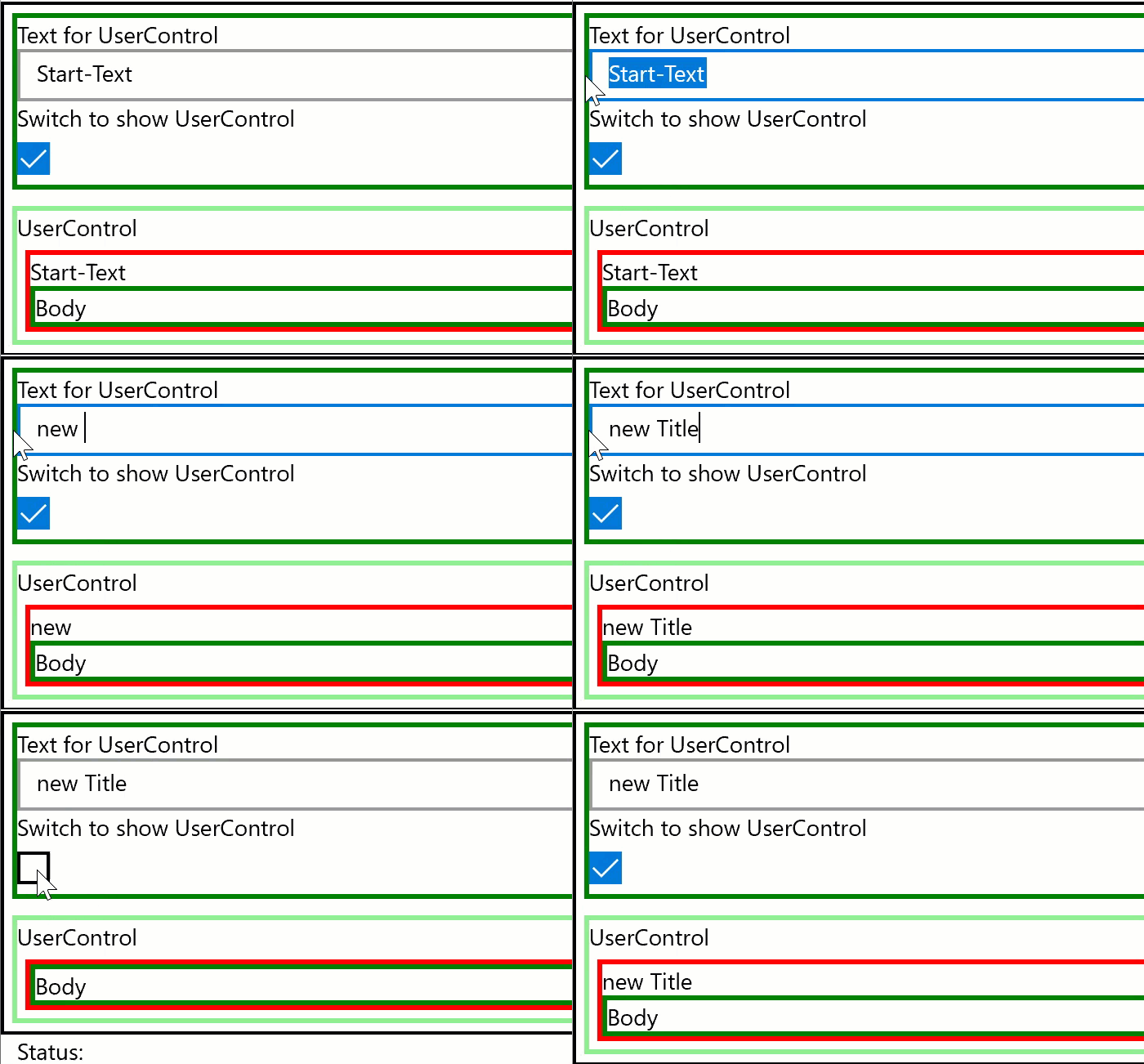
What about this?
UserControlName.ShowTitleText = false;
How can this be used properly?
Hi, try my demo:
<local:UserControlFacilitiesSummary TitleText="{Binding TextValue}" ShowTitleText="{Binding SwitchValue}"/>
Property SwitchValue in ViewModel binds to ShowTitleText DependencyProperty in UserControl. If you want work without Binding you can set the ShowTitleText property directly in CodeBehind:
<local:UserControlFacilitiesSummary x:Name="myUserControl"/>
and in CodeBehind of MainWindow:
       myUserControl.ShowTitleText = false;
       myUserControl.TitleText = "Title of UserControl";
myUserControl.ShowTitleText = "Title of UserControl";
should be
myUserControl.TitleText = "Title of UserControl";
Also:
myUserControl.ShowTitleText = false;
doesn't work, it shows this error:
Cannot implicitly convert type 'bool' to 'Windows.UI.Xaml.Visibility'
Hi, thank you for correction. I correct my code.
Without seeing your code I cannot reproduce your problem. My posted code works fine.
If you use property "ShowTitleText" directly (no Bindung) you must change the design of UserControl.
See my updated code (under Update)
Hi, you must change your UserControl:
             <TextBlock x:Name="txtTitle" Text="{x:Bind TextTitle,Mode=OneWay}" Visibility="{Binding ShowTitleTextUC}"/>
             <TextBlock x:Name="txtSubtitle" Text="{x:Bind TextSubtitle,Mode=OneWay}" Visibility="{Binding ShowSubtitleTextUC}"/>
and CodeBehind:
 public static readonly DependencyProperty ShowTitleTextProperty = DependencyProperty.Register("ShowTitleText", typeof(bool), typeof(UserControlFacilitiesSummary), new PropertyMetadata(true, OnShowTitleTextChanged));
private static void OnShowTitleTextChanged(DependencyObject d, DependencyPropertyChangedEventArgs e) {
  var uc = d as UserControlFacilitiesSummary; uc.ShowTitleTextUC = ((bool)e.NewValue) ? Visibility.Visible : Visibility.Collapsed; uc.OnPropertyChanged(nameof(ShowTitleTextUC));}
public Visibility ShowTitleTextUC { get; set; }
public bool ShowTitleText { get => ShowTitleTextUC == Visibility.Visible;
  set { ShowTitleTextUC = value ? Visibility.Visible : Visibility.Collapsed; OnPropertyChanged(nameof(ShowTitleTextUC)); }}
Interestingly I never used a view model class in my project due to complications. What is CallerMemberName?
I followed your suggestion but this error still won't go away (bearing in mind that I strongly prefer to set the visibility from the MainPage.xaml.cs as it is easier):
myUserControl.ShowTitleText = false;
Cannot implicitly convert type 'bool' to 'Windows.UI.Xaml.Visibility'
Hi, see my last post. Property "ShowTitleText" must be bool if you use this property from code. If you use this property for binding to Visibility property inside UserControl you must use converter. If you don't use converter you must use another property for binding inside UserControl (see my last post).