Hello,
Below I am outlining a problem I am having with the .NET Framework that is wreaking havoc on various programs and utilities I am trying to run. Below is the error I keep getting when I start my system and below that is some issues its causing and my attempted fixes so far. Any help would be appreciated
*****************************************************************************************************************************************************************************
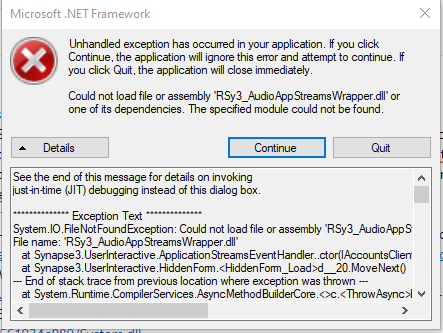
See the end of this message for details on invoking just-in-time (JIT) debugging instead of this dialog box. ************** Exception Text ************** System.IO.FileNotFoundException: Could not load file or assembly 'RSy3_AudioAppStreamsWrapper.dll' or one of its dependencies. The specified module could not be found. File name: 'RSy3_AudioAppStreamsWrapper.dll' at Synapse3.UserInteractive.ApplicationStreamsEventHandler..ctor(IAccountsClient accountEvent, IApplicationStreamsEvent appStreamsEvent) at Synapse3.UserInteractive.HiddenForm.d__20.MoveNext() --- End of stack trace from previous location where exception was thrown --- at System.Runtime.CompilerServices.AsyncMethodBuilderCore.<>c.b__6_0(Object state) ************** Loaded Assemblies ************** mscorlib Assembly Version: 4.0.0.0 Win32 Version: 4.8.4470.0 built by: NET48REL1LAST_C CodeBase: file:///C:/Windows/Microsoft.NET/Framework/v4.0.30319/mscorlib.dll ---------------------------------------- Razer Synapse Service Process Assembly Version: 1.0.0.0 Win32 Version: 1.0.0.0 CodeBase: file:///C:/Program%20Files%20(x86)/Razer/Synapse3/UserProcess/Razer%20Synapse%20Service%20Process.exe ---------------------------------------- System.Configuration Assembly Version: 4.0.0.0 Win32 Version: 4.8.4190.0 built by: NET48REL1LAST_B CodeBase: file:///C:/Windows/Microsoft.Net/assembly/GAC_MSIL/System.Configuration/v4.0_4.0.0.0__b03f5f7f11d50a3a/System.Configuration.dll ---------------------------------------- System Assembly Version: 4.0.0.0 Win32 Version: 4.8.4488.0 built by: NET48REL1LAST_C CodeBase: file:///C:/Windows/Microsoft.Net/assembly/GAC_MSIL/System/v4.0_4.0.0.0__b77a5c561934e089/System.dll ---------------------------------------- Microsoft.VisualBasic Assembly Version: 10.0.0.0 Win32 Version: 14.8.4084.0 built by: NET48REL1 CodeBase: file:///C:/Windows/Microsoft.Net/assembly/GAC_MSIL/Microsoft.VisualBasic/v4.0_10.0.0.0__b03f5f7f11d50a3a/Microsoft.VisualBasic.dll ---------------------------------------- System.Windows.Forms Assembly Version: 4.0.0.0 Win32 Version: 4.8.4488.0 built by: NET48REL1LAST_C CodeBase: file:///C:/Windows/Microsoft.Net/assembly/GAC_MSIL/System.Windows.Forms/v4.0_4.0.0.0__b77a5c561934e089/System.Windows.Forms.dll ---------------------------------------- System.Drawing Assembly Version: 4.0.0.0 Win32 Version: 4.8.4390.0 built by: NET48REL1LAST_C CodeBase: file:///C:/Windows/Microsoft.Net/assembly/GAC_MSIL/System.Drawing/v4.0_4.0.0.0__b03f5f7f11d50a3a/System.Drawing.dll ---------------------------------------- System.Xml Assembly Version: 4.0.0.0 Win32 Version: 4.8.4084.0 built by: NET48REL1 CodeBase: file:///C:/Windows/Microsoft.Net/assembly/GAC_MSIL/System.Xml/v4.0_4.0.0.0__b77a5c561934e089/System.Xml.dll ---------------------------------------- System.Deployment Assembly Version: 4.0.0.0 Win32 Version: 4.8.4270.0 built by: NET48REL1LAST_C CodeBase: file:///C:/Windows/Microsoft.Net/assembly/GAC_MSIL/System.Deployment/v4.0_4.0.0.0__b03f5f7f11d50a3a/System.Deployment.dll ---------------------------------------- PresentationFramework Assembly Version: 4.0.0.0 Win32 Version: 4.8.4470.0 CodeBase: file:///C:/Windows/Microsoft.Net/assembly/GAC_MSIL/PresentationFramework/v4.0_4.0.0.0__31bf3856ad364e35/PresentationFramework.dll ---------------------------------------- WindowsBase Assembly Version: 4.0.0.0 Win32 Version: 4.8.4470.0 built by: NET48REL1LAST_C CodeBase: file:///C:/Windows/Microsoft.Net/assembly/GAC_MSIL/WindowsBase/v4.0_4.0.0.0__31bf3856ad364e35/WindowsBase.dll ---------------------------------------- System.Xaml Assembly Version: 4.0.0.0 Win32 Version: 4.8.4470.0 built by: NET48REL1LAST_C CodeBase: file:///C:/Windows/Microsoft.Net/assembly/GAC_MSIL/System.Xaml/v4.0_4.0.0.0__b77a5c561934e089/System.Xaml.dll ---------------------------------------- Accessibility Assembly Version: 4.0.0.0 Win32 Version: 4.8.4084.0 built by: NET48REL1 CodeBase: file:///C:/Windows/Microsoft.Net/assembly/GAC_MSIL/Accessibility/v4.0_4.0.0.0__b03f5f7f11d50a3a/Accessibility.dll ---------------------------------------- PresentationCore Assembly Version: 4.0.0.0 Win32 Version: 4.8.4470.0 built by: NET48REL1LAST_C CodeBase: file:///C:/Windows/Microsoft.Net/assembly/GAC_32/PresentationCore/v4.0_4.0.0.0__31bf3856ad364e35/PresentationCore.dll ---------------------------------------- System.Core Assembly Version: 4.0.0.0 Win32 Version: 4.8.4470.0 built by: NET48REL1LAST_C CodeBase: file:///C:/Windows/Microsoft.Net/assembly/GAC_MSIL/System.Core/v4.0_4.0.0.0__b77a5c561934e089/System.Core.dll ---------------------------------------- Common.DeviceCallbacks Assembly Version: 1.0.0.0 Win32 Version: 1.0.0.0 CodeBase: file:///C:/Program%20Files%20(x86)/Razer/Synapse3/UserProcess/Common.DeviceCallbacks.DLL ---------------------------------------- ************** JIT Debugging ************** To enable just-in-time (JIT) debugging, the .config file for this application or computer (machine.config) must have the jitDebugging value set in the system.windows.forms section. The application must also be compiled with debugging enabled. For example: When JIT debugging is enabled, any unhandled exception will be sent to the JIT debugger registered on the computer rather than be handled by this dialog box.
*****************************************************************************************************************************************************************************
To rectify this issue on my own. I downloaded the .Net Framework packages from Microsoft and attempted to install them. In each instance the install informed me all my .Net assets were up to date and no further action would be taken. The only option is to close the tool. See dialogue below.
*****************************************************************************************************************************************************************************
Details
- Microsoft .NET Framework 4 is already a part of this operating system. You do not need to install the .NET Framework 4 redistributable. <A HREF="http://go.microsoft.com/fwlink/?LinkId=164207">More information</A>.
Same or higher version of .NET Framework 4 has already been installed on this computer.
*****************************************************************************************************************************************************************************
This problem is stopping me from running various programs, gutted event viewer(MMC Could not create the Snap-In. The Snap-in may not have been installed correctly), preventing a system restore in hopes to fix said problem, preventing a BIOS update to upgrade to windows 11 to also possibly fix said problem.
I ran the .NET Framework Repair Tool and it has no idea there is a problem and tells me it has rectified issues and I should be good. The .NET Framework Cleanup tool is retired so I cannot easily wipe them all and get a fresh install, which is really what I want at this point.
Can anyone let me know if there is a solution here or how I could go about removing and fresh installing the .NET Frameworks?
I am tech savvy(Solution Engineer for a software company in my own right,) but this problem is a mess.
HELP Please :)
' cx='32' cy='32' r='32' /%3E%3Ctext x='50%25' y='55%25' dominant-baseline='middle' text-anchor='middle' fill='%23FFF' %3EA%3C/text%3E%3C/svg%3E)
